Apple Intelligence has added a new feature to the Reminders app that significantly reduces the workload, especially when dealing with large amounts of information. Content from emails, websites, or notes can be directly converted into tasks. Instead of manually copying text or rereading it later, selected content instantly becomes a verifiable reminder. The practical benefit lies in the ability to more quickly transform information into concrete actions.
In everyday life, tasks often accumulate unnoticed. They're hidden in long emails, appear in articles, or lie as a marginal note in an app. Apple Intelligence addresses precisely this issue. The goal isn't to automatically create reminders without review, but rather to shorten the path from information to task. The process remains controllable but becomes significantly more efficient.
How Apple Intelligence creates reminders
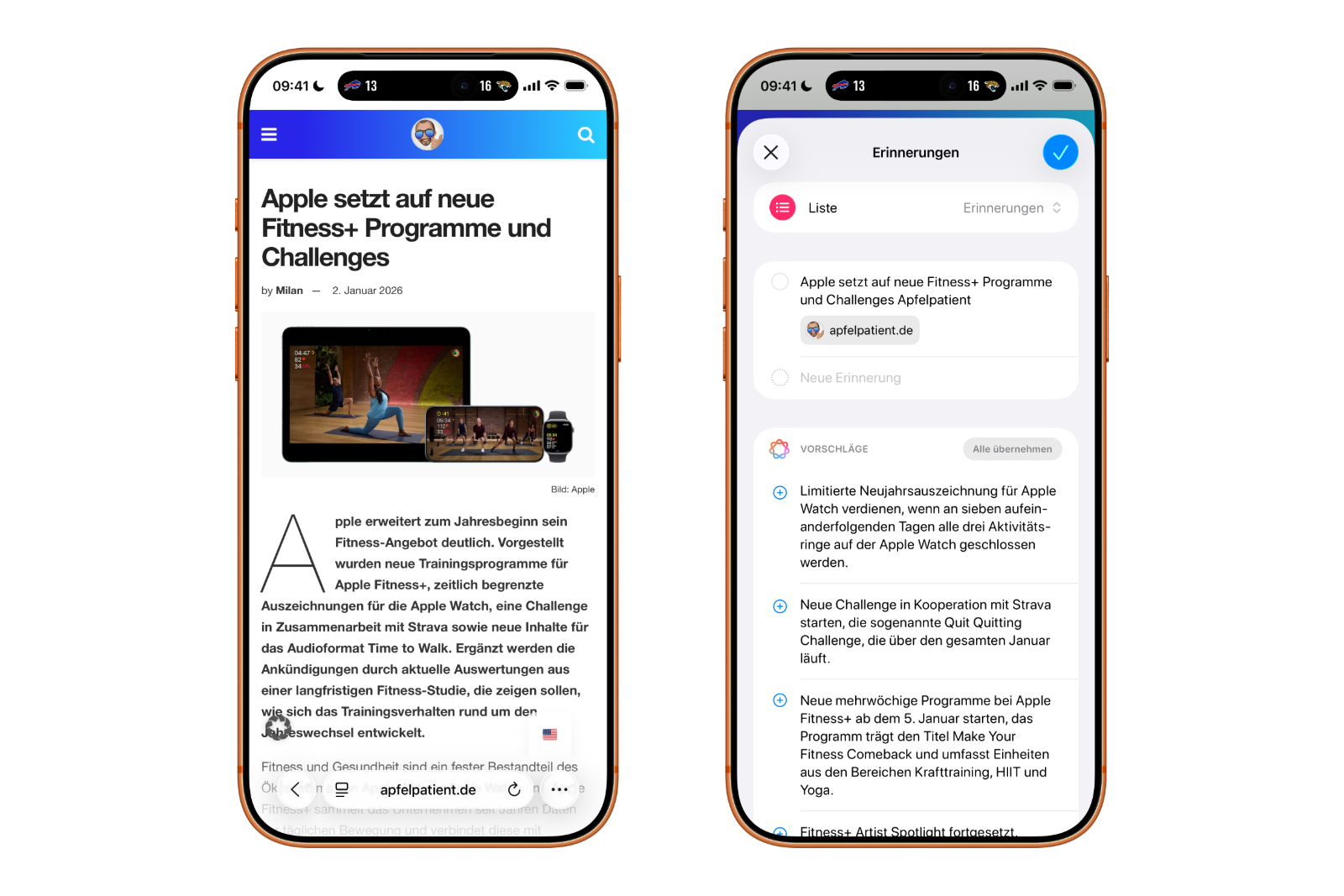
Apple Intelligence analyzes text shared via the sharing window to the Reminders app. The system specifically looks for elements that indicate tasks, such as phrases with clear actions, dates, quantities, or step-by-step instructions.
When a text is shared, reminder suggestions appear. These must be reviewed before being added to the list. This feature doesn't replace manual planning, but it significantly reduces the effort involved in capturing tasks. This is particularly helpful for texts containing multiple to-dos.
Which texts are particularly suitable
Apple Intelligence works most reliably with structured or semi-structured content. This includes recipes, project notes, technical instructions, and emails with bullet points and clearly stated requirements.
Short text passages can be processed just as easily as multiple paragraphs. For longer selections, several reminder suggestions are often generated simultaneously. These can be automatically grouped into sections, a feature that becomes increasingly important as lists grow. Very informal or colloquial texts usually produce less precise results, as clear instructions for action are lacking.
Device support and requirements
Apple Intelligence requires current hardware with Apple Silicon. Text analysis is performed directly on the device, which is why older models are not supported. Availability also depends on language and region settings. The corresponding features will only appear in the system if a supported combination is active.
Activation is done via Settings under Apple Intelligence and Siri. There you can turn on the desired functions. There is no separate switch in the Reminders app itself. Once Apple Intelligence is active, the function is used automatically.
Create reminders from text on iPhone and iPad
On iPhone and iPad, the process is clearly structured:
First, open an email, website, or note containing relevant information. Then, highlight the desired text. Using the share button above the selection, choose "Reminders" from the sharing window.
Next, suggestions for reminders extracted from the selected text appear. These can be reviewed, adjusted, and assigned to a specific list. Ingredient lists, bullet points, and numbered steps are generally recognized without problems. Longer paragraphs also work, but occasionally require a little post-processing.
Create reminders from text on your Mac:
The process is similar on a Mac. A document, webpage, or email is opened, and the relevant text is highlighted. "Reminders" is then selected via a right-click or the Share button in the toolbar.
The suggested tasks are displayed and can be accepted individually. Work documents and research material are particularly easy to process, as they are usually clearly structured. Larger amounts of text are often automatically divided into sections.
Typical use cases
The biggest advantage is evident with sources containing multiple action items. Long emails with various requests can be converted into individual reminders in one step. Travel plans, recipes, and project notes are also well-suited, as they are already structured like lists.
For individual, simple reminders, the time saved is limited. The real added value arises where tasks arrive faster than they can be organized manually.
Tips for better results
Selecting relevant text in a targeted way significantly improves the accuracy of suggestions. Highlighting only the truly important passages allows Apple Intelligence to identify tasks more reliably. After importing, it's worth briefly revising the reminder titles, especially if they contain abbreviations or internal terminology.
With the increasing number of automated reminders, lists, sections, folders and tags are gaining in importance for maintaining order in the long term.
Supported languages
Apple Intelligence is currently available in several languages, including English, French, German, Italian, Spanish, Portuguese, Japanese, Korean, Simplified and Traditional Chinese, Danish, Dutch, Norwegian, Swedish, Turkish, and Vietnamese. Language support is even more limited than with Siri and varies by region.
Apple Intelligence as support in everyday information use
Apple Intelligence expands the Reminders app with a practical automation feature for anyone who regularly derives tasks from longer texts. This feature speeds up task capture and reduces organizational friction. It's especially beneficial for those who need to consolidate information from emails, websites, and notes. For simple, individual tasks, the traditional method remains, but as the amount of information grows, Apple Intelligence demonstrates its greatest value as an integrated function within the Apple ecosystem. Discover a whole range of useful tips and tricks about Apple Intelligence! Here you'll find everything you need to get the most out of the smart features of your Apple devices – have fun browsing and trying them out! The best products for you: Our Amazon storefront offers a wide selection of accessories, including those for HomeKit. (Image: Mojahid_Mottakin / DepositPhotos.com)
- Precision Finding on the Apple Watch requires AirTag 2
- AirTag 2: Which airlines support baggage tracking
- AirTag 1 or AirTag 2: How to tell the difference
- AirTag 2: These iPhones are compatible with improved tracking
- iPhone alarm silent: Why the alarm suddenly stops working
- Safari at 120 Hz: How to activate smoother scrolling
- iOS 26 improves group chats with five new features
- Here's how to create Apple Music playlists with ChatGPT
- iOS 26: Change default apps on your iPhone
- Optimize your messaging app: Stop unwanted audio recordings
- iOS 26 turns photos into impressive 3D spatial scenes
- AirPods: Media no longer continues playing during sleep thanks to iOS 26
- Use Apple's Family Sharing to share content together
- iPhone tip: How alternative app distribution channels work
- iPhone tip: Access flight information directly in the system
- iOS 26.2 explained: How the new AirDrop codes work
- iOS 26.2 enhances the Reminders app with alarm functionality
- Here's how to properly create a backup for iPhone and iPad
- Setting up and using Apple Car Key: All functions explained
- New iOS 26.2 feature: Screen flashes for notifications
- Longer battery life with iOS 26 – Adaptive Power explained
- Live translation with AirPods: Here's how the feature works
- iOS 26: The new focus mode „Reduce interruptions“
Frequently Asked Questions about Apple Intelligence and Reminders
Apple Intelligence is a system-wide feature that analyzes text and generates reminder suggestions. Within the Reminders app, it helps users quickly capture and organize tasks from emails, websites, or notes.
Apple Intelligence searches selected text for typical patterns such as calls to action, dates, quantities, or sequences of steps. Based on this, it generates relevant reminder suggestions, which must be reviewed before saving.
No. Apple Intelligence only generates suggestions. Every reminder must be reviewed and confirmed before being added. This ensures you retain full control.
Structured or semi-structured texts work best. These include emails with bullet points, project notes, recipes, travel plans, or technical instructions. Unclear or very colloquial texts often yield less precise results.
Yes. You can also select and analyze multiple paragraphs. In many cases, Apple Intelligence generates several reminders simultaneously and automatically groups them into sections.
The feature is available on iPhone 15 Pro, iPhone 15 Pro Max or newer, iPad mini (A17 Pro) and iPads, as well as Macs with M1 or newer.
No. Activation is done centrally in the system settings under "Apple Intelligence and Siri". Once the feature is active, the Reminders app uses it automatically.
Yes. On a Mac, you can select text from documents, websites, or emails and add it to Reminders via the context menu or the share function. The process is largely the same as on iPhone and iPad.
Apple Intelligence supports multiple languages, including German, English, French, Italian, Spanish, Portuguese, Japanese, Korean, and Simplified and Traditional Chinese. Availability varies by language and region.
Apple Intelligence is particularly helpful for people who regularly need to convert large amounts of information from texts into tasks. The benefit is less pronounced for individual, simple reminders, but becomes clearly noticeable when dealing with many tasks simultaneously.