iOS 26.2 expands the Reminders app with a feature that functions like a classic iPhone alarm clock. Urgent tasks can be set as full-fledged alarms that appear on the entire screen, sound an audible alarm, and are clearly visible. With a snooze option, a slider to stop the alarm, and a clearly marked indicator, iOS 26.2 ensures that important tasks aren't overlooked.
Reminders can easily get lost among other notifications. A sound is often insufficient, and a focus mode or muted device makes alerts even easier to miss. iOS 26.2 therefore goes a step further, enabling alarm reminders that function like an alarm clock. This new feature gives tasks more weight and ensures that set deadlines are met. Everything remains within the familiar structure of the Reminders app, but with a significantly higher level of attention.
Alarm reminders in iOS 26.2
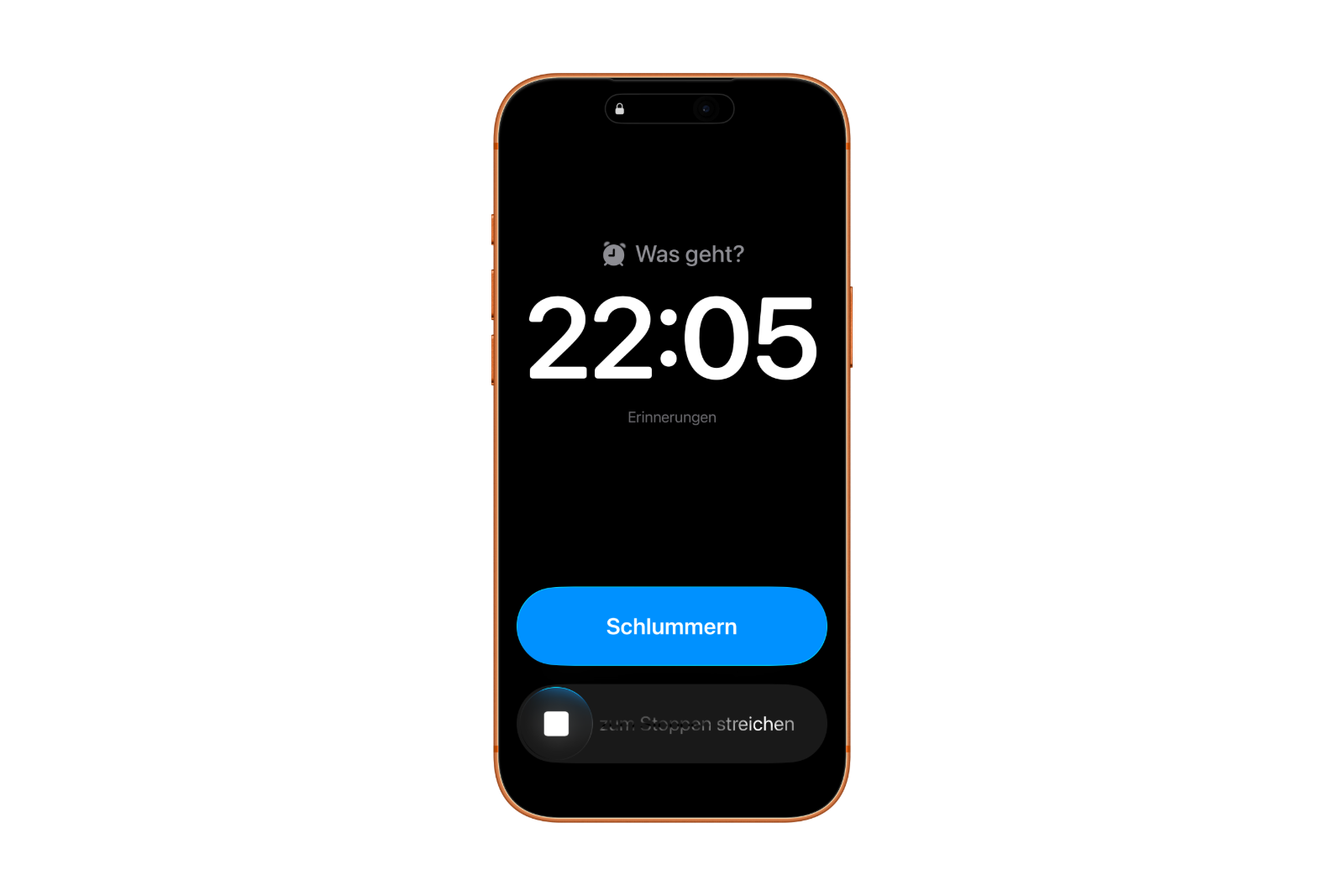
Alarm reminders function like a morning alarm clock and are clearly distinct from traditional reminder notifications. Once the set time is reached, an alarm screen appears with volume control, a snooze button, and a slider to stop the alarm. In iOS 26.2, the snooze button is displayed in a striking blue to make the difference from regular alarms immediately apparent. After stopping or snoozing, the iPhone displays a notification with the option to complete or postpone the task.
Alarm reminders will trigger even if a focus is active or the iPhone is on silent. This ensures the function remains reliable regardless of the device's current settings.
Activate alarms for reminders
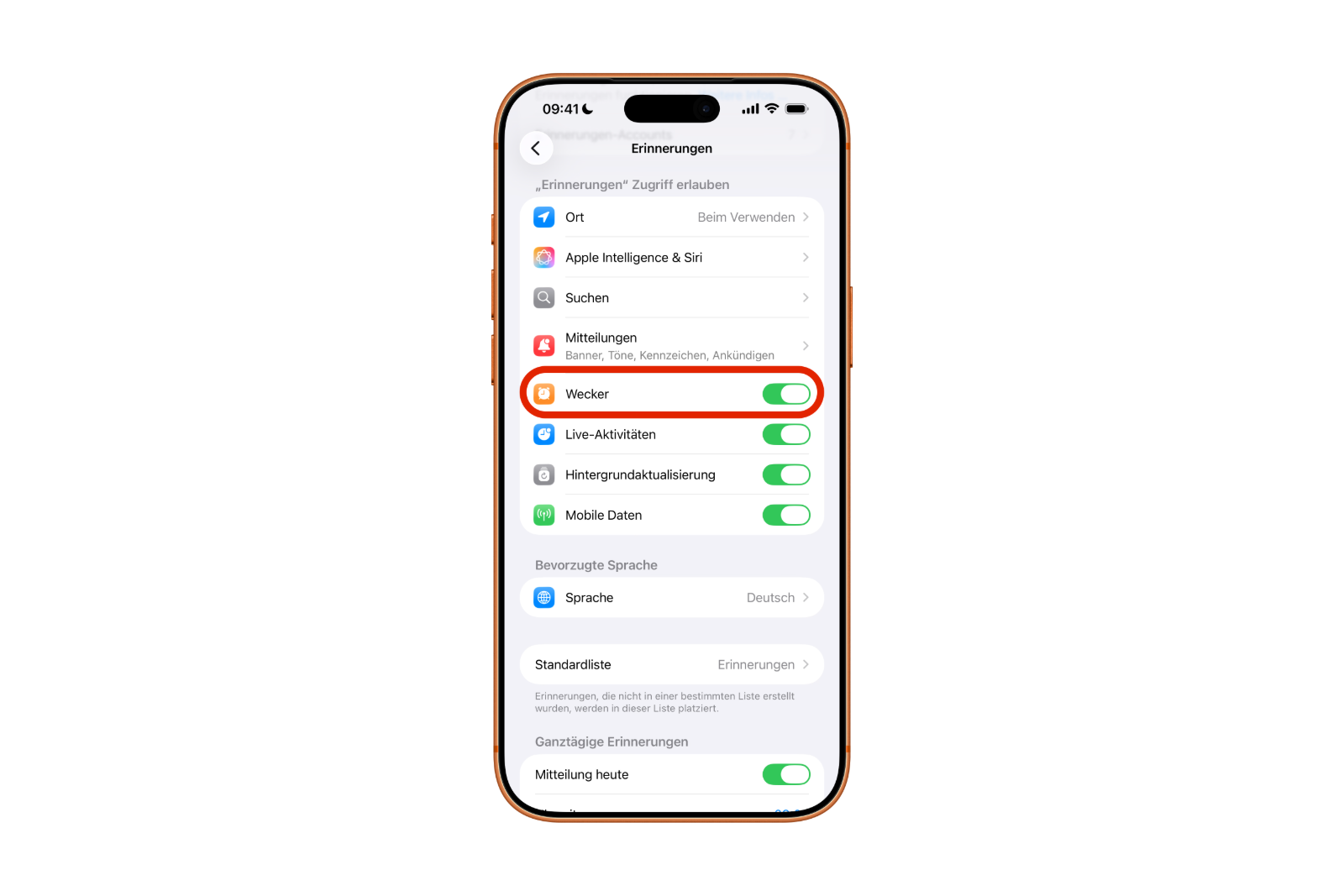
For alarm reminders to work, the Reminders app needs access to iPhone alarms. This access is set up once in iOS 26.2. You can configure this in Settings as follows:
- Open Settings.
- Scroll down and select Reminders in the Apps section.
- In the "Allow access for reminders" section, activate the "Alarms" switch.
Only then can urgent reminders with alarm function be used.
Create a reminder with an alarm
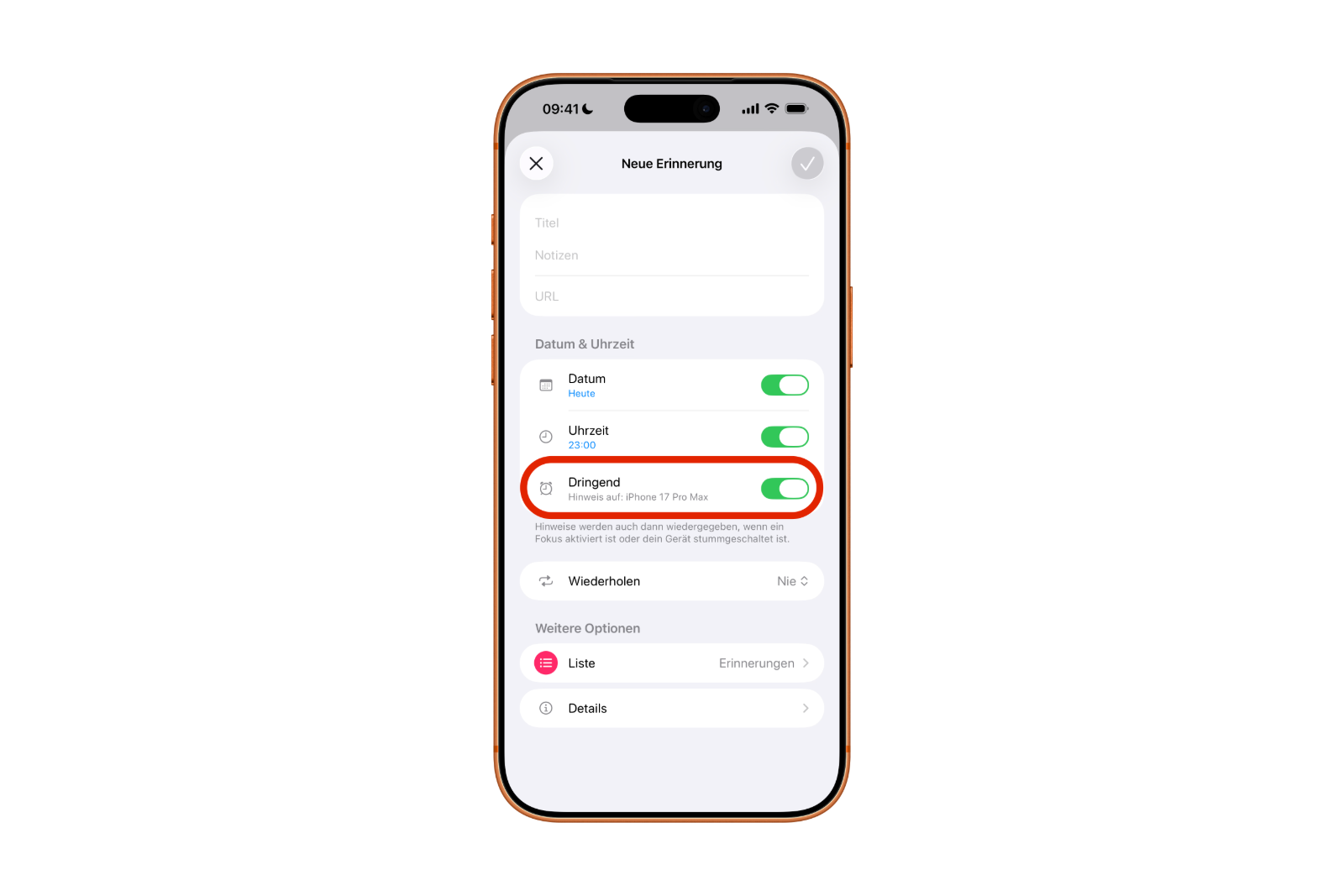
Once alarm access has been granted, each reminder can be linked to an alarm. The steps in the Reminders app are:
- Open the Reminders app.
- Create a new reminder or select an existing one.
- Open the info button to the right of the reminder.
- Activate the time and set the desired time.
- Activate the "Urgent" switch.
The alarm will then sound at the set time. The snooze function and a slider will appear on the screen. After the alarm stops, iOS 26.2 displays a notification with the options to complete or postpone. Tapping "Complete" opens the app, and a second tap marks the task as permanently completed.
Done button instead of snooze
In the settings, you can replace the snooze option with a "Done" button. This will complete the corresponding task directly without having to open the Reminders app. The setting is located here:
- Open Settings.
- Select "Reminders" under Apps.
- In the "Urgent Reminders" section, activate the "Complete from Alarm" switch.
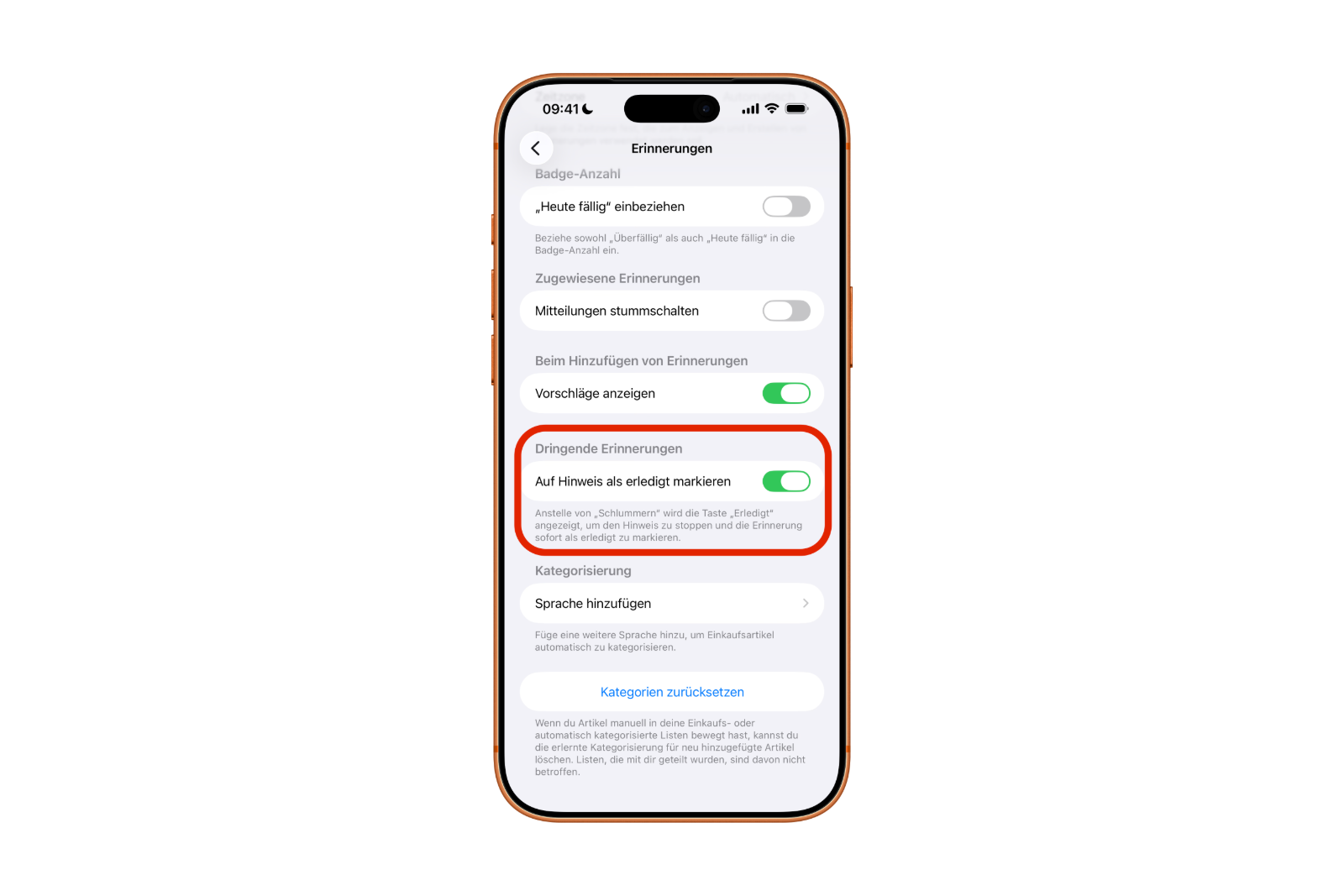
With this option, the alarm is particularly suitable for short tasks that need to be done immediately, such as taking out the trash or watering plants.
How iOS 26.2 makes the Reminders app noticeably more reliable
iOS 26.2 makes the Reminders app significantly more reliable. Urgent tasks can be set as real alarms that are clearly visible and won't be missed, even in Focus mode. The blue snooze button, the stop slider, and the option to use a "Done" button instead ensure precise and straightforward handling. iOS 26.2 thus introduces a practical enhancement that makes everyday life more structured and punctual. The best products for you: Our Amazon storefront offers a wide selection of accessories, including those for HomeKit. (Image: Apple)
- Here's how to properly create a backup for iPhone and iPad
- Setting up and using Apple Car Key: All functions explained
- New iOS 26.2 feature: Screen flashes for notifications
- Longer battery life with iOS 26 – Adaptive Power explained
- Live translation with AirPods: Here's how the feature works
- iOS 26: The new focus mode „Reduce interruptions“
- iOS 26.1: Reactivate the classic stop button on the alarm clock
- iOS 26.1 brings a new lock screen setting for the iPhone
- iOS 26.1: Liquid Glass effects can be toned down
- watchOS 26 brings hints about the Apple Watch dial
- macOS 26 Update: Hidden Tools and Improvements
- New call history in iOS 26: All conversations at a glance
- iOS 26: iMessage not working? Apple announces the solution
- iOS 26 Tricks: 26 small innovations with a big impact
- iOS 26 solves the Bluetooth problem with AirPods in the car
- iPhone: How the new call waiting feature works in iOS 26
- iPhone gets new feature against spam and advertising calls
- iOS 26: New option saves time and data when sending photos
- iOS 26: Over 10 hidden features everyone needs to know
- iOS 26: Visual intelligence now also for screen content
- iPhone 17: How iOS 26 colors your app icons
- iOS 26: Use polls directly in the Messages app
- Discover and manage games with the Apple Games app
- iPhone 17: Tips for using the Center Stage front camera
- iPhone 17 Dual Capture explained: Using the front and rear cameras
FAQs about iOS 26.2 and the new alarm function for reminders
iOS 26.2 adds true alarms to the Reminders app, functioning like an iPhone alarm clock. Tasks appear as full-screen alarms, including sound, snooze function, and a slider to stop the alarm.
Alarm reminders trigger a visual and audible alarm that cannot be missed. Regular reminders only appear as a notification. The alarm version uses a blue snooze button so the difference is immediately recognizable.
Yes. iOS 26.2 triggers alarm reminders regardless of focus mode or device muting. The function remains reliable no matter how the iPhone is configured.
In the settings, under Apps, select Reminders. There, in the Allow access for reminders section, activate the Alarms option. Only then can alarm reminders be used.
In the Reminders app, open a new or existing reminder. Use the info button to set a time and activate the Urgent option. iOS 26.2 will then trigger an alarm at the selected time.
After pausing or snoozing a task, iOS 26.2 displays a notification. From there, the task can be completed or postponed. Tapping "Complete" opens the app, and another tap marks the reminder as done.
Yes. In the settings, under Urgent Reminders, there's a toggle switch for "Complete from Alarm". This will display a "Done" button on the alarm screen instead of the snooze button.
It's ideal for short tasks that need to be completed immediately, such as taking out the trash or watering plants. The task is completed instantly, without even opening the app.
The new alarm function ensures that important tasks don't get lost in the flood of notifications. Visible alarms, a blue snooze button, and clear controls make reminders more binding and easier to manage.