
With iOS 26.2, Apple released an update that specifically enhances AirDrop. The centerpiece is a new feature called AirDrop Codes. It's designed to simplify file sharing with people who aren't in your contacts, while maintaining a strong focus on security. iOS 26.2 thus complements AirDrop with a solution that strikes a balance between convenience and control.
AirDrop has been one of the most frequently used features on the iPhone for years. Photos, videos, and documents can be quickly transferred between devices without an app, cable, or cloud service. In practice, however, there have been recurring situations where the existing AirDrop settings were impractical. AirDrop was either too restricted or deliberately set to be very permissive. iOS 26.2 addresses this issue by introducing AirDrop codes as an additional option to complement the existing features.
AirDrop in iOS 26.2: An Overview
Previously, AirDrop offered three known receiving modes:
- reception
- Contacts only
- Everyone for 10 minutes
These options remain available in iOS 26.2. The new AirDrop codes effectively add a fourth option. This is used automatically when an AirDrop transfer is made to a person who is not in your contacts.
What are AirDrop codes?
AirDrop codes are an additional layer of verification for AirDrop in iOS 26.2. When sending a file to an unknown recipient, the recipient's device displays a one-time code. This code must be entered by the sender to complete the transfer. Apple describes the feature in the official release notes as follows:
AirDrop codes provide an additional layer of verification when using AirDrop with unknown contacts by providing a code on the recipient's device that the sender must enter to complete the transfer.
Temporary AirDrop authorization for 30 days
A key feature of AirDrop codes in iOS 26.2 is the time-limited sharing option. After entering the one-time code, the sender and recipient can see each other as AirDrop options for 30 days. During this period, files can be exchanged without having to enter a code again. Apple treats these users as temporary AirDrop contacts. This can be managed via Settings → General → AirDrop.
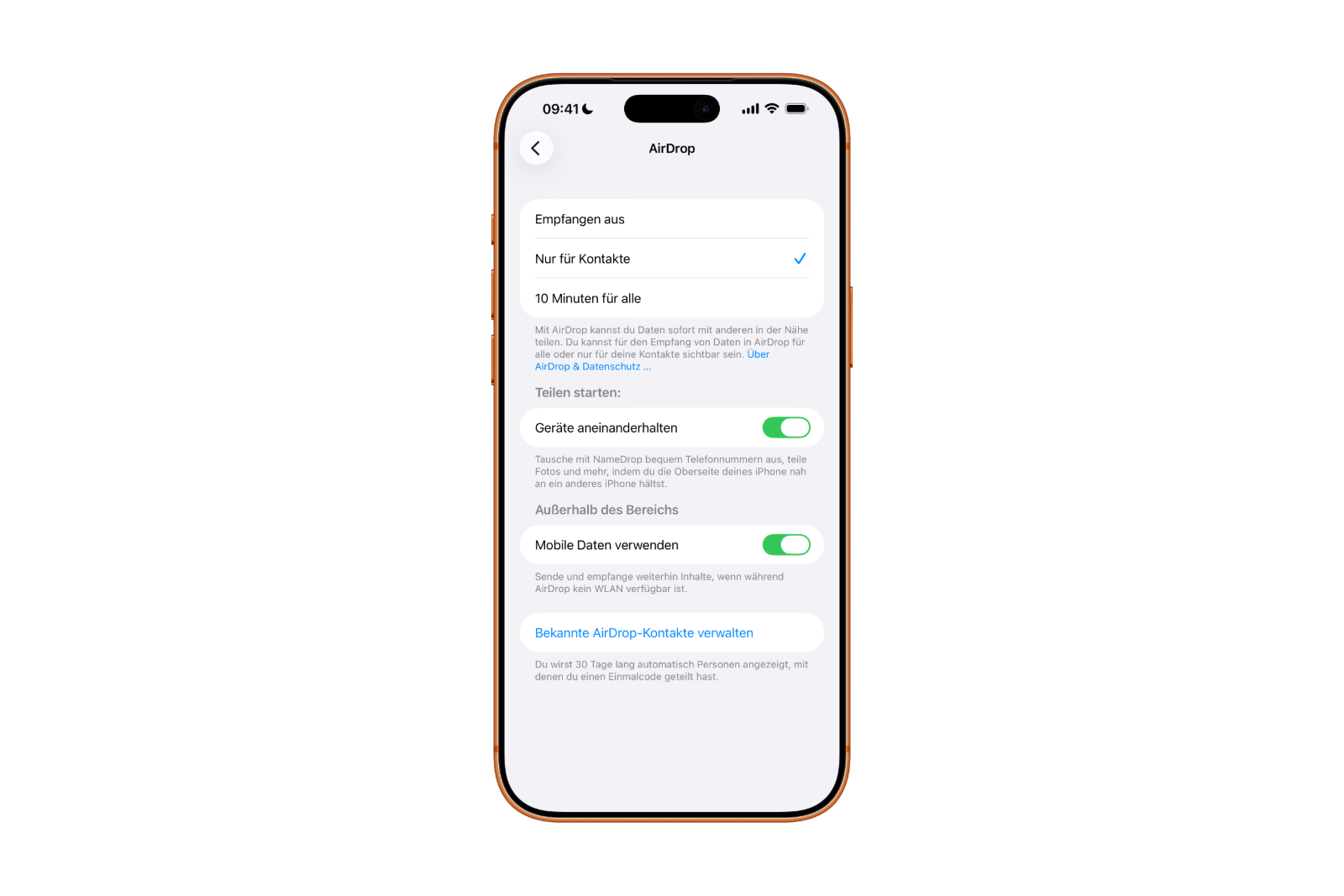
It indicates that people with whom a one-time code has been shared will automatically remain visible for 30 days.
Why Apple introduced AirDrop codes
In many everyday situations, there's a desire to share files with the same person multiple times without saving them directly as a contact. This is precisely where iOS 26.2 comes in.
The "Everyone for 10 minutes" mode significantly weakens security and is intended for exceptional cases. While "Contacts Only" is secure, it's cumbersome, as adding a new contact takes time and is often unnecessary. AirDrop codes fill this gap. They are quick, targeted, and offer significantly more control than open sharing.
iOS 26.2 makes AirDrop more flexible without compromising security
iOS 26.2 expands AirDrop with a well-designed feature that combines security and everyday usability. AirDrop codes allow for easy sharing with strangers without having to constantly create new contacts or fully open AirDrop. The one-time code entry and 30-day authorization period make the feature particularly convenient. iOS 26.2 demonstrates how a relatively small change can significantly improve the daily use of AirDrop. The best products for you: Our Amazon storefront offers a wide selection of accessories, including those for HomeKit. (Image: Apple)
- iOS 26.2 enhances the Reminders app with alarm functionality
- Here's how to properly create a backup for iPhone and iPad
- Setting up and using Apple Car Key: All functions explained
- New iOS 26.2 feature: Screen flashes for notifications
- Longer battery life with iOS 26 – Adaptive Power explained
- Live translation with AirPods: Here's how the feature works
- iOS 26: The new focus mode „Reduce interruptions“
- iOS 26.1: Reactivate the classic stop button on the alarm clock
- iOS 26.1 brings a new lock screen setting for the iPhone
- iOS 26.1: Liquid Glass effects can be toned down
- watchOS 26 brings hints about the Apple Watch dial
- macOS 26 Update: Hidden Tools and Improvements
- New call history in iOS 26: All conversations at a glance
- iOS 26: iMessage not working? Apple announces the solution
- iOS 26 Tricks: 26 small innovations with a big impact
- iOS 26 solves the Bluetooth problem with AirPods in the car
- iPhone: How the new call waiting feature works in iOS 26
- iPhone gets new feature against spam and advertising calls
- iOS 26: New option saves time and data when sending photos
- iOS 26: Over 10 hidden features everyone needs to know
- iOS 26: Visual intelligence now also for screen content
- iPhone 17: How iOS 26 colors your app icons
- iOS 26: Use polls directly in the Messages app
- Discover and manage games with the Apple Games app
- iPhone 17: Tips for using the Center Stage front camera
Frequently asked questions about iOS 26.2 and AirDrop codes
AirDrop codes are a new security feature in iOS 26.2. They allow you to share files with people who are not in your contacts using a one-time verification code.
AirDrop codes are used when initiating an AirDrop transfer with an unknown recipient. The code appears on the recipient's device and must be entered by the sender.
No. The familiar options "Receive off," "Contacts only," and "Everyone for 10 minutes" remain in iOS 26.2. AirDrop codes add an additional option to these settings.
After entering the one-time code, both devices can see each other via AirDrop for 30 days. No further code is required during this period.
The management is done under Settings, General, AirDrop. There, iOS 26.2 displays people with whom a one-time code has been shared and who remain visible for 30 days.
No. That's precisely what AirDrop codes are designed to prevent. iOS 26.2 allows repeated sharing without having to create new contacts.
Yes. AirDrop codes offer targeted sharing for individuals and avoid a completely open AirDrop setting.
iOS 26.2 allows you to manually manage and remove temporary AirDrop contacts if needed.
AirDrop codes are used automatically whenever files are shared with an unknown person. No separate activation is necessary.
Apple is responding to everyday usage scenarios in which AirDrop is used multiple times with the same people without sacrificing security or convenience.