

The iPhone offers many features that often go unnoticed in everyday life. Travel, in particular, reveals the operating system's extensive capabilities. If you need quick information about a scheduled flight while on the go, you don't necessarily have to install a separate app. iOS automatically recognizes flight numbers and provides important data directly.
The App Store offers numerous specialized flight trackers. These applications provide extensive additional information such as weather data, delays, aircraft type, or even visual aircraft identification via the iPhone camera. Many users find such apps useful. However, if only basic and up-to-date information about a specific flight is needed, the iPhone's built-in features are perfectly adequate.
Flight information without additional apps
Flight connections can usually be found using their flight number. This consists of a combination of letters, the airline's IATA code, and a sequence of numbers. iOS usually recognizes such flight numbers automatically as soon as they appear in text. If recognition fails, it often helps to also enter the airline's name.
This feature is particularly useful in the messaging app. Recognized flight numbers are displayed underlined. A long press opens a menu from which the flight number can be copied or a preview with a real-time view of the flight can be displayed.
A quick tap doesn't display a map, but it does reveal two further options. The "Flight Info" option shows detailed information about the current flight status. This includes any delays, the scheduled or actual arrival time, and information about the arrival terminal. Additionally, you can see which baggage carousel you'll be using.
Use via Spotlight search
All flight information mentioned can also be accessed via Spotlight search on the iPhone. After entering the flight number, relevant results appear with the same detailed views as in the Messages app.
Apple has expanded this view with additional practical features. For example, the airport can be opened directly in the Maps app. Furthermore, it's possible to download map data for the destination for offline use. This is particularly helpful if there is no or only a limited internet connection available after landing.
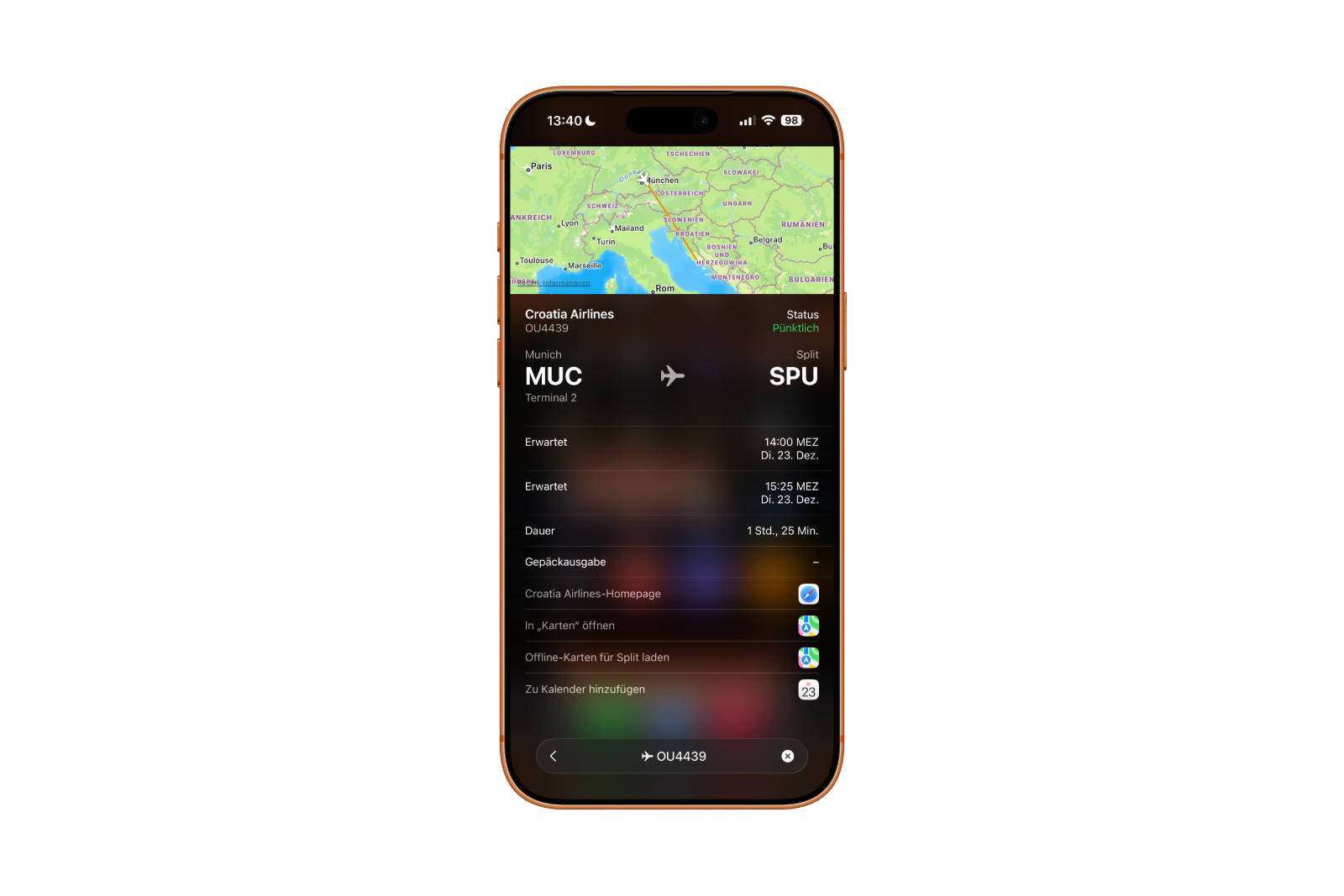
Furthermore, the search results allow you to access the website of the respective airline. Flights can also be entered directly into the calendar to clearly document travel times and arrivals.
iPhone tip: Access flight details without additional apps
The iPhone demonstrates just how much functionality is already integrated into the system when displaying flight information. No additional apps are needed for a quick overview of a scheduled flight. Flight status, arrival times, terminal information, baggage claim, and map functions are all available directly through iOS. This makes the iPhone a reliable travel tool that provides relevant information with just a few taps. The best products for you: Our Amazon storefront offers a wide selection of accessories, including those compatible with HomeKit. (Image: Shutterstock / Anna Hoychuk)
- Family Sharing explained: Easily share and manage iCloud+
- Quickly set up Family Sharing on iPhone, iPad, and Mac
- iOS 26.2 explained: How the new AirDrop codes work
- iOS 26.2 enhances the Reminders app with alarm functionality
- Here's how to properly create a backup for iPhone and iPad
- Setting up and using Apple Car Key: All functions explained
- New iOS 26.2 feature: Screen flashes for notifications
- Longer battery life with iOS 26 – Adaptive Power explained
- Live translation with AirPods: Here's how the feature works
- iOS 26: The new focus mode „Reduce interruptions“
- iOS 26.1: Reactivate the classic stop button on the alarm clock
- iOS 26.1 brings a new lock screen setting for the iPhone
- iOS 26.1: Liquid Glass effects can be toned down
- watchOS 26 brings hints about the Apple Watch dial
- macOS 26 Update: Hidden Tools and Improvements
- New call history in iOS 26: All conversations at a glance
- iOS 26: iMessage not working? Apple announces the solution
- iOS 26 Tricks: 26 small innovations with a big impact
- iOS 26 solves the Bluetooth problem with AirPods in the car
- iPhone: How the new call waiting feature works in iOS 26
- iPhone gets new feature against spam and advertising calls
- iOS 26: New option saves time and data when sending photos
- iOS 26: Over 10 hidden features everyone needs to know
- iOS 26: Visual intelligence now also for screen content
FAQs: Access flight information directly on your iPhone
Yes. The iPhone recognizes flight numbers directly in the operating system and displays relevant flight information without additional apps. The information is displayed via iOS features such as Messages, Spotlight, and built-in previews.
The iPhone provides information such as the current flight status, any delays, the scheduled or actual arrival time, the arrival terminal, and baggage claim. Depending on the flight, map views are also displayed.
Flight numbers consist of an airline code and a sequence of numbers. iOS automatically recognizes this combination in text. If recognition fails, it usually helps to also include the airline's name.
Flight information appears in the Messages app, among other places, if a flight number is included. It can also be accessed via Spotlight search by entering the flight number.
A short tap reveals further options such as "Flight Information". A longer tap opens a menu from which the flight number can be copied or a preview with real-time data can be displayed.
Yes. Airports can be opened in the map app via the flight information view. Additionally, it's possible to download map data for the destination for offline use.
An internet connection is required for up-to-date real-time data. However, previously downloaded maps can also be used offline, for example after landing without mobile data.
Yes. iOS offers the option to directly add detected flights to the calendar. This keeps departure and arrival times clearly organized.
Yes. The flight information view allows you to directly access the website of the respective airline for further details or services.
For basic information, yes. Those who only need status, times, and terminal data can manage with the built-in iOS tools. Extensive additional functions are still offered by specialized apps.