The threat landscape changes when traveling: unfamiliar networks, unknown charging points, stricter border controls, and a significantly higher risk of loss. Since January 2026, US border officials have also been permitted to search more types of devices than before – the Apple Watch is now explicitly on the list. Ten minutes of preparation is enough to close the most important security gaps.
Apple includes a whole range of security features that hardly anyone needs in everyday life, but are exactly what you need in an unfamiliar airport or on a hotel Wi-Fi network. These include the security check in the privacy settings, the blocking mode for particularly vulnerable individuals, and the "Find My" feature. Once set up, you can repeat the preparation process before your next trip in just fifteen minutes.
The second part concerns something Apple cannot resolve: the legal situation at the border. This has shifted noticeably recently, and the figures clearly support this. Most often, however, things don't go spectacularly wrong while traveling, but rather in everyday situations – an unsecured Wi-Fi network in a hotel, an unattended MacBook in a café, a suitcase that doesn't return.
Key Facts at a Glance
- An iPhone that has been completely switched off will require a passcode the next time it is switched on – Face ID and Touch ID will then be locked.
- Since January 1, 2026, an expanded directive has been in effect at US borders, which also includes smartwatches, SIM cards, USB sticks and vehicle systems.
- In fiscal year 2025, US officials searched 55,318 devices, around 17 percent more than in the previous year.
- Hiding data is the wrong approach – what shouldn't enter the country shouldn't even be on the device in the first place.
- The emergency process in case of loss only works if "Find My" was active before the trip.
Before departure: the base in ten minutes
Four steps cover most of it. They take little time and close the gaps that are most frequently exploited on the go.
Update your software. Make sure your iPhone, iPad, Apple Watch, and Mac are running the latest version before you leave. This also applies to apps, as vulnerabilities in popular programs are a common entry point for malware.
Create an encrypted backup. A complete backup is the foundation of any emergency response – via iCloud or locally on your Mac. With enhanced privacy enabled, your iCloud backup is also end-to-end encrypted, meaning Apple itself no longer holds the encryption keys. Detailed instructions explain how to enable enhanced privacy for iCloud and what to keep in mind.
Clear out sensitive data. Chat histories, tax documents in the Files app, old photos: anything you don't need to take with you should be archived beforehand and deleted from your travel device. Remember the "Recently Deleted" album in the Photos app – photos remain there for 30 days before being permanently deleted. Similar recycle bins exist in Notes, iCloud Drive, and Mail.
Check the security features. "Find My" and Activation Lock must be enabled, as well as theft protection. It's worth checking both on a second device – ideally someone in the same Family Sharing group who can intervene remotely if necessary.
Border controls: What has changed since January 2026
As of January 1, 2026, U.S. Customs and Border Protection (CBP) has revised its directive on the search of electronic devices, replacing the 2018 version. The most noticeable change is the expanded definition of devices.
| Device category | Recorded before 2026 | Recorded since January 2026 |
|---|---|---|
| Smartphone, tablet, laptop | Yes | Yes |
| Camera, music player, data storage device | Yes | Yes |
| Smartwatch (e.g. Apple Watch) | no | Yes |
| SIM card | no | Yes |
| USB stick | no | Yes |
| GPS device, drone | no | Yes |
| Vehicle infotainment | no | Yes |
For Apple users, the Apple Watch is particularly relevant. It carries messages, location data from workouts, health metrics, and payment information – and until now, it has been out of reach.
The authorities continue to distinguish between simple and extended searches. A simple search can be conducted by an officer without specific suspicion by manually examining the device. An extended search involves connecting external technology to read and analyze the contents; it requires the approval of a superior officer.
The figures are in CBP's official report: In fiscal year 2025, 55,318 devices were searched, compared to 47,047 the previous year. Relative to approximately 420 million people entering the US, this remains a fraction of less than 0.01 percent – however, the EFF, in its legal challenge against the practice of indiscriminate searches, points out that the absolute number has been rising for years. Three-quarters of those affected were not US citizens.
Why the iPhone should be switched off before inspection
A completely powered-off iPhone cannot be unlocked using Face ID or fingerprint upon startup. Apple's Face ID documentation specifies exactly when a passcode is required: after every restart, after more than 48 hours without unlocking, and after a remote lock command.
This hurdle is embedded in the hardware. In this state, all data is encrypted with the device code, making it significantly more difficult for forensic tools to access than a device that has already been unlocked once since it was switched on.
There's a faster way: If you press and hold the side button and a volume button simultaneously for two seconds, Face ID is deactivated immediately – the iPhone will require your passcode the next time you unlock it. The power-off screen will appear, but you don't need to confirm.
The difference is legally significant. In the US, the situation is inconsistent: Several federal courts have ruled differently on biometric unlocking than on the disclosure of a numerical code; a final ruling from the highest court is still pending. In Germany and the EU, law enforcement is not permitted to compel the disclosure of a code.
What is the wrong reflex at the border?
Security organizations strongly advise against hiding data in hidden areas, duplicate volumes, or similar structures. Border officials may interpret deliberately hidden data as an attempt to deceive, and providing false information to US border officials is considered a serious offense.
A lightweight travel device is more sensible: back up your data before departure, delete sensitive data locally, and log out of unnecessary accounts. You can then access individual data again in a controlled manner once you reach your destination. Anything you don't want in the country shouldn't be on the device in the first place.
Another practical point to consider: anyone who is detained for an extended period or whose device is confiscated will no longer have access to their contact list. Therefore, the phone number of a trusted person should be memorized, and a paper copy of travel documents should be kept in a separate piece of luggage.
On the go: Networks and connections
Public Wi-Fi networks in hotels, cafes, and airports are convenient, but the operator is unknown and the data traffic can theoretically be intercepted. Three points are particularly important when traveling.
Disable automatic connections. For networks that are used regularly, it's worth specifically disabling "Connect automatically." The switch is located behind the info icon next to the network name in the Wi-Fi settings, not in the overview itself. This way, the user consciously decides each time they connect.
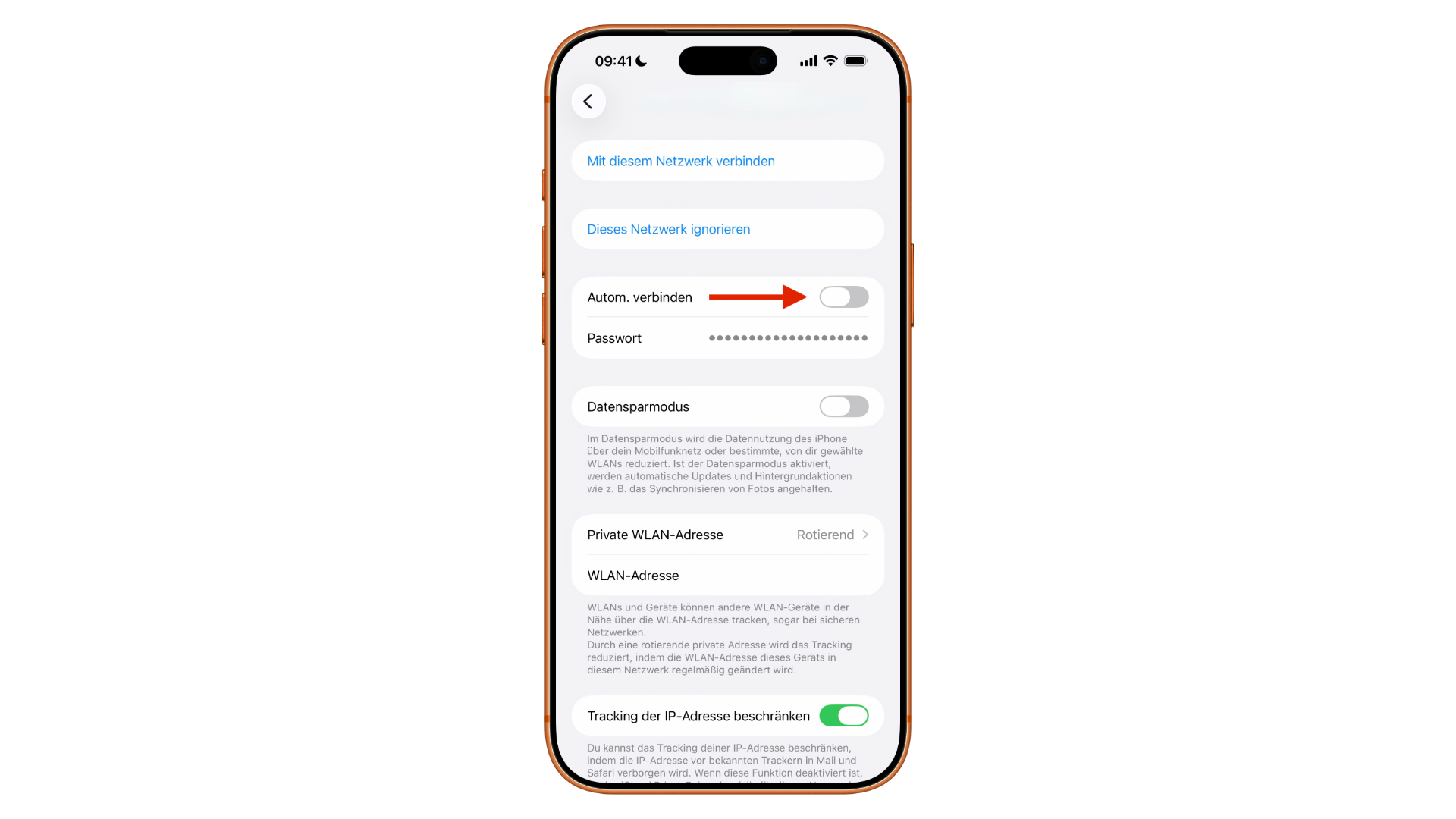
Take the privacy warning seriously. If a corresponding notice appears under the network name, the device's mobile network identity could be revealed – for example, by a hotspot masquerading as a known network.
Enable encryption. Private Relay protects Safari traffic, while a VPN protects all data traffic on the device. A direct comparison of iCloud Private Relay and traditional VPN services clarifies the differences. In some countries, VPN services are regulated or Private Relay is unavailable – checking the regulations before departure will prevent surprises.
Anyone who already has a data plan with international roaming rights can connect their MacBook to the internet via their iPhone's personal hotspot. This is more controlled than any hotel Wi-Fi because the connection runs through their own provider.
Lockdown Mode: who it's really for
Lockdown Mode is Apple's strongest response to targeted attacks – and explicitly not an everyday function. It is aimed at people who, because of their work, could be targeted by sophisticated spyware: journalists in conflict zones, human rights activists, politically exposed persons, and lawyers with sensitive cases.
Active mode blocks most message attachments except images, disables link previews, deactivates complex web technologies in Safari, blocks FaceTime calls from unknown senders, prevents the installation of new configuration profiles, and locks wired connections while the device is locked.
The process involves going to "Settings" – "Privacy & Security" – "Lockdown Mode" then "Enable Lockdown Mode" confirming, clicking "Activate and Restart," and entering the code. On a Mac, the process is similar, via System Preferences. All protection layers and restrictions are listed in the detailed instructions for Lockdown Mode . Background information on the threat is provided in the analysis of Pegasus and commercial spyware on the iPhone.
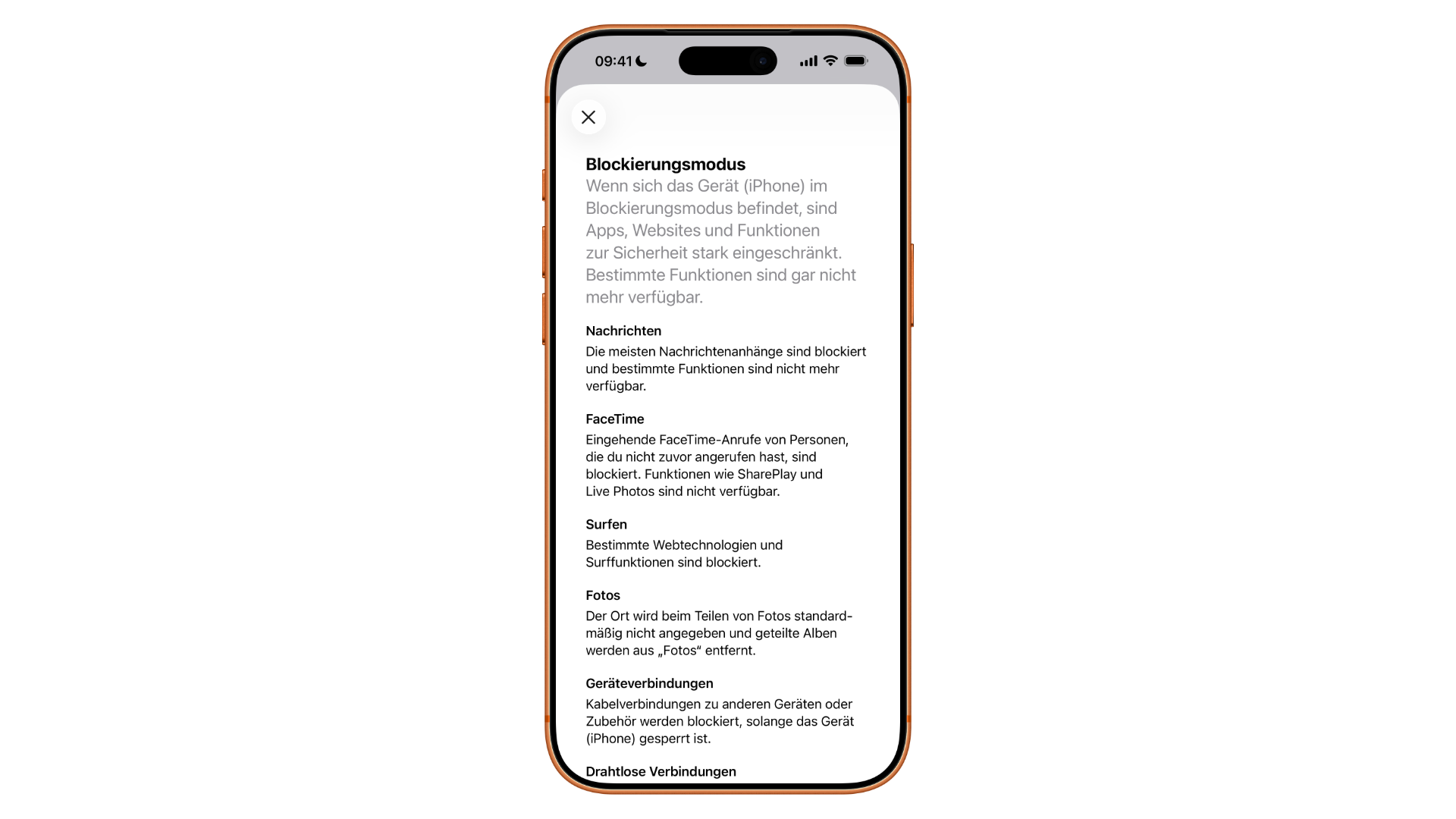
After the trip, the mode can be switched off just as easily.
If the Device Is Lost or Stolen
The emergency process only works if "Find My" was active beforehand. Three steps in this order:
- Activate "Lost Mode" via the "Find My" app on another Apple device or via iCloud.com. This locks the device, displays a custom message on the lock screen, and disables Apple Pay.
- Location tracking. If the device is offline, the last known location remains available for up to seven days. An iPhone can also be located via the "Find My" network even after it has been switched off.
- Remote wiping as a last resort , when it is clear that the device will not return.
Crucially, in all three cases, the device must not be removed from the device list, as this would remove the activation lock. Details on how tracking works and what applies to AirTags and unfamiliar objects can be found in the overview for finding lost Apple devices. Apple has recently tightened its recommendations for theft cases considerably.
The stolen device protection feature is particularly effective when traveling: Outside of familiar locations, the iPhone requires biometric authentication for sensitive actions, followed by a one-hour waiting period and then a second authentication. This timeframe is precisely what's needed to detect a theft. The setup process is described in the instructions for the stolen device protection on the iPhone.
If the suspicion remains that the problem is not the device itself, but access to it, a list of real warning signs of a hacked iPhone will help.
Safety Check as a Travel Reset
Under "Settings" – "Privacy & Security" – "Security Check", two options are available. "Manage sharing & access" shows which people are currently sharing your location, photos, or notes with, and which apps have access to your data. "Emergency reset" immediately resets all sharing permissions.
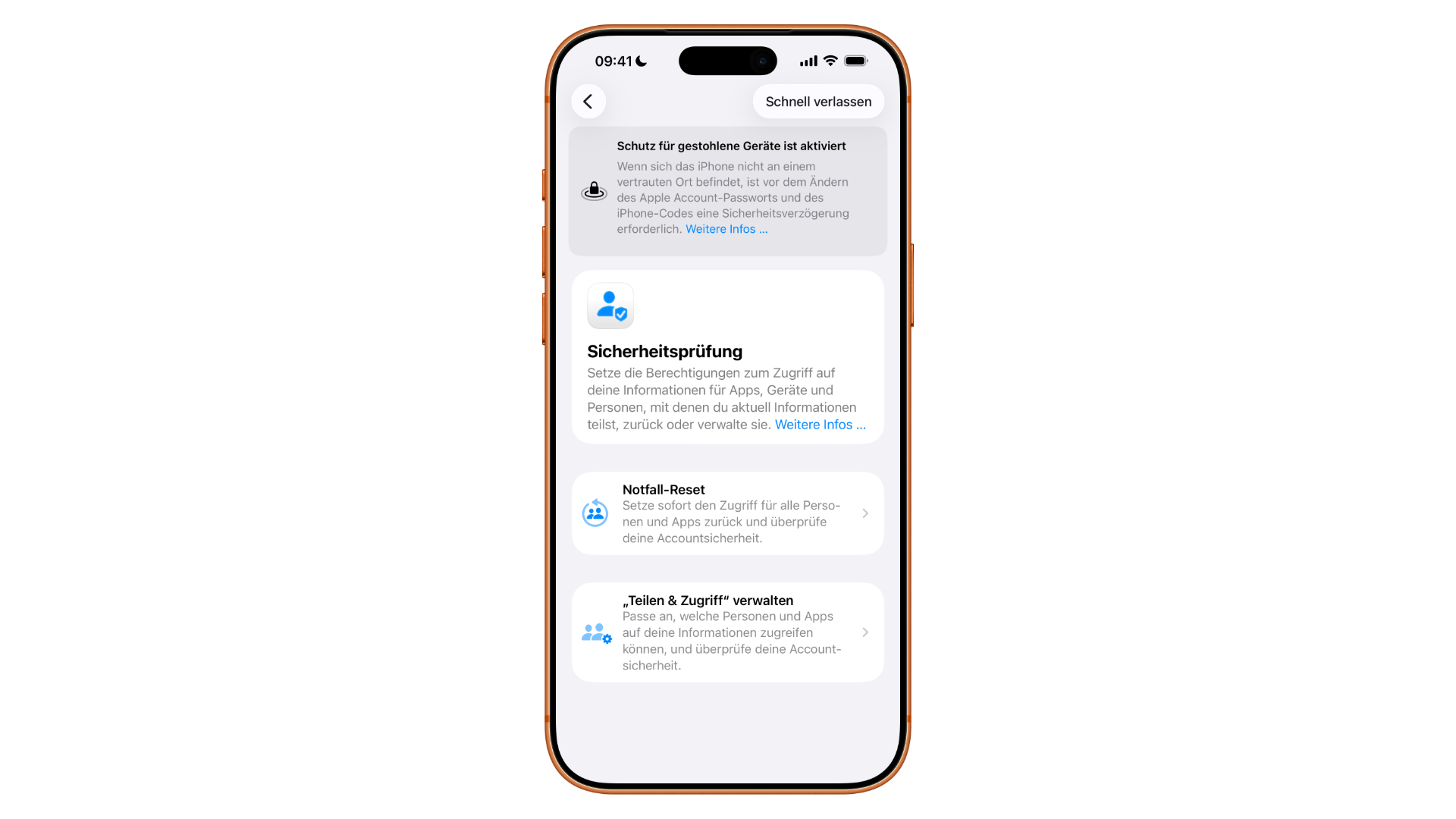
The check only accesses data managed by Apple apps. It does not affect accounts with third-party providers or content on social networks. For saved login credentials, you should use the data leak check in the Passwords app.
Two additional points should be added to the list. For sensitive communication abroad, contact key verification in iMessage is worthwhile – it verifies that the other person is actually using the device they claim to be using. And after longer trips, it's worth checking the installed configuration profiles on your iPhone, because they intervene more deeply in the system than regular apps.
The checklist
| Time | What to do |
|---|---|
| Before departure | Update systems and apps |
| Before departure | Create an encrypted backup, clear the "Recently Deleted" folder. |
| Before departure | Remove sensitive data from travel device |
| Before departure | „"Where is it?", check activation lock and theft protection |
| Before departure | Memorize emergency contact details, take documents in paper form |
| Before the border | Completely switch off the device or lock biometrics using a key combination. |
| On the way | Disable automatic Wi-Fi connections |
| On the way | Keep Private Relay or VPN active |
| In cases of increased risk | Activate blocking mode |
| In case of loss | Set "Lost" mode immediately, do not delete the device from the list. |
| After the trip | Security check performed, configuration profiles checked |
What has actually changed for travelers
The technical side has been stable for years – Apple has the tools, they just need to be switched on before takeoff. What has shifted is the legal side, and in one direction.
The expanded device definition introduced in January 2026 affects Apple users more than others because the ecosystem is more interconnected. Anyone carrying an iPhone, Apple Watch, and MacBook is traveling with three devices, all of which share the same messages, calendars, and location data. A blank iPhone is of little use if the same content is displayed on the watch – content that no one had previously noticed.
In practical terms, this means: If you're serious about preparing for your trip, consider all your devices together, not just your phone. For the vast majority of travelers, the risk remains low; searches only affect a fraction of those entering the country. However, anyone traveling for work with confidential data will almost certainly need a dedicated travel device.
Once the routine is established
After two or three trips, the preparation becomes second nature – the checklist is completed in ten to fifteen minutes the second time around. The most time-consuming part is the initial tidying of the equipment; everything after that is just routine.
What is constantly changing, however, is the legal situation. It has already undergone one significant change this year alone, and the travel advisories issued by the Federal Foreign Office are updated accordingly. A quick look at them before any trip to a country with stricter controls takes two minutes and is more up-to-date than any travel guide. (Image: Apfelpatient)
- iCloud Costs: All storage plans, prices, and which one is worth it
- iOS 27: Adjust the AirPods equalizer and customize the sound
- iOS 27: Liquid Glass transparency can be adjusted seamlessly
Frequently Asked Questions: iPhone and MacBook while traveling
Border officials are permitted to search electronic devices even without specific suspicion. Those who are neither U.S. citizens nor Green Card holders risk being denied entry and having their devices confiscated if they refuse. U.S. citizens and Green Card holders cannot be refused entry, but should expect lengthy questioning and device seizure.
Yes, since January 1, 2026. The revised CBP directive explicitly mentions smartwatches for the first time, along with SIM cards, USB sticks, GPS devices, drones, and vehicle infotainment systems. The 2018 version did not include these categories.
Yes. After every restart, the iPhone requires the passcode; Face ID and Touch ID are locked. In this state, all data is encrypted with the device passcode. A faster way is to press and hold the side button and volume button for two seconds – this locks the biometrics immediately.
In the US, the legal situation is inconsistent. Several federal courts have ruled differently on biometric unlocking compared to the disclosure of a numerical code; a final ruling from the highest court is still pending. In Germany and the EU, law enforcement is not permitted to compel the disclosure of a code.
Generally not trustworthy because the operator is unknown. Automatic connections should be disabled, and a private relay or VPN should be active. If a privacy warning appears in the Wi-Fi settings, the connection should not be established automatically.
Using "Find My," you can mark the device as lost, locate it, and remotely wipe it in an emergency. Important: Do not remove it from the device list, otherwise the activation lock will be removed. With anti-theft protection enabled, an additional one-hour security delay applies outside of trusted locations.
Not for most people. It's designed for those who could be targeted because of their work – journalists, activists, lawyers with sensitive cases. In everyday use, it noticeably slows down iMessage, FaceTime, and Safari.