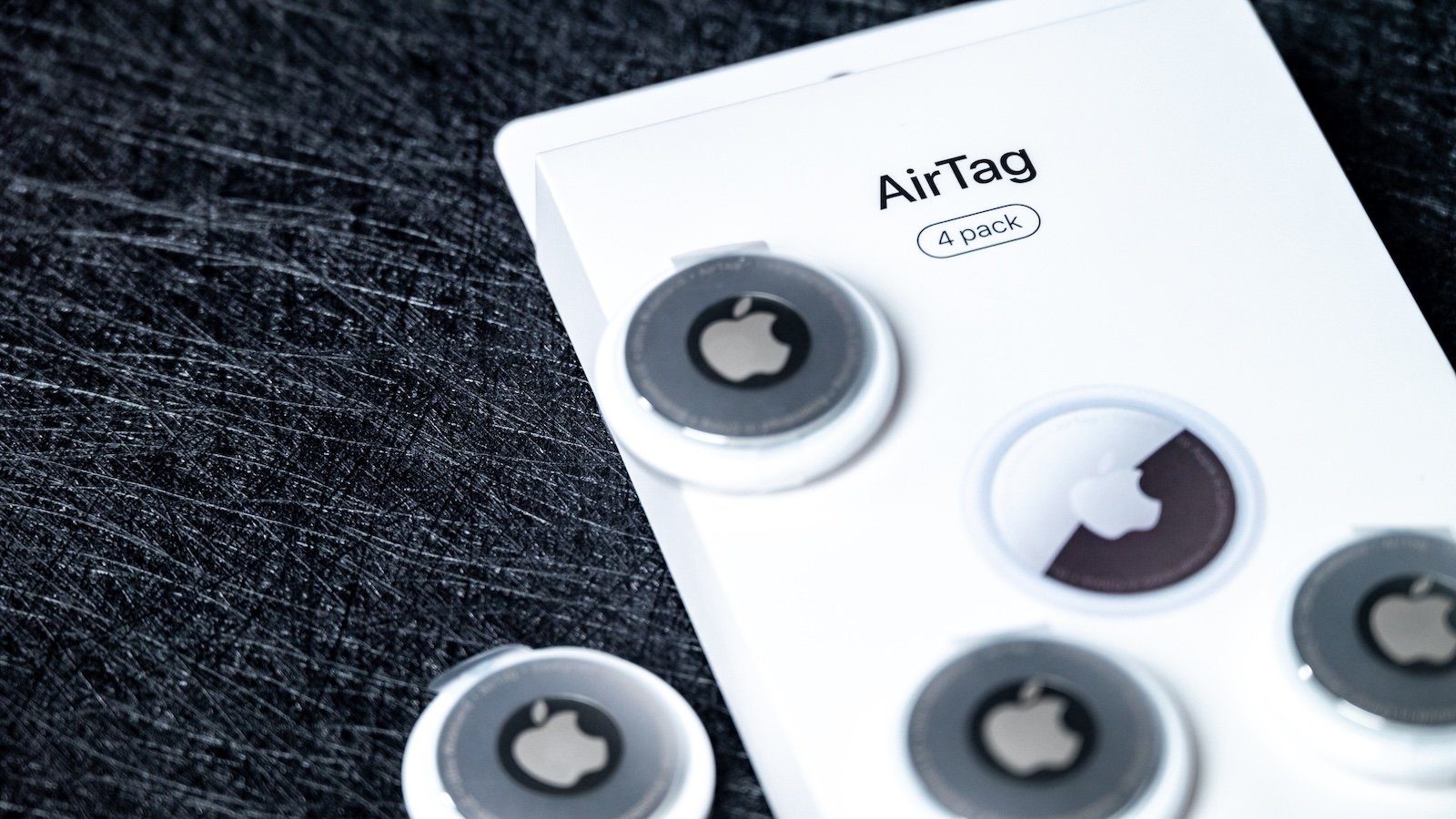
Apple's AirTag has been an integral part of the Apple ecosystem since its introduction. Now, a new version has been released, called the AirTag 2. This is precisely where the problem begins: the official product name doesn't always make the difference clear. Anyone wanting to know whether they're looking at the original AirTag or the second generation needs to take a closer look.
Apple itself doesn't use a consistently unambiguous name like "AirTag 2." Instead, phrases like "the new AirTag" or "AirTag (2nd generation)" appear. To avoid confusion, the term AirTag 2 has become established, even though it's not Apple's official name. Retailers like Amazon sometimes help by labeling the older model as "Apple AirTag (1st generation)." Nevertheless, uncertainty remains, especially with devices that have already been unboxed or when buying individual AirTags.
Why the name alone is not enough
The packaging and product itself are almost identical for both generations. Neither size nor shape provides a clear indication of which model it is. Even the product name on sales pages is not always unambiguous. Therefore, relying solely on the name "AirTag" is insufficient.
The reverse side as a crucial feature
The most reliable way to distinguish between the two generations is by looking at the engraving on the back of the AirTag. Apple clearly displays this engraving on the front of the product packaging. It's immediately visible after unpacking. The text clearly identifies which generation you have.
Engraving on the original AirTag (1st generation)
The following information is printed on the back of a first-generation AirTag:
- AirTag
- Designed by Apple in California
- Assembled in China
- Bluetooth LE
- Ultra Wideband
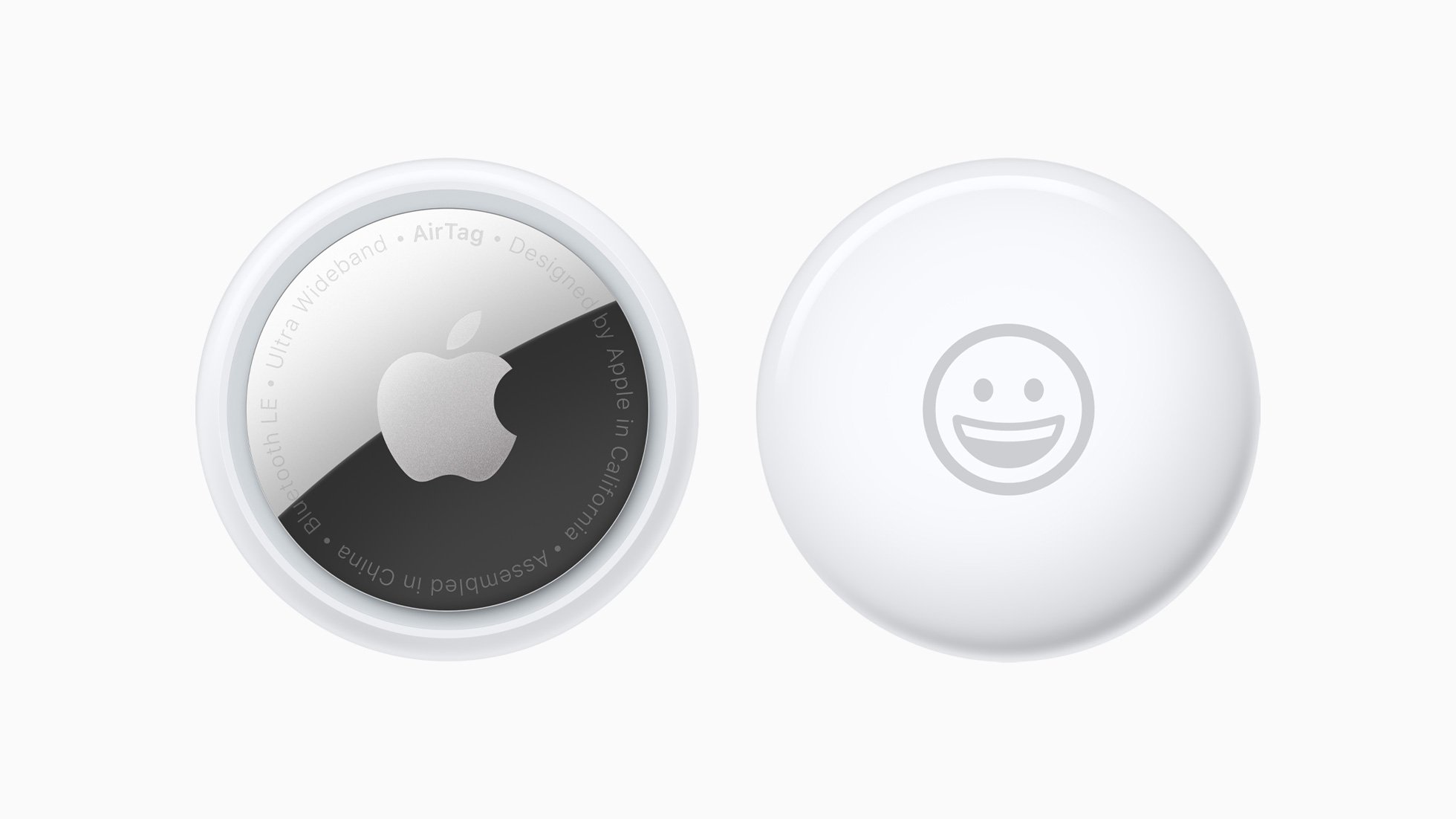
It is noticeable that the lettering is not entirely in capital letters.
Engraving on the AirTag 2
The back of the second-generation AirTag looks different. Here's the information you'll find:
- AirTag
- FIND MY
- NFC
- BLUETOOTH LE
- ULTRA WIDEBAND
- IP67
- APPLE INC.
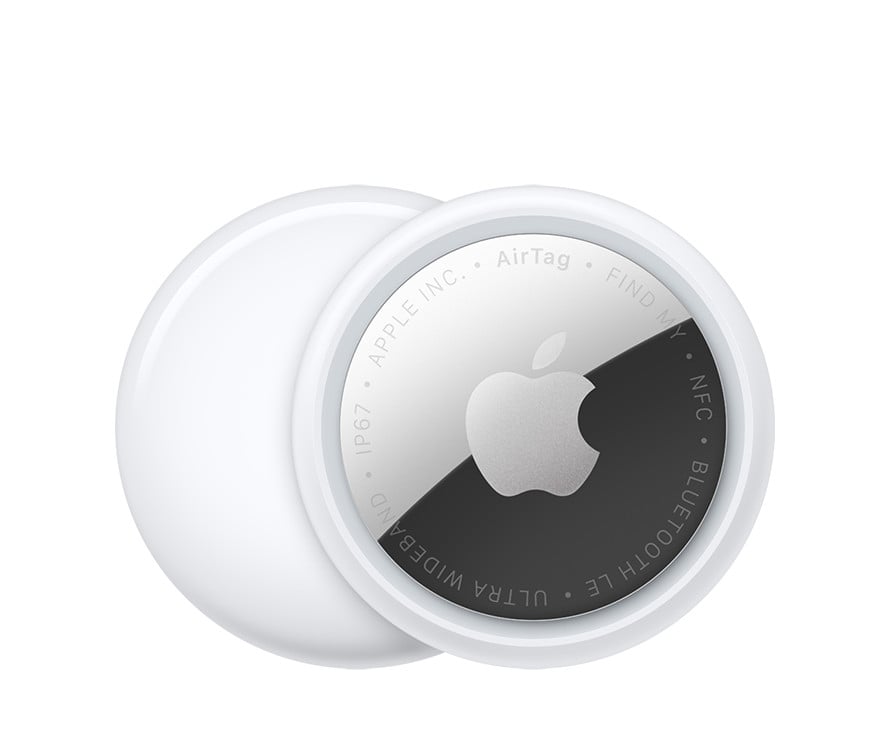
All elements of the engraving are written entirely in capital letters. This detail is the crucial difference.
Capital letters as a clear rule
The distinction can be reduced to a simple rule:
- If the entire engraving on the back is in capital letters, it is the new AirTag or AirTag 2. If this continuous capital lettering is missing, it is the first generation.
Buying advice
When buying an AirTag, it's always worth checking the back or the image on the packaging. This helps avoid accidentally purchasing an older model. If the first generation is sufficient, price is the most important factor. If it's below the official retail price of €35 for the new AirTag, it usually indicates a first-generation AirTag.
How AirTag and AirTag 2 can be reliably distinguished
The difference between AirTag and AirTag 2 is subtle but clearly identifiable. The most reliable information comes not from the product name, but from the engraving on the back. Knowing this detail allows you to quickly and easily determine which AirTag generation you have, without relying on unclear labels or retailer information. The best products for you: Our Amazon storefront offers a wide selection of accessories, including those compatible with HomeKit. (Image: Shutterstock / BadPixma)
- AirTag 2: These iPhones are compatible with improved tracking
- iPhone alarm silent: Why the alarm suddenly stops working
- Safari at 120 Hz: How to activate smoother scrolling
- iOS 26 improves group chats with five new features
- Here's how to create Apple Music playlists with ChatGPT
- iOS 26: Change default apps on your iPhone
- Optimize your messaging app: Stop unwanted audio recordings
- iOS 26 turns photos into impressive 3D spatial scenes
- AirPods: Media no longer continues playing during sleep thanks to iOS 26
- Use Apple's Family Sharing to share content together
- iPhone tip: How alternative app distribution channels work
- iPhone tip: Access flight information directly in the system
- iOS 26.2 explained: How the new AirDrop codes work
- iOS 26.2 enhances the Reminders app with alarm functionality
- Here's how to properly create a backup for iPhone and iPad
- Setting up and using Apple Car Key: All functions explained
- New iOS 26.2 feature: Screen flashes for notifications
- Longer battery life with iOS 26 – Adaptive Power explained
- Live translation with AirPods: Here's how the feature works
- iOS 26: The new focus mode „Reduce interruptions“
- iOS 26.1: Reactivate the classic stop button on the alarm clock
- iOS 26.1 brings a new lock screen setting for the iPhone
- iOS 26.1: Liquid Glass effects can be toned down
- watchOS 26 brings hints about the Apple Watch dial
- macOS 26 Update: Hidden Tools and Improvements
Frequently Asked Questions about AirTag 1 and AirTag 2 (FAQ)
Apple does not use a consistent terminology like "AirTag 2". Instead, terms like "the new AirTag" or "AirTag (2nd generation)" appear, which can easily lead to confusion.
No. The product name alone does not provide reliable information about which generation is being used, as both versions are often given the same name.
At first glance, hardly. Size, shape, and front are almost identical, which is why a closer examination is necessary.
The back contains manufacturer information, which varies between generations. It is the most reliable feature for identification.
Not always. Although Apple shows the back of the device on the packaging, the generation is not clearly stated.
Partly. Some retailers refer to older models as "AirTag (1st generation)", but this cannot be relied upon.
Yes, this happens frequently, especially with individual sales, used devices, or unclear product descriptions.
The price can be a clue. If it's significantly lower than the official retail price of the new AirTag, it's often the first generation.
This is the only way to ensure that expectations for the product are met and that no false assumptions arise during the purchase.