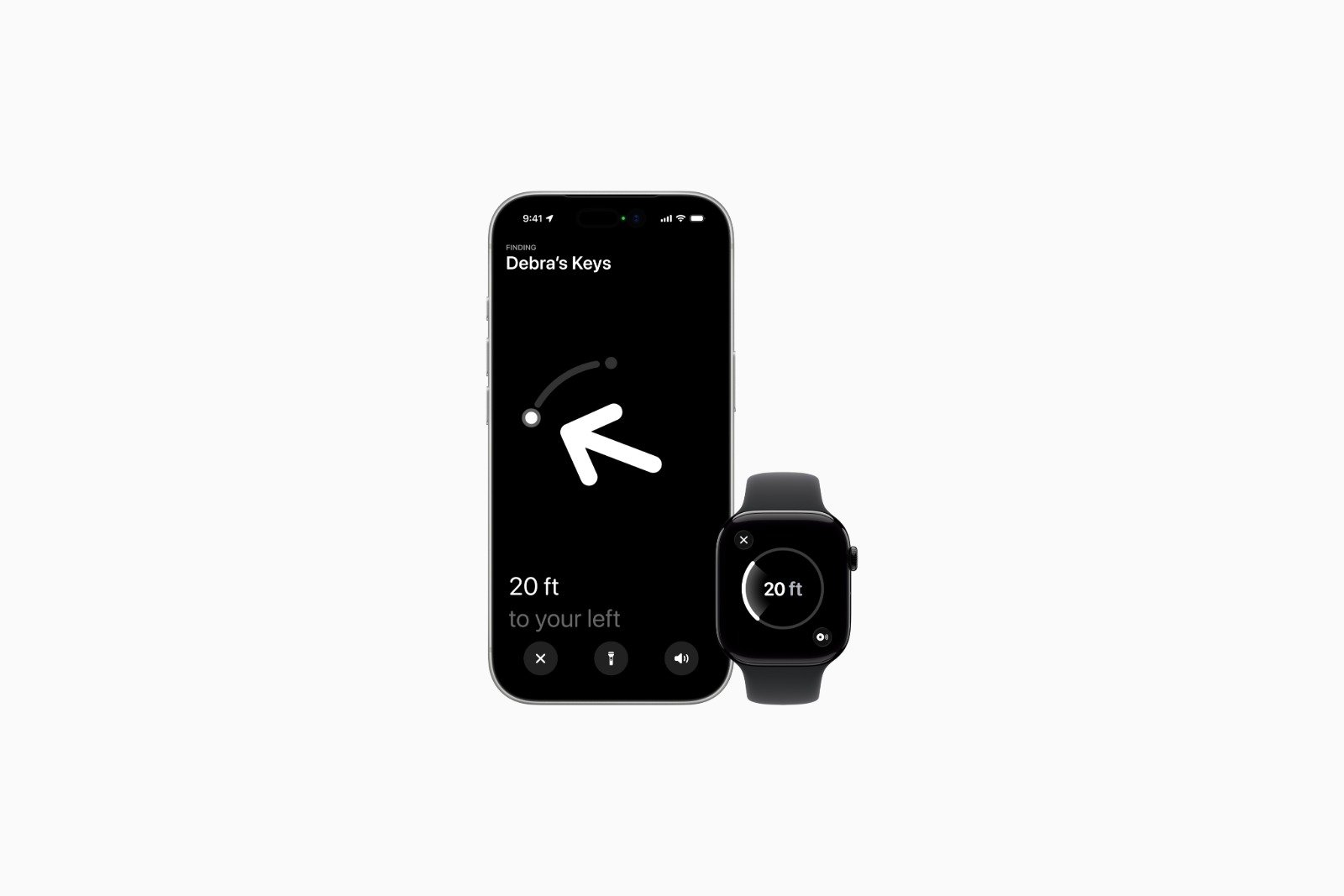
Precision Finding is one of the most important features of the AirTag. It helps you precisely locate lost items by displaying distance and direction. Apple has expanded this feature with newer Apple Watch models. However, there is a clear limitation: Precision Finding on the Apple Watch does not work with the original AirTag.
A recent Apple support document and our own testing confirm that precision finding support on the Apple Watch is tied to the AirTag's hardware. Although the Apple Watch Series 9 and later, as well as the Apple Watch Ultra 2 and later, are technically capable, only the second-generation AirTag is supported. The original AirTag from 2021 is excluded.
What makes precision finding possible with the AirTag
Precision Finding displays the exact location of an object to which an AirTag is attached. A directional arrow and the precise distance are shown. This feature is familiar from compatible iPhones and is now also available on compatible Apple Watch models.
Previously, the Apple Watch's precision finding function could be used to locate an iPhone 15 or newer. However, a comparable feature for finding an AirTag was not yet available on the watch.
Limitation of the original AirTag
Despite having hardware support on the Apple Watch, precision finding does not work with the first-generation AirTag. Released in 2021, the AirTag does not support the newer Ultra Wideband features in the way required for use with the Apple Watch.
Tests clearly show that Precision Finding cannot be activated on the Apple Watch with the original AirTag. This limitation applies exclusively to the Apple Watch. The original AirTag can still be easily found using Precision Finding on an iPhone 11 or later.
Support through the second generation AirTag
With the AirTag 2, Apple has created the conditions for precision finding on the Apple Watch. When paired with a compatible watch, the location of an AirTag can now be determined directly from the wrist.
This requires that at least watchOS 26.2.1 is installed on the Apple Watch. The Apple Watch Series 9 or later and the Apple Watch Ultra 2 or later are supported.
Setting up precision finding on the Apple Watch
According to Apple, setup is done via the Apple Watch Control Center:
- Open control center
- Scroll down and select "Edit".
- Tap "Add"
- Scroll to "Find Items".
- „Select "Find Items" and then "Find AirTag".
- Select an object using "Choose"
- Confirm with "Done" and complete the process.
Only after this setup will the function be permanently available in the control center.
Using precision finding in everyday life
The search for a second-generation AirTag is also conducted via the control center:
- Open control center
- Select “Find AirTag”
- Follow the instructions on the screen and move around until a connection is established.
- Pay attention to the displayed distance and direction.
- As soon as the Apple Watch is in close proximity to the AirTag, the screen turns green.
Greater range for the AirTag 2
Another difference between the original AirTag and the AirTag 2 is the precision finding range. The AirTag 2 works from a distance up to 1.5 times greater than the original model.
This extended range requires current hardware. You'll need either an iPhone 15 or newer, or a compatible Apple Watch (Series 9 or newer, or Ultra 2 or newer). The iPhone 16e is explicitly excluded!
- AirTag 2: Meaningful improvements without a complete overhaul
- AirTag 2: All the improvements in tracking and technology
Why precision finding on the Apple Watch only works with AirTag 2
Precision Finding on the Apple Watch is subject to specific technical requirements. While the feature works reliably with the second-generation AirTag, the original AirTag is not compatible with the Apple Watch. This limitation does not apply when using the iPhone. Therefore, anyone wanting to use AirTag search directly on their Apple Watch absolutely needs an AirTag 2, a current Apple Watch model, and a compatible watchOS version. The best products for you: Our Amazon storefront offers a wide selection of accessories, including those for HomeKit. (Image: Apple)
- AirTag 2: Which airlines support baggage tracking
- AirTag 1 or AirTag 2: How to tell the difference
- AirTag 2: These iPhones are compatible with improved tracking
- iPhone alarm silent: Why the alarm suddenly stops working
- Safari at 120 Hz: How to activate smoother scrolling
- iOS 26 improves group chats with five new features
- Here's how to create Apple Music playlists with ChatGPT
- iOS 26: Change default apps on your iPhone
- Optimize your messaging app: Stop unwanted audio recordings
- iOS 26 turns photos into impressive 3D spatial scenes
- AirPods: Media no longer continues playing during sleep thanks to iOS 26
- Use Apple's Family Sharing to share content together
- iPhone tip: How alternative app distribution channels work
- iPhone tip: Access flight information directly in the system
- iOS 26.2 explained: How the new AirDrop codes work
- iOS 26.2 enhances the Reminders app with alarm functionality
- Here's how to properly create a backup for iPhone and iPad
- Setting up and using Apple Car Key: All functions explained
- New iOS 26.2 feature: Screen flashes for notifications
- Longer battery life with iOS 26 – Adaptive Power explained
- Live translation with AirPods: Here's how the feature works
- iOS 26: The new focus mode „Reduce interruptions“
Frequently asked questions about precision finding with AirTag on the Apple Watch
No. Precision Finding on the Apple Watch only works with the second-generation AirTag. The original AirTag is not supported.
The original AirTag from 2021 does not support the newer Ultra Wideband features in the way required for precision finding on the Apple Watch.
Yes. The original AirTag can still be found using Precision Finding on an iPhone 11 or later. This limitation only applies to the Apple Watch.
The Apple Watch Series 9 or newer and the Apple Watch Ultra 2 or newer are supported.
The Apple Watch must have at least watchOS 26.2.1 installed for precision finding to work with AirTag 2.
The range is up to 1.5 times greater than the original AirTag. However, the maximum range is only achieved with current hardware.
You will need either an iPhone 15 or later, or a compatible Apple Watch (Series 9 or later, or Ultra 2 or later). The iPhone 16e is explicitly excluded.
As soon as the Apple Watch is in close proximity to the AirTag, the screen turns green.
Yes. The feature must be added once via the control center before it is permanently available.
Yes. After opening the function, a specific AirTag can be selected, provided that multiple AirTags are linked to the Apple ID.