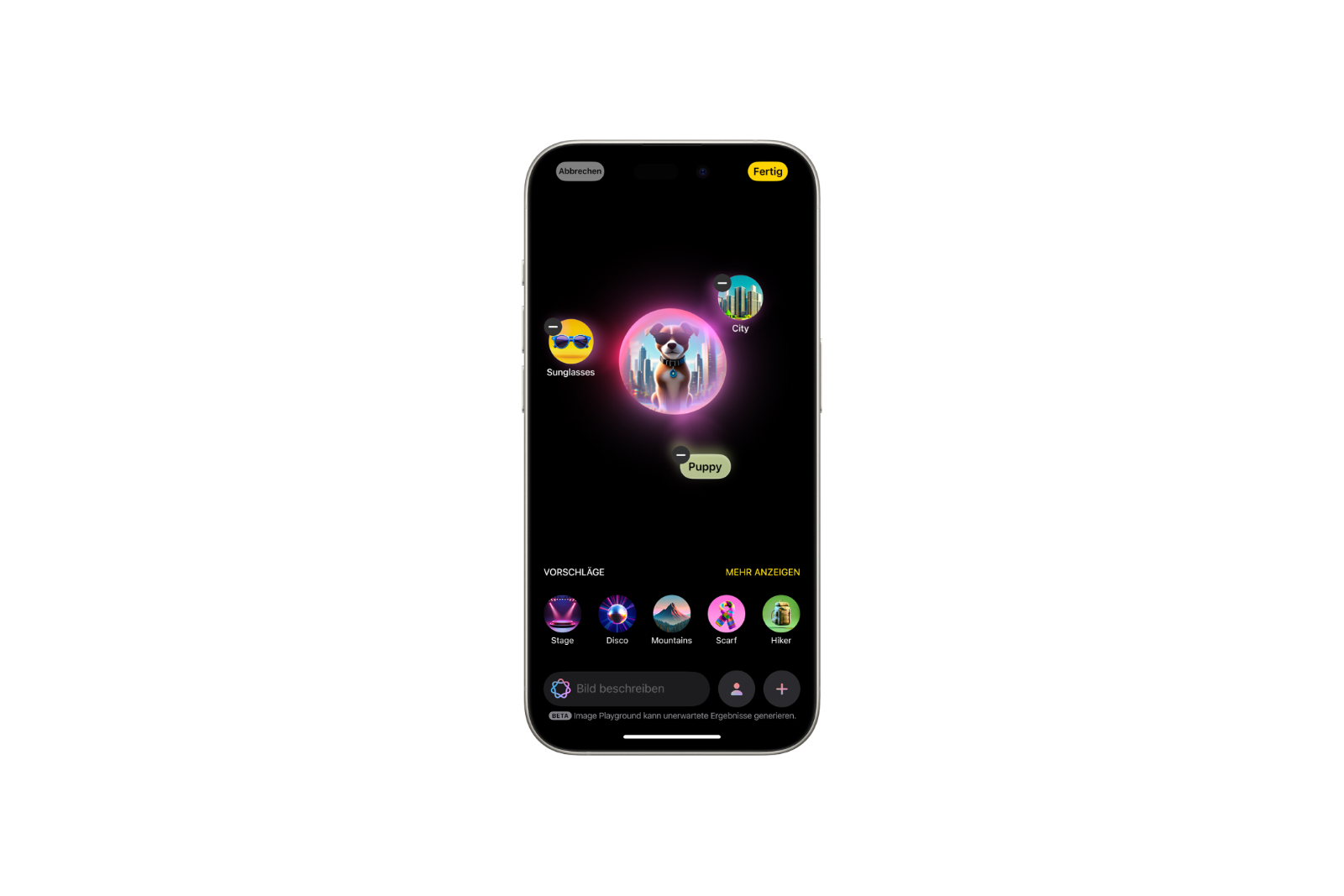
Image Playground has changed dramatically: what started as an app with just three playful styles has become a fully-fledged creative tool. ChatGPT styles were added with iOS 26, and with iOS 27, photorealistic images could even be created directly on the iPhone. The range of possibilities, from initial concept to photorealistic result, is now extensive.
Creating images directly on the iPhone was long limited to illustrative and comic-style results. Now, Image Playground covers significantly more ground – from Apple's own styles and ChatGPT-powered looks to photorealistic images. This requires Apple Intelligence to be set up and activated on the iPhone; the image features work from the iPhone 15 Pro onwards. The following sections show step by step what's possible and how to refine the results.
Here's how to create an image in Image Playground
All you need to get started is your iPhone. The basic process is as follows:
- Open the "Image Playground" app and tap on "+".
- Choose a basis: a concept (themes such as locations, costumes, or accessories), your own text description, or a person from the photo library. For a person to be selectable, they must first have been named in the "Photos" app.
- Alternatively, put together an appearance – such as skin tone and style – if no photos are to be used.
- Select a style. Apple provides the on-device rendered styles Animation, Illustration, and Sketch; each selection generates new previews to try out.
- Clicking "Done" saves the image to the gallery.
Styles created on the device can be used indefinitely and do not require an internet connection.
New styles via ChatGPT (from iOS 26 onwards)
With iOS 26, Image Playground can be extended with ChatGPT styles. In addition to the Apple styles, five additional looks are available: Anime, Oil Painting, Watercolor, Vector, and Print. There's also the "Any Style" option, which allows you to describe any look with free text – for example, in the style of a specific artist or as a realistic image, something the Apple models can't create. You can use either a text description or a photo that you upload.
Because these styles are calculated via ChatGPT, the extension must first be connected to Apple Intelligence and the sending of the request to the ChatGPT servers must be confirmed. The system will notify you before each request is sent, and images originating from ChatGPT will be marked accordingly. Note: With free ChatGPT accounts, usage is limited to a few images; a paid subscription is required for more. Additionally, ChatGPT styles are noticeably slower than local rendering.
Genmoji directly in Image Playground (from iOS 26 onwards)
Genmoji – custom-generated emoji – can now be selected directly as a style in Image Playground since iOS 26, no longer just in the Messages app. A new feature is the ability to combine multiple existing emojis into a new one: simply tap several emojis or add a text description to an emoji. Genmoji works exclusively with descriptions, not photos. The result can be transferred to the emoji keyboard and then used in messages.
Edit, refine, and share images
Even saved images can be further customized. To do this, open an image in the gallery and select "Edit". You can add further concepts, change the text description, and adjust the people depicted, such as changing their appearance or skin tone. Changing the style gives the image a new look with just a few taps.
Finished images can be shared directly to Messages, via email, or to social networks using the share function; a title can also be added via "More Options." Additionally, Apple Intelligence is expanding the editing capabilities in the Photos app, allowing for further optimization of generated and captured images.
Image Playground in other apps
The image features aren't limited to the app itself. In the messaging app, Image Playground can be accessed directly within a conversation to create a suitable image. In Freeform, created images can be combined with drawings and text elements to create custom boards.
What iOS 27 brings: photorealistic images
Image Playground makes its biggest leap with iOS 27. The app has been completely rebuilt and now generates photorealistic images directly – without the intermediary of ChatGPT. This makes it suitable for wallpapers, contact posters, or images for presentations and invitations for the first time. Because the necessary models are too large for the device to render on its own, the requests are processed via Apple's private cloud compute. The results are marked with an invisible SynthID watermark, indicating that they are AI-generated.
Editing is also more flexible: changes can be initiated via a description, a specific area of the image can be selected with a tap, and content can be added, changed, or removed only within that area. Format and aspect ratio can be adjusted via a small menu and changed at any time. Images can also be created and edited with iOS 27 in conjunction with Siri AI – however, this new generation will not initially launch on iPhones and iPads in the EU, so the direct route via the Image Playground app remains the only option here. The app itself and its styles are not affected by the restriction.
Creative tool with a growing range of functions
Image Playground is much more than just a gimmick with three styles. On-device calculated looks, ChatGPT styles for greater bandwidth, and, from iOS 27 onwards, photorealistic images cover a wide range, from quick Genmojis to contact posters. Connecting the app to ChatGPT expands the possibilities even further – but the basic functions are always available offline and without limits.
The best products for you: Our Amazon Storefront offers a wide selection of accessories, including for HomeKit. (Image: Apple)
- Find My: Locating Lost Apple Devices, AirTags, and Items
- Apple Intelligence: Multiple languages possible?
- Using Apple Intelligence with Siri: Features and iOS 27 Outlook
- Visual Intelligence explained: How to use your camera and screen
- ChatGPT with Apple Intelligence: Easy setup on the iPhone
- Limit Apple Intelligence: How to use screen time correctly
- Using Apple Intelligence in the Messages app
- Apple Intelligence: The best tips for your Photos app
- With Apple Intelligence: Focus and notifications under control
- Apple Intelligence: Quickly summarize web pages
- Apple Intelligence in the Mail app: All functions at a glance
- Apple Intelligence: How the writing tools work
- Setting up Apple Intelligence: Instructions for iPhone, iPad and Mac
- Shortcuts in iOS 27: How to easily create automations using descriptions
- Which USB-C Cable Does Your Mac Need?
- Apple Silicon: How Much RAM Do You Really Need?
- How many external displays does your Mac support?
- iOS 27: Finally Set Alarm and Notification Volumes Separately
- Create a Pass in iOS 27: Create Your Own Wallet Passes
- iOS 27, iPadOS 27 and macOS Golden Gate: These Apple devices are compatible
- How to install the iOS 27 Developer Beta: guide, risks and troubleshooting
Frequently Asked Questions: Image Playground
Image Playground is Apple's AI-powered image generation app, part of Apple Intelligence. It allows you to create images from a concept, a text description, or a person in your photo library – on iPhone 15 Pro and later.
As a standalone app on the iPhone (iOS 18.2 and later). The features are also available directly in Messages and Freeform.
Apple's own styles are rendered on the device – unlimited and without an internet connection. ChatGPT styles require a connection and user consent. Photorealistic rendering from iOS 27 onwards runs on Apple's private cloud computing platform.
Open the app, tap "+", choose a basis (concept, description or person), set a style and save to the gallery with "Done".
From Apple: Animation, illustration, and sketch. Via ChatGPT (from iOS 26): Anime, oil painting, watercolor, vector, print, and "any style" via free text. From iOS 27, photorealistic images are added directly.
In the gallery of the Image Playground app. From there, images can be shared, copied, or titled.
Yes, since iOS 27 directly in the app. Previously, realistic motifs were only possible via the ChatGPT option "Any Style".