
Apple significantly expands the Wallet app in iOS 27, bringing it closer to its goal of making physical wallets obsolete. From redesigned passports and digital hotel keys to AI-powered bill splitting, seven new features are being added – though some of them have clear regional limitations.
The Wallet app has been evolving for years from a simple payment tool to a central repository for tickets, IDs, and cards of all kinds. With iOS 27, Apple is consistently continuing this trend, adding seven new features to the app that further position the iPhone as a replacement for the traditional wallet. These features are part of the ongoing beta phase of iOS 27 and range from visual enhancements to deeply integrated AI tools. However, the latter, in particular, come with limitations for users in Germany.
Upgraded passports with a new design
Following the revamp of airline boarding passes in iOS 26, Apple is upgrading other pass types in iOS 27. Memberships, gift cards, loyalty cards, and bonus cards will now feature a bolder design with a full-screen background image, main logo, header and footer, and an optional barcode. Each pass can also display up to two actions at the bottom, such as directions to the venue or a points balance check.
For security purposes, the passport issuer's certificate can be verified to confirm the authenticity of a digital passport. The app also supports four additional barcode types, including EAN-13, Code 39, Codabar, and ITF. For developers, Apple offers a new Mac app called "Passport Designer," which simplifies passport creation through a visual editor.
Create your own passports
One of the most practical new features is the "Create Passport" function, which allows you to create tickets, memberships, and similar items directly in the Wallet app. If a digital version of a physical ticket doesn't exist, one can be generated from the original. Data can be captured either via visual intelligence using an existing barcode or QR code, or by manual entry.
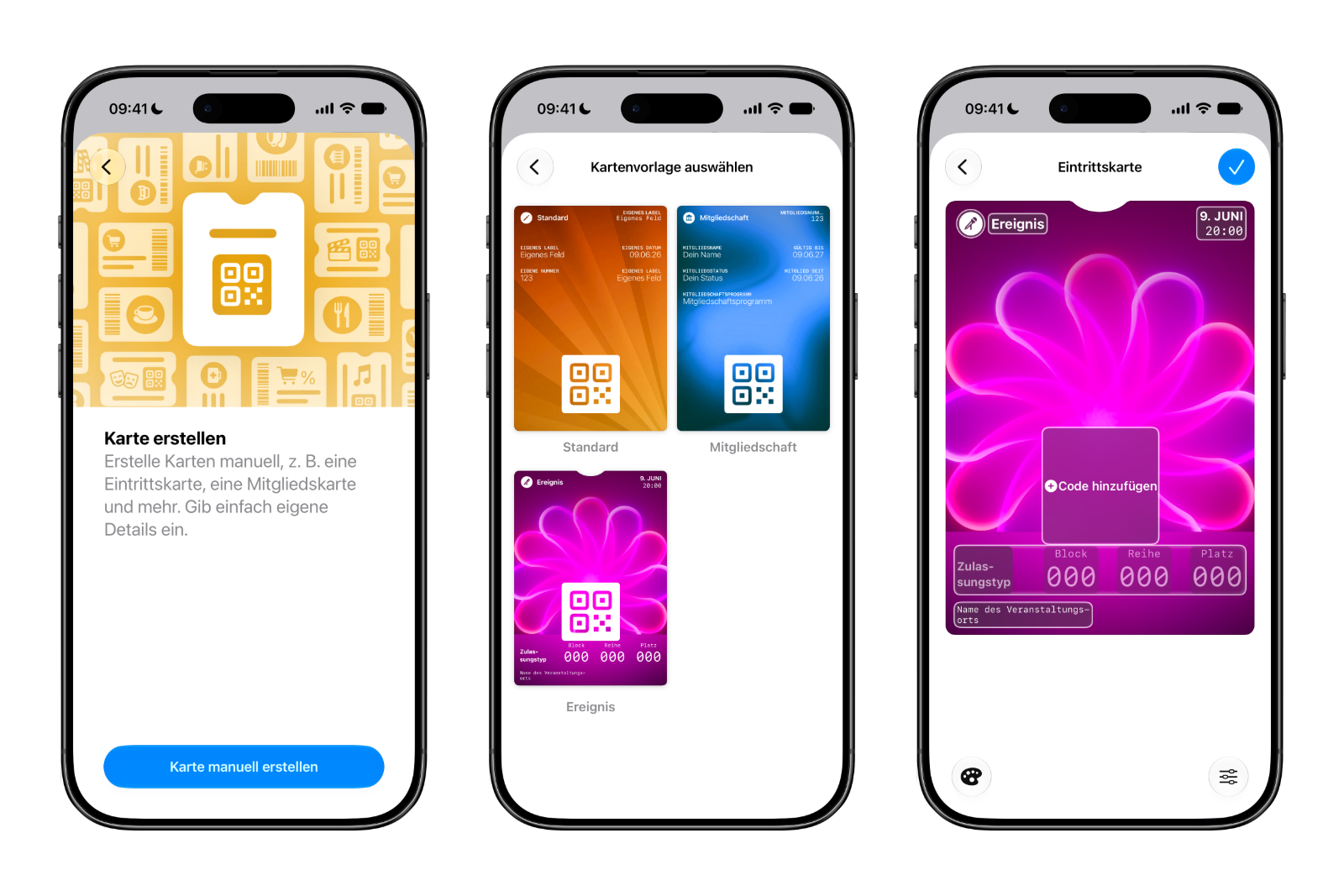
Templates include Standard, Membership, and Event, each with relevant information such as name, location, and access type, as well as a scannable code. For customization, there are twelve background colors with various textures or seven individual backgrounds for categories like Theater, Music, Sports, and Film. Individual fields can be added or removed as needed, from date and contact information to coupon codes, vehicle identification numbers (VINs), and insurance details – allowing most physical cards to be digitally replicated.
More information on digital hotel keys
When a digital hotel key from a participating hotel is added to the Wallet app, the app now displays additional details about the trip. Hotels can use it to provide updates on booked activities and grant access to various services. The key thus becomes a mini travel hub rather than just a door opener.
Splitting invoices using photos
Using the new Siri mode in the Camera app, as well as a feature in the Messages and Wallet apps, you can photograph a receipt and split it with Apple Intelligence. Visual Intelligence, which became a central AI tool in iOS 27, captures the receipt, creates a digital copy of all items, and allows each person to select what they consumed. Tax and tip amounts are calculated automatically. The subsequent payment is processed via Apple Cash—a feature currently only available in the US. The AI analysis itself requires at least an iPhone 15 Pro, while many of the other Wallet innovations work on all supported iPhones.
Keeping an eye on spending with "insights" in mind
The "Insights" feature lets you add financial accounts to the Wallet app to keep track of your spending. It's an extension of the connected accounts feature already familiar from previous iOS versions and includes spending, recurring transactions, account balances, and more. This requires a financial institution that supports the "Connected Cards" standard – several UK banks currently do.
Order tracking and faster payment
Two minor updates round out the package. Order tracking in the Wallet app is being expanded to Australia and Canada. Additionally, a new feature called "Tap to Share" is being introduced, allowing customers to connect to a participating merchant's iPhone for faster digital checkout.
How much of that actually reaches the EU
Herein lies the crucial catch for users in Germany. The AI-powered bill splitting relies on Siri mode and enhanced Visual Intelligence – both features of Siri AI that are not available on iPhones and iPads in the EU at launch. Apple cites the requirements of the Digital Markets Act as the reason. Furthermore, the associated payment method is already tied to Apple Cash, which is only offered in the US.
Passport creation is also affected, insofar as it relies on the enhanced Visual Intelligence – manual passport creation remains unaffected. The other new features, such as the new passport design, digital hotel keys, and "Tap to Share," are not dependent on Siri AI, but are subject to their own regional limitations: "Insights" relies on banks that support "Connected Cards," which are currently primarily found in the United Kingdom.
iOS 27: Here's what's next
The Wallet app illustrates the pattern of iOS 27 on a smaller scale: Apple is increasingly integrating everyday functions with AI – and this particular aspect remains excluded in the EU for the time being. Nevertheless, users in Germany will still benefit from tangible improvements, from more flexible passport designs to enhanced hotel key functionality. As with all beta features, details may change before the final release in autumn 2026, and individual regional restrictions could be lifted at a later date. (Image: Shutterstock / Stockinq)
- iOS 27: What's new in the Weather app
- iPhone Ultra (iPhone Fold): All rumors and facts at a glance
- HomePod 3 & HomePod mini 2: All the rumors at a glance
- New Apple TV 4K: All the rumors about the update with Siri AI
- Apple Watch Ultra 4: All the rumors at a glance
- Apple Watch Series 12: All the rumors at a glance
- Apfelpatient Weekly #11
- Apple Security Camera: All the rumors at a glance
- Apple HomePad: All the rumors at a glance
- MacBook Ultra: All the rumors at a glance
- iPhone 18 Pro: All the rumors at a glance
- Siri AI in iOS 27: All the Features at a Glance
- iPhone 18: All the rumors at a glance
- Apfelpatient Weekly #10
- These Apple Features Aren't Available in the EU
- Safari in iOS 27: All the New AI Features
- iOS 27 Expands Health and Fitness – From Nutrition to Menopause
- iPhone Ultra (iPhone Fold): All rumors and facts at a glance
- Apple's third-generation Foundation Models: How the new AI architecture works
- What's New in the iOS 27 Photos App
- Siri AI is based on Gemini – but is not Gemini