Apple regularly releases security updates for iPhone, iPad, Mac, and other devices. But what types are there, how do they work – and why should you install them immediately?
Security updates are among the most important measures for protecting Apple devices from attacks. Nevertheless, many users postpone installation – often due to lack of time or because the changes aren't immediately visible. However, recent incidents like the Coruna and DarkSword exploit kits demonstrate that security vulnerabilities are being exploited with increasing speed. Therefore, Apple has fundamentally revised its update strategy in recent months and introduced new mechanisms designed to secure devices more quickly and efficiently.
Why Security Updates are so important
Apple devices are considered relatively secure, but no software is without flaws. Vulnerabilities are discovered in every iOS or macOS version after its release – sometimes dozens at once. With iOS 26.4 alone, Apple closed over 35 security gaps affecting various areas of the system.
Some of these vulnerabilities allow attackers to execute malicious code or bypass security policies via manipulated web content. Others affect fundamental system functions such as the kernel, Bluetooth, or FaceTime. Without updates, these entry points remain open – and the risk increases with each day that a known vulnerability goes unpatched.
The window of time between the discovery of a vulnerability and its active exploitation is constantly shrinking. Sophisticated surveillance tools, once available only to state intelligence agencies, are increasingly becoming commercially available. Those who delay updates expose themselves to unnecessary risk.
What types of Security Updates are there?
Apple uses various methods to close security gaps. Depending on the urgency and scope of the issue, different mechanisms are employed.
Regular Software Updates
The most common form is the classic iOS, iPadOS, and macOS update with a new version number—for example, from iOS 26.3 to iOS 26.4. These updates include new features, bug fixes, and extensive security patches. They are installed via "Settings" → "General" → "Software Update" and usually require a restart.
The advantage: Regular updates are comprehensive and cover many vulnerabilities at once. The disadvantage: Their development and testing take weeks. Therefore, they are not always fast enough for acute threats.
Security improvements implemented in the background (BSI)
With iOS 26.1, Apple introduced a new system that can deliver security updates significantly faster: "Background Security Improvements," internationally known as Background Security Improvements (BSI). These updates target individual, particularly vulnerable components such as Safari, WebKit, and other system libraries.
The first official BSI update was released in March 2026 for iOS 26.3.1, iPadOS 26.3.1 and macOS Tahoe 26.3.1. It closed a WebKit vulnerability that allowed manipulated web content to bypass the so-called Same-Origin Policy – a fundamental security barrier in the browser.
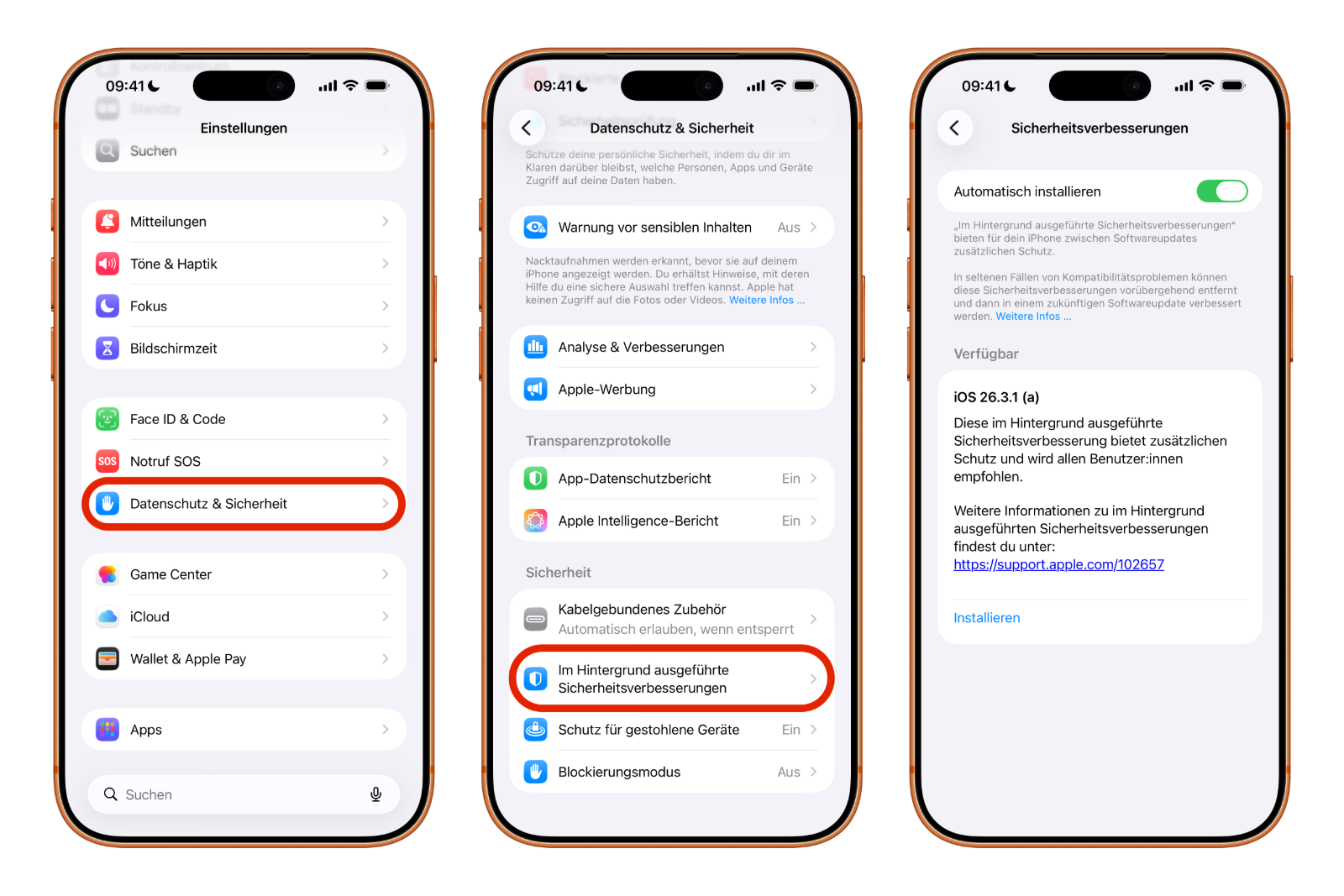
BSI updates are identified by the "(a)" designation after the version number. They are not distributed via the standard software update process, but rather via "Settings" → "Privacy & Security" → "Background security improvements". If automatic installation is enabled there, the patches will be installed automatically as soon as the device is inactive and has sufficient battery power.
One important detail: BSI updates require that the device is already running the latest base version of the operating system. Therefore, anyone still on an older iOS version will only receive the fixes with the next regular update.
Security Updates for older systems
Apple doesn't just provide patches for the current generation of operating systems. Older versions like iOS 18 and iOS 16 also receive targeted security updates when needed. For example, in March 2026, Apple released iOS 18.7.7, iOS 16.7.15, and iOS 15.8.7 to protect older devices from the Coruna exploit kit. This kit reportedly contained 23 different exploits that could attack iPhones running iOS versions from iOS 13 onward.
This shows that even those using an older iPhone that no longer supports iOS 26 should install available security updates immediately.
Rapid Security Responses (predecessor)
Before the BSI updates, Apple relied on so-called "Rapid Security Responses," introduced with iOS 16. The idea was similar: quick interim updates for urgent security issues. In practice, however, the system was rarely used. The only official release in July 2023 led to compatibility problems—some websites no longer displayed correctly, and the update had to be withdrawn and revised. The BSI updates replace this system and are intended to function more reliably.
Here's how to ensure your Device is protected
The best security strategy starts with the right settings. Apple offers several options for receiving updates automatically.
Enable automatic software updates: Under "Settings" → "General" → "Software Update" → "Automatic Updates," you can enable both the downloading and installation of automatic updates. This ensures that regular iOS updates are installed automatically as soon as they are available.
Enable background security improvements: Under "Settings" → "Privacy & Security" → "Security improvements running in the background", the "Install automatically" option should be enabled. This will automatically install BSI updates in the background.
Regular manual checks are recommended: Even with automatic updates enabled, it's advisable to occasionally check manually for available updates under "Settings" → "General" → "Software update". User reports indicate that updates aren't always rolled out immediately and uniformly to all devices.
Lockdown Mode: The strongest protection level
For individuals with particularly high security needs - such as journalists, activists, or executives - Apple offers Lockdown Mode. This mode specifically restricts features that could serve as potential attack vectors. These include certain message attachments, complex web technologies, and wired connections. Lockdown Mode is available on iPhone, iPad, and Mac and can be enabled or disabled at any time via Settings.
Which Devices will still receive Updates?
Not every Apple device receives unlimited security updates. The current iOS 26 version supports the iPhone 11 and newer. Older models like the iPhone 8, iPhone X, or iPhone XR occasionally still receive targeted security patches for older iOS versions, but full protection is only guaranteed with the latest system generation.
Devices that no longer receive security updates are considered a security risk – especially if they are used for sensitive tasks such as online banking, email, or password management. In this case, switching to a newer model is recommended.
Apple's Security Strategy is changing
The introduction of background security improvements marks a significant change in strategy. For the first time, Apple is consistently decoupling security patches from feature updates. The goal: to keep the time window between the discovery of a vulnerability and the release of a patch as short as possible.
At the same time, Apple is increasingly focusing on proactive security measures. With iOS 26.4, Stolen Device Protection was enabled by default – a feature that had been available since iOS 17.3 but previously required manual activation. With iOS 26.4.1, this default activation was also extended to enterprise devices.
Looking ahead, it appears that BSI updates will be released more frequently. In the long term, they could supplement or partially replace the traditional model of large monthly security updates – thereby raising the security of all Apple devices to a new level.
Apple Security Updates – the most important information at a glance
Security updates are not an optional convenience, but a necessity. The threat landscape is constantly evolving, and Apple responds with increasingly faster and more targeted protection mechanisms. Keeping your devices up to date, enabling automatic updates, and using blocking mode when necessary provides the best possible protection. This applies not only to iPhones, but to all Apple devices – from iPads and Macs to Apple Watches. The best products for you: Our Amazon storefront offers a wide selection of accessories, including those for HomeKit. (Image: Shutterstock / A9 STUDIO)
- Ransomware explained: Could my iPhone be affected?
- Identity theft: What to do if your Data has been stolen?
- Recognizing Social Engineering: How to Protect Yourself from Manipulation
- Detecting AI fraud: Deepfakes, fake voices and how to protect yourself
- Recognizing Quishing: How to protect yourself from QR code fraud
- Use public Wi-Fi safely: How to protect your iPhone
- iOS 26.4: Show Hotspot Data usage per Device
- Recognizing Smishing: How to protect yourself from SMS fraud
- Create and manage secure passwords: The Apple guide
- WhatsApp hacked: How to protect your Account
- Recognizing Phishing: How to protect yourself from fraud
- Creating, Changing, and Deleting an Apple ID: The complete Overview
- Activate iPhone Call forwarding: All Methods under iOS 26
- iPhone vibrates for no Reason: Causes and Solutions under iOS 26
- Connecting and resetting AirPods: Instructions for all Models
- AirDrop not working: All Solutions for iOS 26
- iPhone loading slowly: Causes and Solutions under iOS 26
- iPhone Screen Recording: Instructions for iOS 26
- How to view your Wi-Fi Password on your iPhone: All Methods under iOS 26
- iPhone Update Problems: All Solutions for iOS 26
- Creating an iPhone Backup: All methods under iOS 26
- Transferring Data to a new iPhone: All Methods under iOS 26
Frequently Asked Questions: Apple Security Updates
Apple releases security updates irregularly, but frequently. Major updates usually appear every four to six weeks, while BSI updates can be released at any time in between in the event of acute threats.
BSI updates are compact security updates that Apple has been delivering in the background since iOS 26.1. They specifically address vulnerabilities in components such as WebKit or Safari without requiring a full system update.
A restart is usually required. For certain components like Safari, a simple browser restart may suffice, but full protection will only take effect after a device restart.
Known vulnerabilities remain open and can be exploited by attackers. The risk includes, among other things, access to personal data, passwords, and financial information.
Yes, Apple also provides targeted security patches for older iOS versions. For example, updates for iOS 15, iOS 16, and iOS 18 were released in 2026. However, full functionality is only guaranteed with the current iOS generation.
Under "Settings" → "Privacy & Security" → "Background security improvements", activate the "Install automatically" option.
Both serve the same purpose, but BSI updates are installed automatically in the background, while Rapid Security Responses had to be installed manually via the software update menu. Furthermore, Apple made the BSI system more robust after Rapid Security Responses caused compatibility issues in 2023.