
Previously, the Passwords app only warned users if a login appeared in a data breach – changing it remained a manual process. In iOS 27, a new, agent-based AI feature takes care of this tedious step automatically, replacing weak passwords if desired.
At WWDC 2026, Apple showcased a range of Apple Intelligence features for iOS 27, and one of them is likely to be particularly noticeable in everyday use. The Passwords app, which has served as the central hub for logins, two-factor authentication codes, and Wi-Fi credentials for the past two years, will gain the ability to automatically replace compromised passwords. Previously, while the app reliably indicated which passwords had appeared in a data breach or been reused, users had to manually change them for each service. Apple is now closing this gap.
From warning message to independent correction
The Passwords app and Safari could previously work together to detect whether a password was weak, used multiple times, or compromised by a data breach. Tapping the warning would lead directly to the affected website, but from there, manual intervention was required: logging in, finding the account settings, creating a new password, updating the entry – and this had to be done for each affected account individually.
In iOS 27, the feature handles these steps automatically. Apple Intelligence works "agentically" with Safari, navigating independently to the respective login page, logging in with the saved credentials, generating a new strong password, and updating the entry in the app. This transforms a simple warning list into a tool that can resolve the issues directly, if desired.
This is how the exchange process works
The process is deliberately kept simple. In the Passwords app, you see the accounts marked as weak or compromised and authorize the exchange with a tap. The system then works through the list in the background, while a live activity displays the progress – so you can follow what the iPhone is doing instead of being left in the dark.
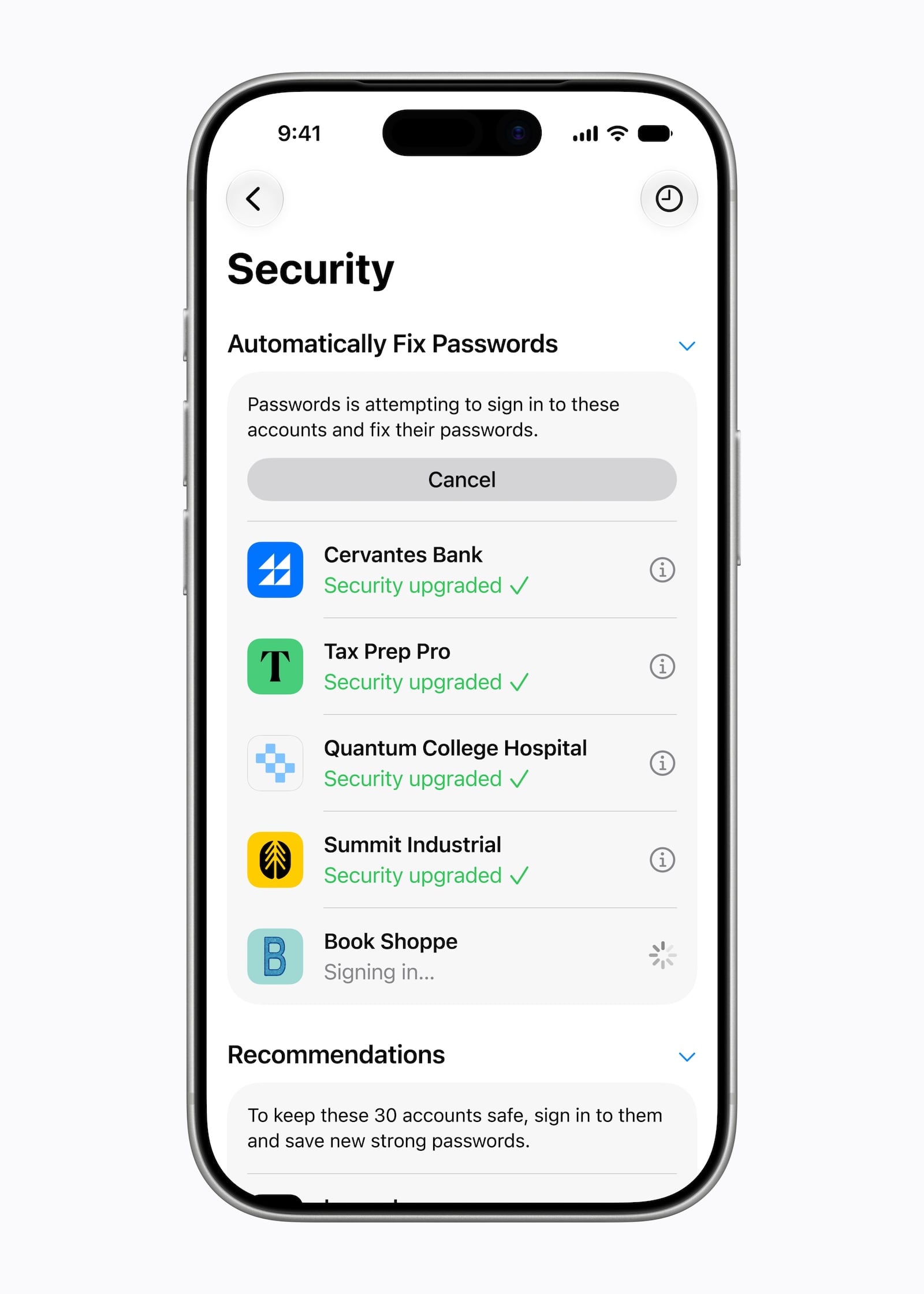
It's important to note that the feature only activates after approval and is limited to so-called "authorized" accounts. Apple has not yet specified which services and websites will be supported. Therefore, it's likely that not every login will be automatically changed initially, and some accounts will remain excluded for the time being.
How AI works in the background
Technically, the feature relies on the next generation of Apple Intelligence, or rather, the Apple Foundation Models. Depending on the requirements, processing runs either directly on the device or securely via Private Cloud Compute – Apple's approach of handling more demanding AI tasks on its own servers without making the data accessible to Apple. This ensures that the sensitive handling of access data remains tied to the data protection architecture that Apple uses to equip its AI features overall.
The situation regarding regional availability is encouraging: While some Apple intelligence features are launching with a delay in the EU – the new Siri AI, for example, will initially not be available on iPhone and iPad due to the regulatory requirements of the Digital Markets Act – the automatic password change feature is already available in the first developer beta in Germany. The feature works as intended on a German device.
Why this feature is more than a footnote
From our perspective, automatic password changing is one of the underrated highlights of iOS 27. Practical use quickly reveals why: By far the biggest sticking point regarding account security was never identifying weak passwords, but rather the tedious process of changing them – service by service, form by form. This hurdle is now eliminated, significantly increasing the likelihood that compromised login credentials will actually be replaced promptly, instead of remaining on the warning list for months.
The competitive aspect is also interesting. The integrated password app is thus functionally approaching established providers like 1Password or Bitwarden, and automatic password changing is an argument that carries additional weight in a direct comparison of password managers. Open questions remain where the automation reaches its limits: How reliably the AI navigates differently designed login pages and how it handles additional security questions will have to be demonstrated in widespread use.
Availability: Beta now, final launch in autumn
The feature is part of the first developer beta of iOS 27, which has been available since June 8. The public beta will follow in July, and the final rollout to all users is planned for September. Those who don't want to wait and are willing to accept the risk of an early version can already try out the feature via the Developer Program – however, the stable version is recommended for productive use with real login credentials. (Image: Apple)
- Call Context in iOS 27: When the iPhone prepares the call for you
- With Claude Fable 5, Anthropic is introducing a Mythos model for everyone for the first time
- visionOS 27: What's new for the Apple Vision Pro
- macOS 27 Golden Gate: These are all the new features
- Why Apple is now building a Siri app with iOS 27
- iOS 27: Apple Music, Lock Screen Widget and Find My
- Dispute over Siri AI: The EU Commission contradicts Apple
- Apple is expanding its services: Here's what's coming this fall
- watchOS 27: App grid, new gesture and smarter fitness
- CarPlay gets video apps and the new Siri with iOS 27
- Private Cloud Compute: Apple's AI now performs calculations at Google
- Siri AI is free – iCloud+ raises AI daily limits
- iOS 27 and more: The new features beyond the WWDC stage
- iOS 27 cleans up the AirPods settings
- iOS 27: Evidence of the foldable iPhone is mounting
- Xcode 27 and new AI frameworks for developers
- tvOS 27: These are the new features for Apple TV
- iOS 27, macOS 27 and more: Apple launches the Developer Betas
- App Store: Apple gives developers new tools
- Apple expands parental controls with new features
- Siri AI in the EU: DMA delays launch on iPhone and iPad