
Apple is significantly expanding its parental controls: This fall, a simpler setup process, a new "Ask to Browse" feature for websites, flexible time limits, and a redesigned screen time management system will be available. These tools are designed to help parents manage their children's digital world in an age-appropriate and gradual way – and will be available with software updates for iPhone, iPad, and Mac.
At its WWDC keynote on June 8, 2026, Apple unveiled a range of new parental control features, which will be released with the iOS 27, iPadOS 27, and macOS 27 updates this fall. With these features, the company is further expanding its already comprehensive parental controls on iPhone and iPad, emphasizing, as Apple puts it, the idea that every child is different. Sumbul Desai, Apple's Vice President of Health and Fitness, described the approach as providing simple and intuitive tools, based on expert advice, that will allow parents to personalize their children's digital journeys and develop healthy habits.
The child account as a starting point
Apple considers setting up a child account the most important first step. This activates system-wide, age-appropriate safeguards - such as restricting access to adult websites, allowing only age-appropriate media, and implementing age-based restrictions in the App Store. When setting up a new device, parents are guided through the process of creating a child account, a procedure closely resembling the existing setup of an iPhone for children using Family Sharing. A child account is mandatory for children under 13, although the minimum age varies by country; it can be used by children up to 18 years old.
What content do children see?
Once a child account is set up, parents can specifically determine which apps are available on the device. This allows for a focused start with just a few essential apps, a curated selection, or precisely the apps that parents deem appropriate. Additional apps can be added gradually without relinquishing control.
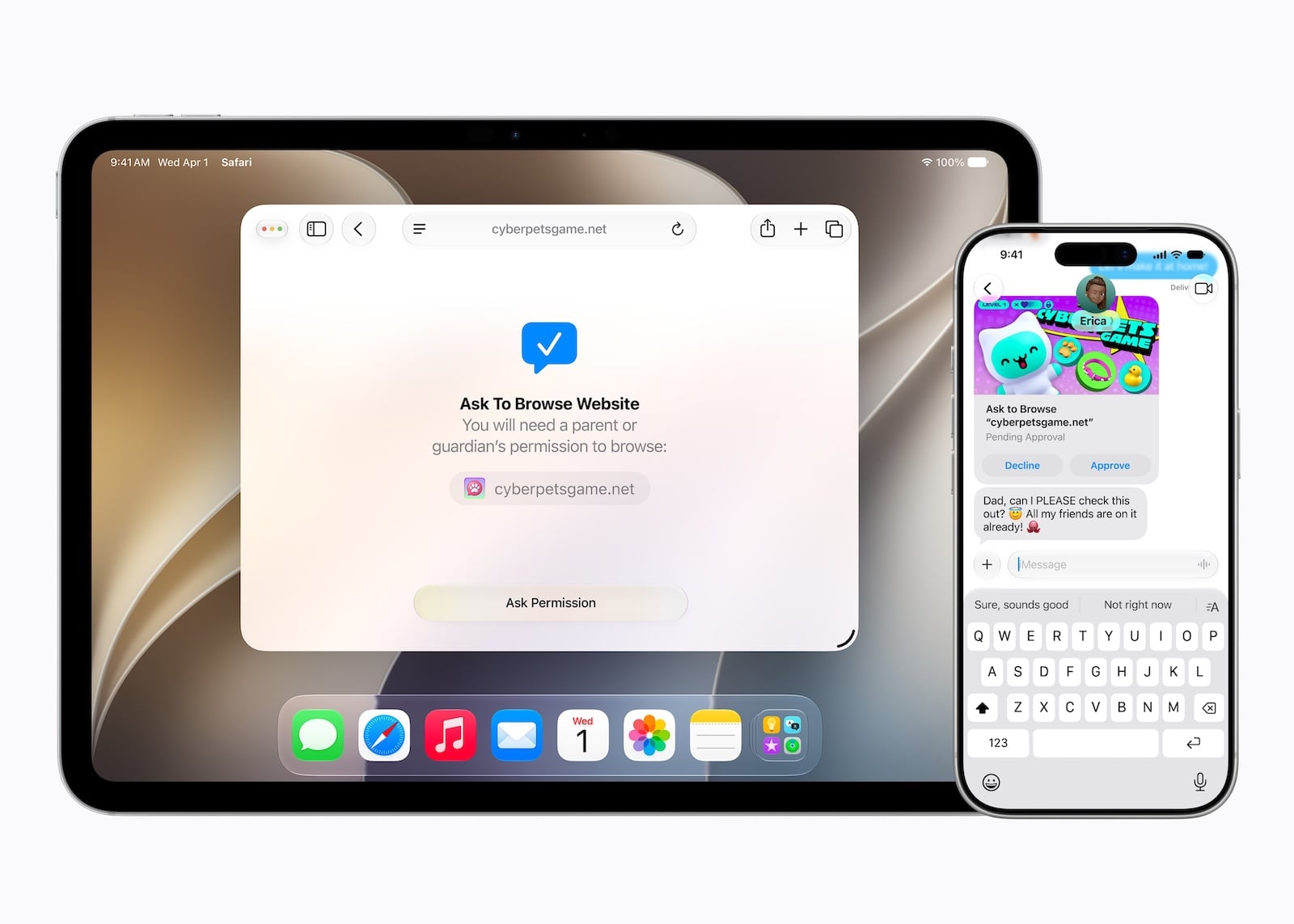
With "Ask to Buy," parents could already require their child to ask for permission before downloading an app from the App Store - whether free or paid - or before making an in-app purchase. Now, "Ask to Browse" has been added: This allows you to specify that children must also ask for permission before opening a new website in Safari. The feature works across platforms on iPhone, iPad, and Mac.
Who children communicate with
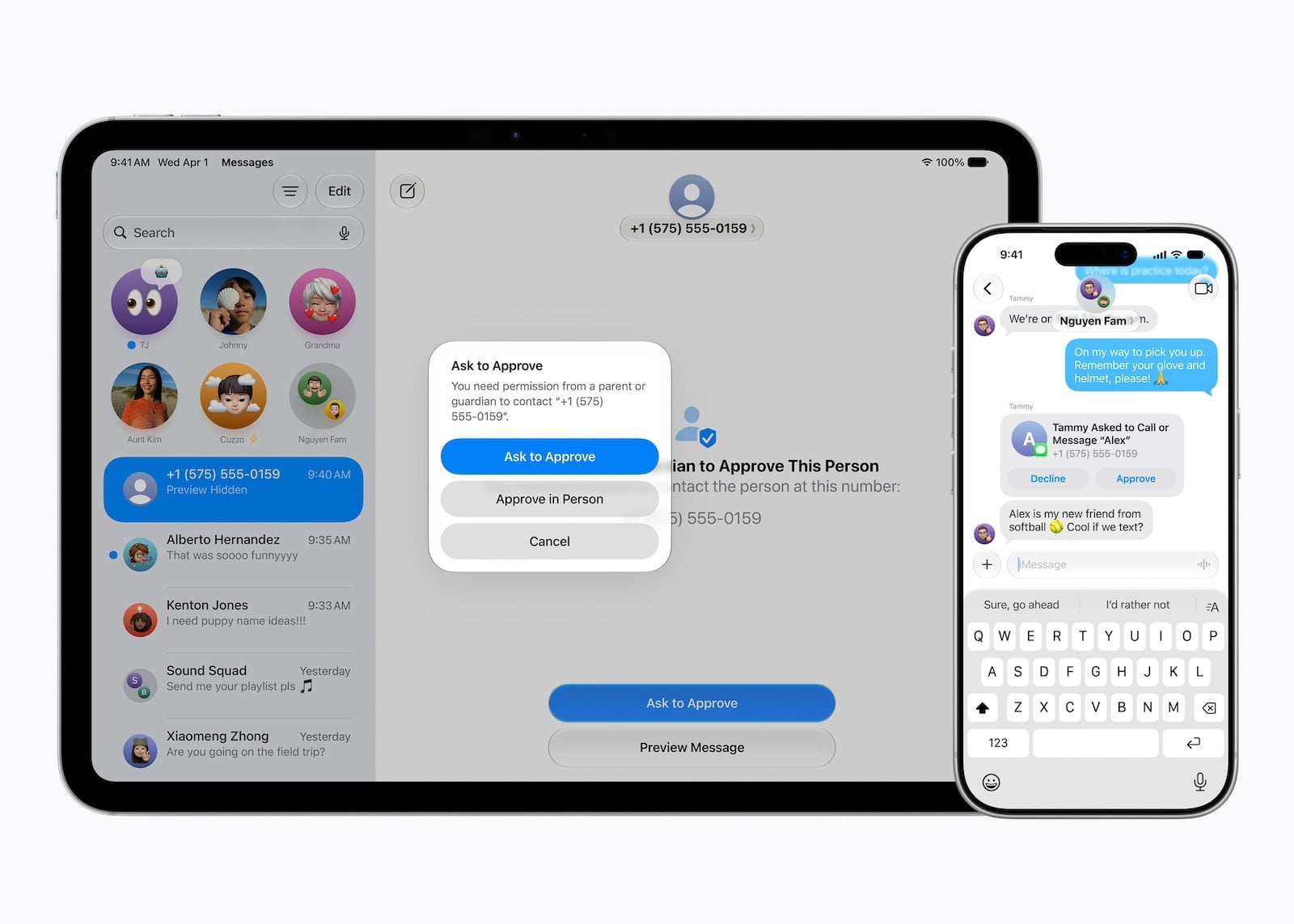
From the very beginning, parents can control who their children contact via messages, FaceTime, and phone. If a child wants to communicate with a new contact, prior parental consent can be required.
Communication security features already blur detected nudity in messages and FaceTime calls and are enabled by default for users under 18. In the future, they will also intervene and block shared images or videos that contain depictions of violence or gore.
When children use apps
Time allowances give parents more flexible ways to manage the time their children spend in app categories such as entertainment, games, and social media. When setting these allowances, parents receive age-appropriate guidance based on expert research, which serves as a starting point – everything can be adjusted according to their own discretion.
Additionally, daily schedules can be set up to regulate which apps children can access at what times of day and throughout the week. This helps maintain focus, for example, during school hours.
The newly designed screen time
Screen time has been redesigned, giving parents an overview of their children's average device usage and most frequently used apps. Adjustments to app and web access can be made instantly with a single tap – for example, to temporarily restrict access during meals, outdoor play, or other moments requiring attention. If a child needs more time to complete something in an app, access can be extended just as easily. Parents who have primarily used this tool for themselves will find many of the same settings that now make managing screen time for children even more intuitive.
Expert advice and proven tools
Apple points out that it has been incorporating findings from clinical and developmental psychology research, as well as from online safety experts, into its products for years. Together with the American Academy of Pediatrics (AAP), the company is adapting the AAP's Family Media Plan into a guide that parents can use when using Apple products. To provide further guidance, Apple has also launched a dedicated website for parents, which compiles current tools, advice, and answers to frequently asked questions.
Alongside these new features, tried-and-tested functions remain. Screen Time passcode notifications inform parents when their passcode has been entered on their child's device. Reporting tools, which allow users to report harmful content directly to Apple, are currently available in select countries and are planned for global rollout. The Apple Watch for Kids brings connectivity, fitness, health, and safety features to devices used by children who don't have their own iPhone: Parents can reach their child and locate them using "Find My," while children can stay in touch with family and friends via calls and messages, track activity goals, and use features like Apple Maps and Apple Music. However, the Apple Cash payment feature mentioned in this context is not available in Germany. Schooltime mode helps children stay focused by blocking notifications and disabling apps.
Tools for developers
Developers are also expected to contribute to age-appropriate experiences. Apple provides several tools for this purpose: SensitiveContentAnalysis helps protect children from inappropriate content such as violence or nudity, while PermissionKit ensures that parents approve new in-app contacts. The Declared Age Range API also allows developers to query a child's age range to tailor the app experience accordingly – privacy-friendly and without revealing the child's date of birth.
Apple's parental controls grow with age
The new features will appear after installing the Screen Time update in iOS 27, iPadOS 27, and macOS 27 this fall; Apple reserves the right to make changes until then. Overall, Apple is shifting the focus away from rigid prohibitions toward a system that grows with the child, adapting to their age and maturity and gradually giving parents control. Instead of a one-time setup, this creates a framework that evolves with the child—and consciously keeps responsibility with parents, rather than handing it over to an automated system. (Image: Apple)
- Siri AI in the EU: DMA delays launch on iPhone and iPad
- Apple Intelligence: The next generation is here
- Siri AI: Apple introduces the completely redesigned assistant
- Tim Cook gets in the mood for WWDC with a "Good Morning" video.
- Gemini could become the upper limit for Apple's AI ambitions
- UK is demanding that Apple implement a feature that already exists
- UK threatens tech executives with jail if children can see nude images
- Epic Games counters Apple's move before the Supreme Court
- Apple Arcade: Nine new games in June and July
- App Store: Ecosystem reaches $1.4 trillion
- Apple TV shows the trailer for "Lucky" starring Anya Taylor-Joy
- Apple opens Europe's first Developer Center in Berlin
- Apple discloses revenue figures in India antitrust dispute
- Microsoft is ending Office support for older Macs and iPhones
- Musk must hand over Tesla and SpaceX emails in accordance with Apple's procedure
- Vision Pro Stylus: Apple patent aims to make virtual textures tangible
- MacBook Neo is selling better than the new MacBook Air and Pro
- Apple Design Awards 2026: The twelve winners have been chosen
- Anthropic expands Glasswing and plans Mythos launch for all
- Silo Season 3: Trailer reveals the origin story
- Apple TV wins Gotham Award for Pluribus