Beyond the major WWDC headlines, the first iOS 27 beta contains a number of smaller improvements that quickly become apparent in everyday use. Apple Music has been completely revamped and is faster, the persistent Now Playing widget can finally be swiped away, and Find My allows users to temporarily hide their location.
The first developer beta of iOS 27 shows that Apple hasn't just been working on the prominently featured functions, but also on many details. While the large package of services and features will set the framework for the fall release, it's often the small tweaks that make the difference in daily use. Three of these already stand out in the early beta – in Apple Music, the lock screen, and the "Find My" app.
Apple Music is being revamped and made faster
Apple Music doesn't receive a single flagship feature with iOS 27, but rather many targeted improvements across design, playback, and speed.
New artist and album pages
The most immediately noticeable change is the redesigned artist page: it features a prominent shuffle button, displays the artist name in a new format, and rearranges the layout in several places. According to Apple, the album pages have also been reworked, although no visible changes are apparent in the first beta.
Smoother transitions with AutoMix
AutoMix, Apple's AI-powered feature for crossfading tracks based on key and tempo, will be more refined in the future. Improved algorithms will generate new transition types and make the changes between songs smoother. Those who prefer the classic crossfade can still use it.
More translated song lyrics and lossless music on Apple TV
Song lyrics translation expands to include seven new language pairs, including English to French, German, Italian, Korean, and Spanish, as well as French to English and Japanese to English. The pronunciation guide for sing-alongs adds five new pairs, such as English to Hangul and Katakana. Additionally, Apple brings high-resolution lossless audio and regular lossless audio to tvOS, allowing music to be enjoyed in studio quality through compatible external speakers on Apple TV 4K.
Noticeably faster speed and closer integration with Siri
Beneath the surface, responsiveness is improved: Streaming is supposed to become more reliable, the "Recently Released" view loads faster, and playback starts more quickly after a fresh app launch. At the same time, Apple Music is moving closer to the completely revamped Siri AI – if you ask the assistant about an artist, you can start playback mid-conversation with a casual command like "play one of her new singles." This conversational control is part of what distinguishes the new Siri in iOS 27.
The Now Playing widget can finally be removed
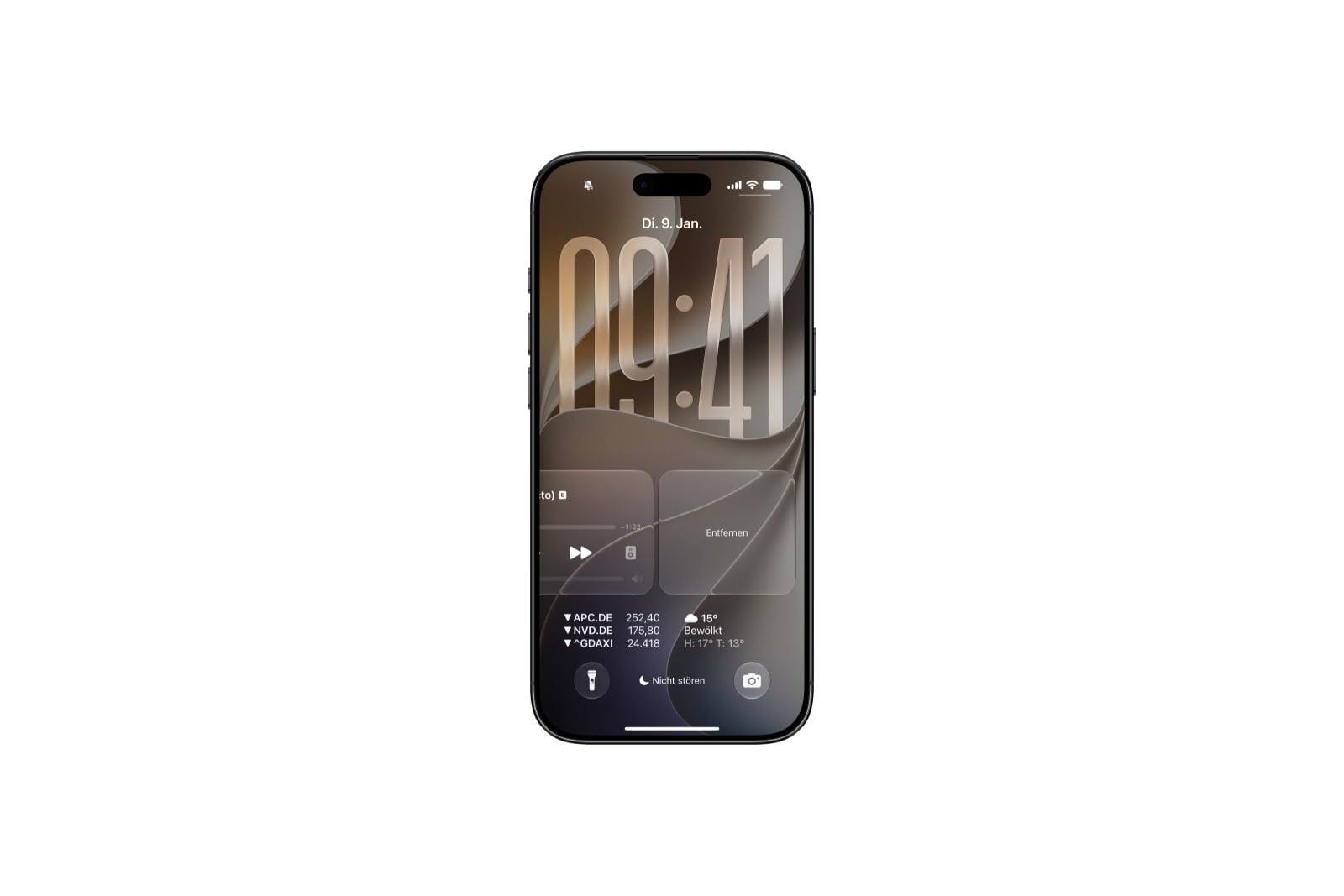
A small but long-awaited change concerns the lock screen. Previously, there was no way to remove the playback controls while something was playing in the background. In iOS 27, a swipe to the left on the controls reveals a remove button from the right; tapping it removes the controls from the lock screen – and simultaneously removes the smaller Now Playing widget from Dynamic Island.
How to immediately bring the controls back to the forefront is still unclear in the early beta. The only reliable workaround so far is to pause playback, wait a few minutes, and then restart it. Additionally, the behavior seems to depend on the app: switching from a podcast to video playback, for example, brings the widget back to the forefront. As subtle as this adjustment is, it should please anyone who likes to keep their lock screen tidy.
Find My temporarily hides the location
Location sharing in Find My was previously quite rigid: either someone could see your location, or sharing had to be completely disabled. iOS 27 introduces a more flexible middle ground. In your Find My card, under "People" in the "My Location" section, a new option, "Hide Location," appears. Tapping it temporarily hides your location - specifically for twelve hours - before it automatically reverts to the previously set sharing status. While the feature is active, the button changes to "Show Location."
The appeal lies in the automatic reset: Unlike completely disabling sharing, you don't have to remember to turn it back on later. This makes the feature ideal for brief moments when you want to remain unobserved, while the connection to family or friends resumes seamlessly afterward. It complements the unified Find My app, which runs alongside watchOS 27 on the Apple Watch.
Small screws with everyday impact
The three new features demonstrate what often matters most in a software update: it's rarely the big, dramatic changes that transform daily iPhone use, but rather details like a cleaner lock screen or more flexible location sharing. All three can be tested now in the developer beta, with the public beta following next month. The final version of iOS 27 will reach all users with a compatible iPhone as a free update this fall. (Image: Apfelpatient)
- Dispute over Siri AI: The EU Commission contradicts Apple
- Apple is expanding its services: Here's what's coming this fall
- watchOS 27: App grid, new gesture and smarter fitness
- CarPlay gets video apps and the new Siri with iOS 27
- Private Cloud Compute: Apple's AI now performs calculations at Google
- Siri AI is free – iCloud+ raises AI daily limits
- iOS 27 and more: The new features beyond the WWDC stage
- iOS 27 cleans up the AirPods settings
- iOS 27: Evidence of the foldable iPhone is mounting
- Xcode 27 and new AI frameworks for developers
- tvOS 27: These are the new features for Apple TV
- iOS 27, macOS 27 and more: Apple launches the Developer Betas
- App Store: Apple gives developers new tools
- Apple expands parental controls with new features
- Siri AI in the EU: DMA delays launch on iPhone and iPad
- Apple Intelligence: The next generation is here
- Siri AI: Apple introduces the completely redesigned assistant
- Tim Cook gets in the mood for WWDC with a "Good Morning" video.
- Gemini could become the upper limit for Apple's AI ambitions
- UK is demanding that Apple implement a feature that already exists
- UK threatens tech executives with jail if children can see nude images
- Epic Games counters Apple's move before the Supreme Court
- Apple Arcade: Nine new games in June and July