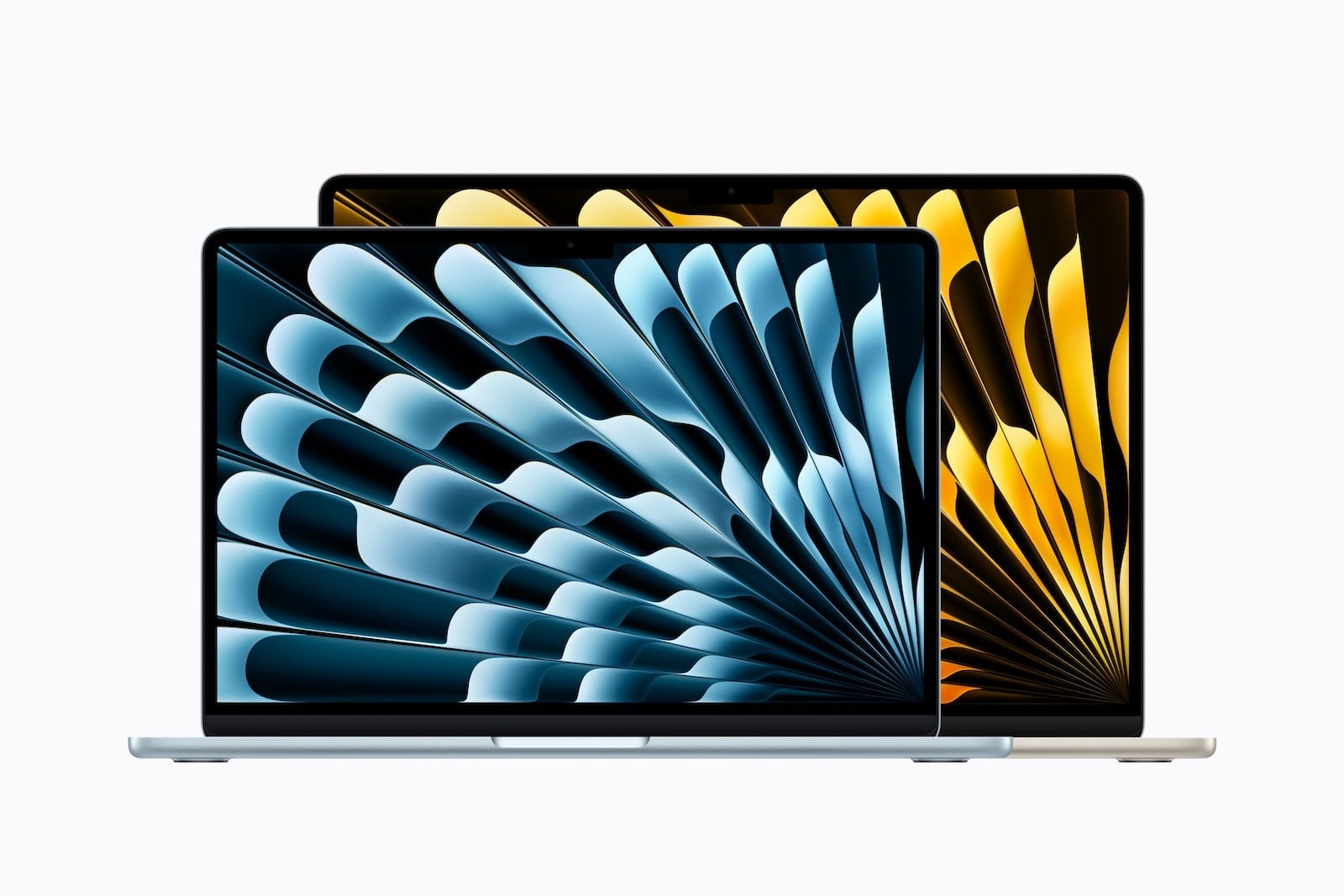
The MacBook Air with M5 processor comes in two sizes: 13-inch and 15-inch. Both share the same M5 chip, the same ports, the same camera, and the same battery life. The differences lie in the display size, speakers, GPU in the base model, weight, and price. This comparison shows which size is best for whom.
Choosing between the 13-inch and 15-inch MacBook Air isn't about performance—it's about how you use it. Someone who primarily works on the go, commutes by train, or sits in a lecture hall has different needs than someone who uses the MacBook Air as their main computer on their desk. Apple has minimized the technical differences between the two sizes. That makes it all the more important to understand the few real differences—because they can significantly impact your daily life.
Both models were unveiled in March 2026 and have been available since March 11th. They feature the Apple M5 chip, Wi-Fi 7 via the N1 chip, Bluetooth 6, and come with a 512 GB SSD – twice as much as their predecessor.
Prices in the Apple Store Germany:
- MacBook Air 13″ (M5): from 1,199 euros
- MacBook Air 15″ (M5): from 1,499 euros
There's a €300 price difference between the two sizes. The question is whether the larger display and better speakers justify this extra cost.
Display
| Feature | MacBook Air 13″ | MacBook Air 15″ |
|---|---|---|
| Diagonal | 13.6 inches (34.46 cm) | 15.3 inches (38.91 cm) |
| Resolution | 2,560 x 1,664 pixels | 2880 x 1864 pixels |
| Pixel density | 224 ppi | 224 ppi |
| Brightness | 500 nits | 500 nits |
| Technology | Liquid Retina (IPS, LED) | Liquid Retina (IPS, LED) |
| Color space | P3 Wide Color | P3 Wide Color |
| True Tone | Yes | Yes |
| Billion colors | Yes | Yes |
Both displays are technically identical – same pixel density, same brightness, same color gamut. The only difference is the size. The 15-inch display offers approximately 25 percent more workspace, which makes a noticeable difference when working with two windows side-by-side, editing videos, or viewing spreadsheets.
When consuming media – movies, TV series, YouTube – the 15-inch model feels noticeably more immersive. Those who primarily use the MacBook Air as a standalone device without an external monitor will benefit most from the larger display.
Display conclusion: Technically identical, but the 25 percent larger area of the 15-inch model makes a real difference in everyday work and media consumption.
Chip and Performance
| Feature | MacBook Air 13″ | MacBook Air 15″ |
|---|---|---|
| Chip | Apple M5 | Apple M5 |
| CPU | 10-Core (4 Super + 6 Efficiency) | 10-Core (4 Super + 6 Efficiency) |
| GPU (Base) | 8-Core | 10-Core |
| GPU (optional) | 10-Core | 10-Core (always) |
| Neural Engine | 16-Core | 16-Core |
| Memory bandwidth | 153 GB/s | 153 GB/s |
| Raytracing | Yes | Yes |
The CPU is identical in both models – the same 10-core CPU with four super cores and six efficiency cores. The only performance difference lies in the GPU of the base model: The 13-inch MacBook Air starts with an 8-core GPU, while the 15-inch model always has a 10-core GPU.
In practice, this means that for everyday tasks like office work, web browsing, streaming, and photo editing, no difference is noticeable. For more graphics-intensive tasks—3D rendering in Blender, video editing with effects, demanding games—the two additional GPU cores offer a measurable advantage. However, those who configure the 13-inch model and upgrade to the 10-core GPU will negate this difference.
There are no differences in RAM and storage: Both start with 16 GB and 512 GB SSD, and both are configurable up to 32 GB RAM and 4 TB SSD.
Performance summary: The CPU performance is identical. The GPU difference in the base model (8 vs. 10 cores) is only relevant for graphics tasks and can be compensated for in the 13-inch model through configuration.
Audio
This is one of the biggest noticeable differences between the two sizes.
- MacBook Air 13″: 4-speaker system with support for 3D audio and Dolby Atmos
- MacBook Air 15″: 6-speaker system with force-balanced woofers, support for 3D audio and Dolby Atmos
The 15-inch model not only has two additional speakers, but also dedicated subwoofers with force compensation. The result is a significantly fuller, more room-filling sound with noticeably more bass. Anyone who regularly listens to music, podcasts, or movies without headphones will immediately notice the difference.
Both models have the same ring of three microphones with directional beamforming and support the microphone modes voice isolation and wide spectrum.
Audio verdict: The 15-inch model sounds noticeably better – fuller bass, wider sound. Those who frequently use the MacBook Air without headphones will benefit from the 6-speaker system.
Design and weight
| Feature | MacBook Air 13″ | MacBook Air 15″ |
|---|---|---|
| Height (thickness) | 1.13 cm | 1.15 cm |
| Width | 30.41 cm | 34.04 cm |
| Depth | 21.5 cm | 23.76 cm |
| Weight | 1.23 kg | 1.51 kg |
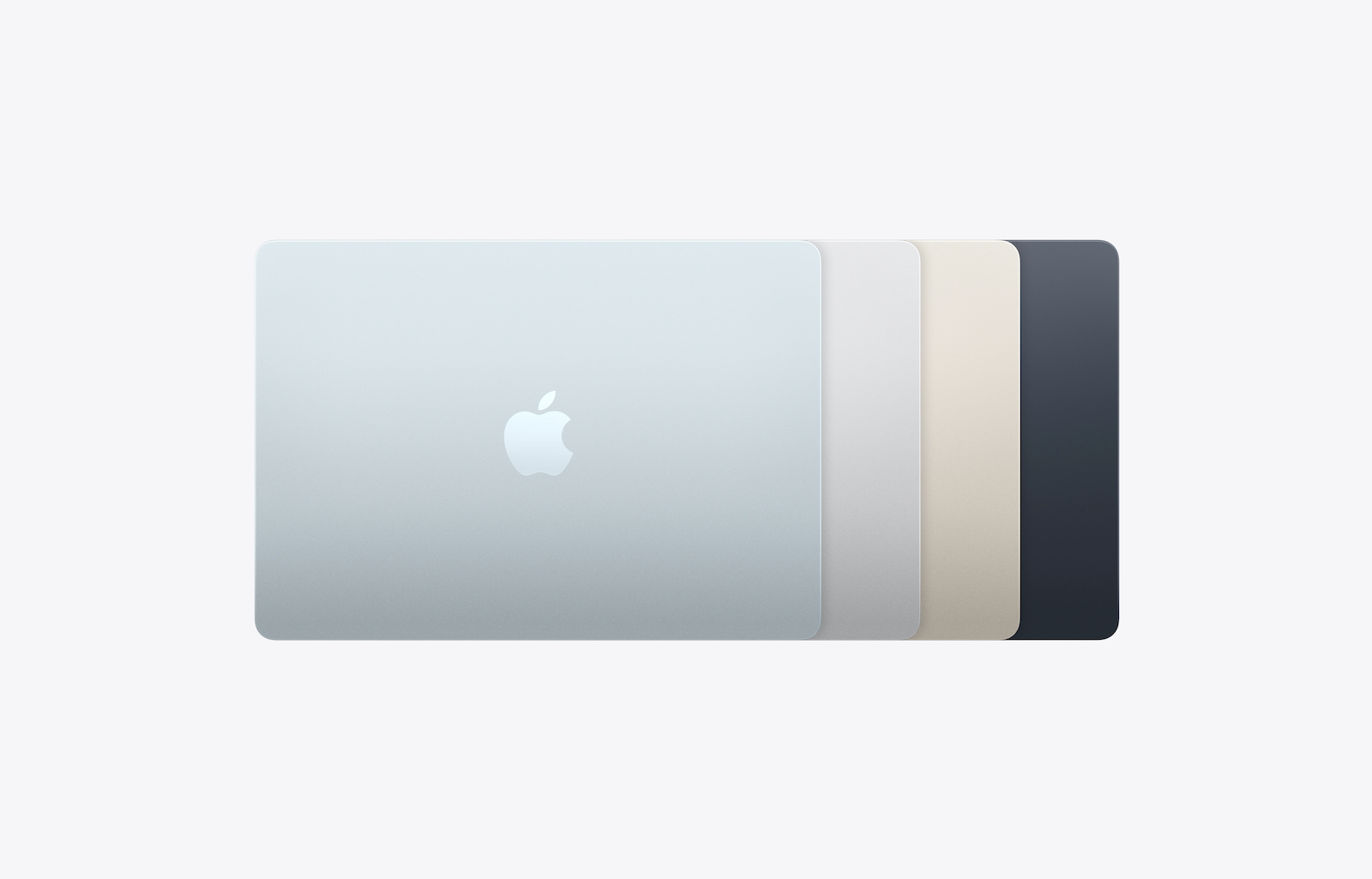
| Colors | Sky Blue, Silver, Starlight, Midnight | Sky Blue, Silver, Starlight, Midnight |
Both models share the same fanless aluminum unibody design and the same color options. The only difference lies in the dimensions and weight.
The 13-inch model weighs 1.23 kg – around 280 grams less than the 15-inch model. The difference is noticeable in a backpack, especially on long hikes or daily commutes. The 13-inch model also fits better on small tables in cafes, lecture halls, or on airplanes.
The 15-inch model, at 1.51 kg, is still lighter than most comparable 15-inch laptops from other manufacturers. It can easily be carried in a backpack, but requires a bit more space when opened.
Design conclusion: If maximum portability is needed, choose the 13-inch model. If you appreciate the larger display and don't need to worry about every gram, the 15-inch model is a good choice – it's surprisingly light for its size.
Battery and Charging
| Feature | MacBook Air 13″ | MacBook Air 15″ |
|---|---|---|
| Battery capacity | 53.8 Wh | 66.5 Wh |
| Video streaming | Up to 18 hours | Up to 18 hours |
| Wireless surfing | Up to 15 hours | Up to 15 hours |
| Minimum charging power | 30 W | 35 W |
| Fast charging | From 70 W | From 70 W |
Despite the significantly larger battery in the 15-inch model (66.5 Wh vs. 53.8 Wh), the battery life is identical for both sizes: up to 18 hours of video streaming and up to 15 hours of wireless browsing. The reason: The larger display of the 15-inch model consumes correspondingly more power.
There's a slight difference when it comes to charging: The 13-inch model requires at least a 30W power adapter, while the 15-inch model needs at least 35W. Fast charging works for both models starting at 70W. Important: In the EU, neither model includes a power adapter – only the MagSafe cable. A USB-C power adapter must be purchased separately.
Both models charge via MagSafe 3 or USB-C.
Battery summary: Same runtime, same everyday usability. The larger battery of the 15-inch model merely compensates for the higher power consumption of the larger display.
Ports, Camera and Connectivity
There are no differences here. Both models offer:
- 2x Thunderbolt 4 (USB-C) with up to 40 Gbit/s
- 1x MagSafe 3 charging port
- 1x 3.5 mm headphone jack
- Support for up to 2 external displays
- 12 MP Center Stage Camera with desktop view
- WLAN 7 (N1 Chip), Bluetooth 6, Thread
- Touch ID
- Apple Intelligence
There is also no difference between the two sizes in terms of storage, RAM and configuration options (up to 32 GB RAM, up to 4 TB SSD).
Which size is right for whom?
MacBook Air 13″ – the right choice if:
- Maximum portability and low weight (1.23 kg) are priorities.
- The laptop is transported daily in a backpack – to university, to the office, while traveling.
- Space is limited (lecture hall, airplane, small tables)
- An external monitor is available at home or in the office.
- The budget should remain at around 1,200 euros.
- The 8-core GPU in the base model is sufficient for everyday use.
MacBook Air 15″ – the right choice if:
- The MacBook Air is used as the main computer without an external monitor.
- More screen space is appreciated for multitasking, spreadsheets, or creative work.
- Better speakers with deeper bass are important for media consumption.
- The device mainly commutes between the desk and the sofa.
- The desired 10-core GPU in the base model at no extra cost is
- An extra 300 euros is included in the budget.
All differences at a glance
| Feature | MacBook Air 13″ | MacBook Air 15″ |
|---|---|---|
| Price from | 1.199 € | 1.499 € |
| Display | 13.6″ Liquid Retina | 15.3″ Liquid Retina |
| Resolution | 2560 x 1664 | 2880 x 1864 |
| Pixel density | 224 ppi | 224 ppi |
| Brightness | 500 nits | 500 nits |
| Chip | M5 | M5 |
| GPU (Base) | 8-Core | 10-Core |
| RAM | 16 / 24 / 32 GB | 16 / 24 / 32 GB |
| Memory | 512 GB / 1 / 2 / 4 TB | 512 GB / 1 / 2 / 4 TB |
| Speakers | 4 speakers | 6 speakers with woofers |
| Microphones | 3 with beamforming | 3 with beamforming |
| Camera | 12 MP Center Stage | 12 MP Center Stage |
| Battery life | Up to 18 hours | Up to 18 hours |
| Battery capacity | 53.8 Wh | 66.5 Wh |
| Minimum charging power | 30 W | 35 W |
| Connections | 2x TB4, MagSafe, 3.5 mm | 2x TB4, MagSafe, 3.5 mm |
| Wi-Fi | WLAN 7 (N1) | WLAN 7 (N1) |
| Bluetooth | 6 | 6 |
| Weight | 1.23 kg | 1.51 kg |
| Thickness | 1.13 cm | 1.15 cm |
| Colors | 4 | 4 |
| Apple Intelligence | Yes | Yes |
MacBook Air 13 or 15 inch – which is worth it?
The choice between 13 and 15 inches isn't a question of performance, but of lifestyle. If you carry your laptop in your backpack every day and work a lot on the go, the 13-inch model is the better choice. It's more compact, lighter, and €300 cheaper – with identical battery life and virtually identical performance.
Anyone using the MacBook Air as their primary computer—at their desk, on the sofa, or at the kitchen table—and who doesn't have an external monitor should opt for the 15-inch model. The 25 percent larger screen area makes a real difference when working and consuming media, and the improved speakers with subwoofers are a welcome bonus. At 1.51 kg, the 15-inch model is still remarkably light for its size.
Ultimately, both models are excellent laptops. The €300 price difference for the 15-inch model is justified if the larger display and better speakers are actually used in everyday life. Those who primarily work on the go and connect an external monitor at home can save themselves the extra cost – and still get the same MacBook Air. The best products for you: Our Amazon storefront offers a wide selection of accessories, including those compatible with HomeKit. (Image: Apple)
- iPhone Buying Guide: iPhone 17 vs. Air vs. 17e
- iPad Buying Guide 2026: Which iPad is right for you?
- Apple Watch Buying Guide: Ultra 3 vs. Series 11 vs. SE 3
- MacBook Air vs. MacBook Pro 2026: Which is worth it?
- Apple AI Pin: All the info on the new wearable
- iPhone 17 vs. iPhone 17 Pro: Which model is really worth it?
- Apple is reportedly preparing six new products
- iPhone Fold: All rumors and facts at a glance
- Apple radically restructures its iPhone lineup: All the details
- AirPods Max 2: All audio improvements at a glance
- AirPods Max 2: New feature for the Digital Crown
- AirPods Max 2 overview: What's stayed the same
- AirPods Max 2 vs. AirPods Max 1: All the differences in detail
- iOS 27: These are the new features Apple is planning for the iPhone
- M6 MacBook Pro: Apple plans major changes
- Apple 2026: These new devices are still expected
- MacBook Neo changes the role of the iPad as a laptop replacement
- Apple TV 2026: Why Apple prefers to wait rather than rush into delivery
- MacBook Neo: Why this Apple notebook is so important
- MacBook Neo vs. MacBook Air: The most important differences
- Studio Display vs. Studio Display XDR: All the differences
- M5 MacBook Air vs. M4 MacBook Air: The differences
- iPhone 17e vs. iPhone 16: Which one is worth it?
- iPhone 17e vs. iPhone 16e: All the differences
Frequently Asked Questions: MacBook Air 13 vs. 15
Both sizes share the same M5 chip, the same ports, the same camera, and the same battery life. The actual differences lie in the display (13.6 vs. 15.3 inches), the speakers (4 vs. 6 with subwoofers), the GPU in the base model (8 vs. 10 cores), the weight (1.23 vs. 1.51 kg), and the price (a €300 premium).
The CPU is identical. The 15-inch model has a 10-core GPU in its base configuration, compared to the 8-core GPU in the 13-inch model. In everyday use, the difference is barely noticeable – only in graphics-intensive tasks do the two additional GPU cores offer a measurable advantage. Configuring the 13-inch model with a 10-core GPU negates this difference.
No. Despite the larger battery (66.5 Wh vs. 53.8 Wh), the battery life is identical for both sizes: up to 18 hours of video streaming and up to 15 hours of wireless browsing. The larger battery simply compensates for the higher power consumption of the larger display.
Yes, definitely. The 15-inch MacBook Air has a six-speaker system with dedicated force-balanced woofers, while the 13-inch model only has four speakers without woofers. The sound is noticeably fuller and more immersive, especially with music and movies.
In the EU, neither model includes a power adapter – only the USB-C to MagSafe 3 cable. A USB-C power adapter must be purchased separately. The 13-inch model requires at least 30W, and the 15-inch model at least 35W. Fast charging works with both models starting at 70W.
It depends on usage patterns. The 13-inch model is more compact, lighter (1.23 kg), and fits better on small tables in lecture halls or on trains. However, those who don't use an external monitor and frequently work with multiple windows will benefit from the 25 percent larger display of the 15-inch model – which, at 1.51 kg, is still lighter than most comparable 15-inch laptops.
Yes, both models support up to two external displays simultaneously via their two Thunderbolt 4 ports – with resolutions of up to 6K at 60 Hz or 4K at 144 Hz. A single display with up to 8K at 60 Hz is also possible.