Apple Tips & Tricks
Every new version of iOS, iPadOS, macOS, and watchOS adds features – and hides many of them so well that even long-time Apple users miss them. On top of that come everyday problems: backups failing, AirDrop refusing to work, Wi-Fi passwords disappearing.
This is where step-by-step guides for exactly those moments live: from setting up a new iPhone to transferring data to uncovering hidden features in iOS and macOS. Every guide is verified against the current version – so the steps are correct when you actually need them.
Topics range from basics for newcomers to specialized features for power users: setting up iCloud properly, pairing an Apple Watch with an iPhone, using Focus modes effectively, resetting old devices for resale. When problems come up, the solution isn't just shown – it's also explained why something goes wrong, so the same issue can be solved independently next time.

Adjusting Apple Vision Pro correctly: step by step
Customize Apple Vision Pro: Discover our step-by-step guide for maximum comfort & security. Read and adjust now!
Read moreDetails
Extract audio from videos on Mac – How to do it
Easily extract audio from videos on your Mac with QuickTime and iMovie. Perfect for projects, teaching materials, and multimedia applications.
Read moreDetails
iOS 18: New iCloud option for constant file access
With iOS 18 you can save important files permanently on your device. Discover the new iCloud option, more about it here at...
Read moreDetails
Optimized Gaming: How to Use iOS 18 Game Mode
iOS 18 for gamers: Discover the new Game Mode! Higher frame rates and better sound. Here you can find out how you can improve your gaming experience...
Read moreDetails
macOS 15: Tips for using the new video calling features
macOS 15 Sequoia brings new video conferencing features. Learn how presenter preview and background replacement improve your meetings.
Read moreDetails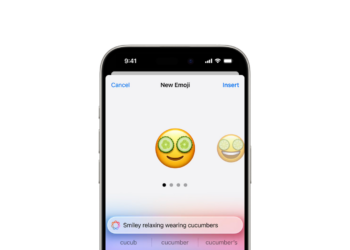
Unique Emoji with iOS 18: How Genmoji works
Genmoji with iOS 18: Apple uses AI for personalized emoji. Learn how to create & use unique emoji characters.
Read moreDetails
iOS 18 Photos: How the "Clean Up" tool works
Perfect photos thanks to iOS 18: Remove distracting objects with the new "Clean Up" tool. Find out how to optimize your images.
Read moreDetails
iOS 18: Schedule and automatically send messages
Schedule messages and send them later with iOS 18. Learn how to enable the new Send Later feature in the Messages app...
Read moreDetails
Lock and hide apps with iOS 18: Here's how
Securely lock and hide apps with iOS 18. Get to know the new features and protect your sensitive data from unauthorized access...
Read moreDetails
macOS Sequoia: How to use the new window layout
With macOS Sequoia, window arrangement is child's play. Find out how to position windows optimally and use keyboard shortcuts.
Read moreDetails