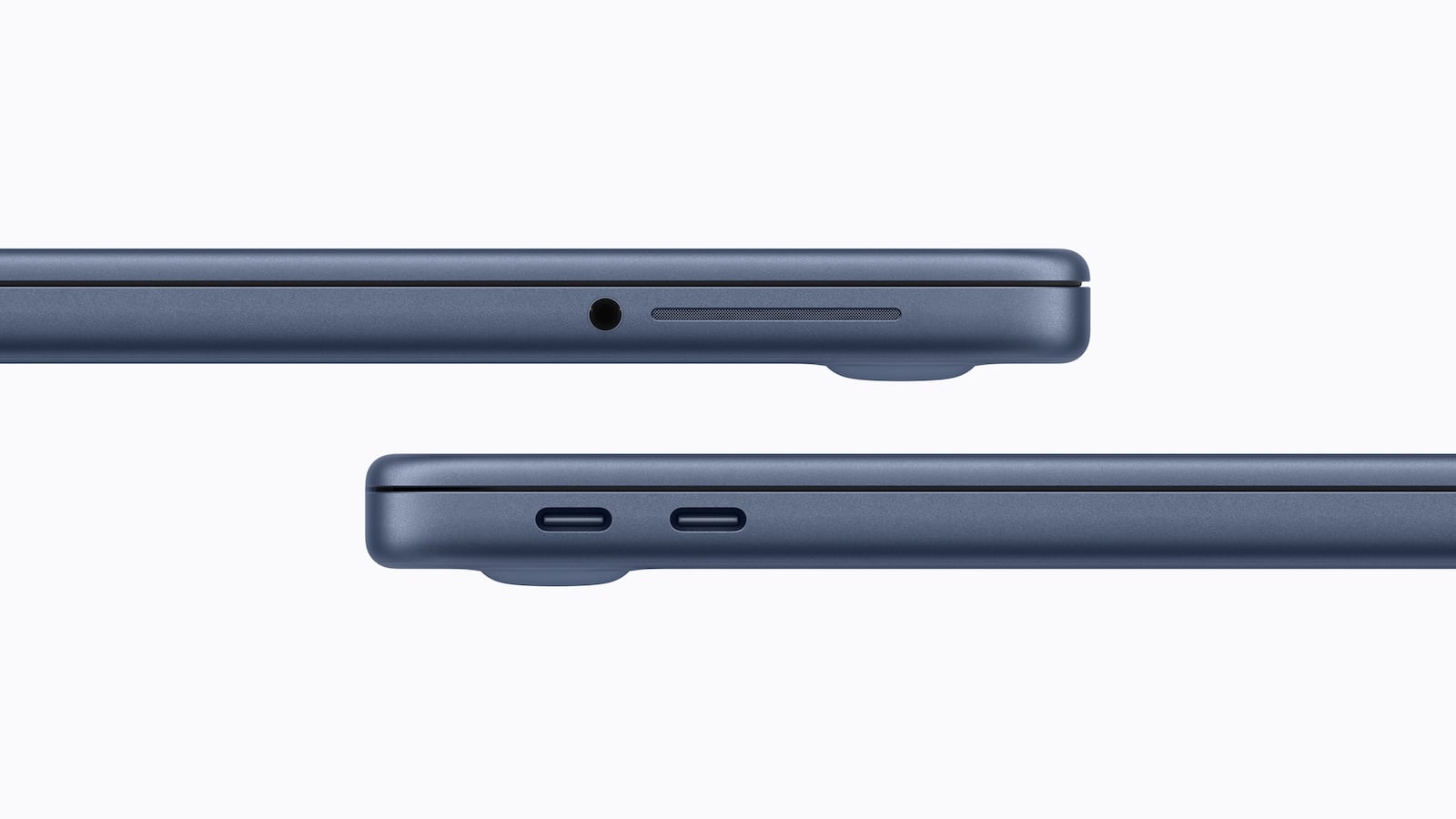
The MacBook Neo features an unusual port configuration. It has two USB-C ports that look identical externally but function differently. One port is significantly faster than the other and supports additional features. These differences are relevant for several typical applications, such as connecting an external monitor or transferring large amounts of data. Anyone using the MacBook Neo should be aware of these details, as they affect the practical use of the device.
USB-C has established itself as the standard port for modern laptops in recent years. A single port can perform multiple tasks, including charging, data transfer, and connecting to an external display. This concept is also implemented in the MacBook Neo.
However, the device's two USB-C ports are not configured identically. Although they look the same, they differ in speed and functionality. This technical decision is likely related to the installed processor and affects several usage scenarios.
Two USB-C ports with different specifications
The MacBook Neo has two USB-C ports that use different technical standards.
- The left port is a USB-C 3 port. This supports a maximum data transfer speed of up to 10 Gb/s.
- The right port, on the other hand, is a USB-C 2 port, which is limited to a maximum data transfer speed of up to 480 Mb/s.
This makes the difference between the two ports significant. While the USB-C 3 port is suitable for fast external storage devices or other power-intensive devices, the USB-C 2 port is more in line with the speed of older USB standards.
DisplayPort is only available via one connection
Another important difference concerns support for external displays. Only the MacBook Neo's USB-C 3 port supports DisplayPort.
This means that an external monitor can only be connected via this port. If the USB-C 2 port is used instead, no display output is available.
Therefore, the correct connection must be selected when using an external display.
Both ports support charging
Despite the different data speeds, both USB-C ports on the MacBook Neo can be used for charging.
The power supply can therefore be connected to either of the two ports. The limitation applies exclusively to data transmission and display function, not to the charging process.
Indistinguishable from the outside
One notable feature is that the two USB-C ports are visually indistinguishable. There are no visible markings or indicators to show which port is faster.
The differences only become apparent during use, for example in the speed of data transfer or when connecting a monitor.
Connection to the A18 Pro chip
The different capabilities of the ports are likely related to the hardware architecture. The MacBook Neo uses the A18 Pro chip.
The limitation of one port to USB 2 speeds is likely related to the A18 Pro's USB controller. It may only support a limited number of high-speed interfaces, which is why only one of the two ports receives full USB-C 3 functionality.
Other ports of the MacBook Neo
In addition to the two USB-C ports, the MacBook Neo has a headphone jack. No other ports are available. These include, among others:
- MagSafe for charging
- additional USB ports
- HDMI
- SD card reader
Therefore, charging is only possible via USB-C.
Pre-order and market launch
The MacBook Neo is available for pre-order now. Official availability begins on Wednesday, March 11th. From that point on, the device will be available for regular purchase.
MacBook Neo: Two USB-C ports with different functions
The MacBook Neo features a streamlined port layout with two USB-C ports and a headphone jack. Although the two USB-C ports look identical, their technical specifications differ significantly.
One port supports USB-C 3 with speeds up to 10 Gb/s and DisplayPort, while the other is limited to USB-C 2 with speeds up to 480 Mb/s. Both ports can be used for charging, but only the faster port is suitable for external displays and high data transfer rates.
These differences are likely related to the A18 Pro chip's USB controller. The device is available for pre-order now and will be released on March 11. The best products for you: Our Amazon storefront offers a wide selection of accessories, including those for HomeKit. (Image: Apple)
- MacBook Neo: Touch ID is only available at an extra cost
- MacBook Neo: Apple's new entry into the Mac world
- iPhone Security: Dangerous exploit toolkit in circulation
- M4 iPad Air: First Geekbench results have surfaced
- Studio Display XDR supports DICOM medical images
- Apple is promoting Mac gaming at GDC 2026
- Studio Display XDR: 120 Hz only with certain Macs
- Studio Display & Studio Display XDR without Intel support
- OpenAI: GPT-5.3 enables better dialogue
- Meta Ray-Ban: Data privacy nightmare revealed
- The Pro Display XDR is being discontinued
- MacBook Air M5: What the new generation brings
- MacBook Pro with M5 Pro & M5 Max officially unveiled
- Apple M5 Pro and M5 Max: More power for professionals
- Apple presents Studio Display & Studio Display XDR
- Apple TV: No third season for Palm Royale
- Anthropic simplifies AI migration with import tool
- Where is the file located? Offline Files knows the answer instantly
- iOS 26.4 Beta 3 is here: Next step towards release
- Paramount plans mega streaming service with HBO
- Apple unveils new accessories for spring 2026
- Will an iPhone 16e case also fit the iPhone 17e?
- iPad Air with M4 is here: Here's what the update offers
- The iPhone 17e is here: Here's what's inside the new model