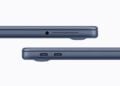
With the MacBook Neo, Apple expands its Mac lineup with a new entry-level notebook. The device is aimed at users looking for a lightweight and affordable macOS system for everyday tasks. These primarily include web browsing, working with documents, streaming, and simple creative activities.
A key technical aspect of the MacBook Neo is its support for external displays. While connecting an external monitor is straightforward, the possibilities are clearly limited. These limitations clearly demonstrate where Apple positions the MacBook Neo within its Mac product line.
The display support is strongly reminiscent of earlier Apple Silicon laptops and, in some respects, also of the architecture of mobile Apple chips from the iPhone.
Apple unveiled the MacBook Neo on March 4th, positioning it as the most affordable notebook in its Mac lineup. With a starting price of €699, it's significantly cheaper than many other MacBook models.
Inside, the A18 Pro processor, originally developed for mobile devices and also used in the iPhone, powers the device. This decision directly impacts several of the device's technical specifications, including performance, energy efficiency, connectivity, and support for external displays.
While more powerful Macs rely on M-series chips and allow for significantly more flexible display configurations, the MacBook Neo is deliberately designed to be simpler.
Support for external monitors on the MacBook Neo
The MacBook Neo supports connecting an external monitor with a maximum resolution of 4K at 60 Hz. Simultaneously, the laptop can continue to use its integrated display. Both screens run in parallel without reducing the resolution of the internal display.
The connection is made via USB-C with DisplayPort support in so-called Alt Mode. This technology enables the transmission of a video signal via the USB-C port, allowing an external monitor to be connected directly.
However, the MacBook Neo does not support multi-display configurations. Only a single external monitor can be used at a time. Setups with two or more monitors are not supported by this device.
This makes the notebook particularly suitable for classic desktop setups, where the laptop is combined with an additional monitor. This configuration is sufficient for many everyday work processes.
Connections and technical display details
The MacBook Neo has two USB-C ports that can be used for both charging and connecting accessories. Both ports therefore serve multiple functions, which is typical for modern Apple devices.
However, there is a limitation for external displays. Only the left USB-C port supports video output to external monitors. This port operates at USB 3 speeds and supports output via DisplayPort in USB-C Alt Mode.
This port allows you to connect an external monitor with up to 4K resolution at 60 Hz. The laptop's integrated display remains active during this time.
The built-in display is a 13-inch Liquid Retina display. It offers a resolution of 2408 × 1506 pixels and reaches a maximum brightness of 500 nits. Even when an external monitor is connected, this screen continues to operate at full resolution and remains fully usable.
In everyday use, this means that the MacBook Neo is typically used with a single additional monitor, while the integrated display continues to serve as a second screen.
Comparison with early Apple Silicon Macs
The limitation to only one external monitor is not entirely new for Apple. In fact, the situation is strongly reminiscent of the first generation of Apple Silicon laptops.
The original MacBook Air with the M1 chip also only supported one external monitor, even though the device already had Thunderbolt ports. Later Apple Silicon models significantly expanded these capabilities.
Newer MacBook Air models with Apple Silicon chips feature Thunderbolt ports, which are significantly more powerful. This allows them to drive high-resolution monitors, including Apple's own 6K Pro Display XDR.
The MacBook Pro models go a step further. They can drive multiple external monitors simultaneously. Depending on the model, several displays can be operated via a combination of Thunderbolt and HDMI ports.
Why the MacBook Neo only supports one monitor
The main reason for this limitation lies in the A18 Pro chip used in the MacBook Neo. This processor originates from Apple's mobile chip development and is based on the same architecture used in the iPhone.
Mobile chips are designed to operate as efficiently as possible and to provide many functions in a highly integrated manner. Large display subsystems, such as those found in high-performance desktop or workstation processors, play a less significant role.
Benchmark tests nevertheless show solid performance. In Geekbench 6, the A18 Pro achieves a single-core score of 3,539 points and a multi-core score of 8,772 points. These values were measured on an iPhone 16 Pro, which serves as the host device for the chip.
With these results, the mobile chip performs roughly on par with the original M1 Mac in multi-threaded tasks.
However, supporting multiple external displays would require additional technical components. These include additional display engines within the processor and higher-bandwidth I/O connections, such as those provided by Thunderbolt.
The MacBook Neo deliberately forgoes Thunderbolt and relies exclusively on standard USB-C connectivity. This keeps the device technically simpler and allows it to be offered at a lower price. The disadvantage, however, is reduced flexibility in complex multi-monitor configurations.

The role of display engines in the processor
A key technical factor for the number of supported monitors is the number of so-called display engines in the processor.
Simpler chips usually only have a single external display pipeline. In this case, only one external monitor can be driven at a time.
More powerful chips, on the other hand, have multiple display controllers. These make it possible to operate several monitors simultaneously, often even with very high resolutions.
The Apple Silicon M-series chips used in the MacBook Air and MacBook Pro have significantly more of these display controllers. Therefore, these devices can support multiple external monitors.
The position of the MacBook Neo in Apple's portfolio
The MacBook Neo occupies a distinct position within Apple's product range. It is the most affordable Mac notebook and is aimed at users who need a simple and lightweight macOS device for everyday tasks.
The target group primarily includes students and everyday users who mainly surf the internet, edit documents, stream media or occasionally do creative work.
For this type of use, a setup with an external monitor is perfectly adequate in most cases. Complex workstations with multiple displays, on the other hand, are more common in professional settings.
For tasks like software development, video editing, or financial trading that require multiple screens, MacBook Air or MacBook Pro models with Apple Silicon M-series chips are still the better choice. These devices are designed for more demanding desktop workstations and support multiple high-resolution monitors simultaneously.
MacBook Neo and external monitors: Deliberately simple configuration
The MacBook Neo clearly demonstrates how Apple structures its Mac portfolio. External display support is functional, but deliberately limited. An external monitor with 4K resolution at 60 Hz can be used without any problems, while the integrated 13-inch Liquid Retina display remains active.
The limitation to only one external monitor is directly related to the A18 Pro chip used, which comes from Apple's mobile processor line and is primarily designed for efficiency and integration. At the same time, Apple has omitted Thunderbolt to keep the device simpler and more affordable.
This clearly positions the MacBook Neo as an entry-level device for everyday use. For users with simple workflows, the notebook is adequately equipped, while more demanding multi-monitor workstations remain the domain of the more powerful MacBook models. The best products for you: Our Amazon storefront offers a wide selection of accessories, including those compatible with HomeKit. (Image: Apple)
- MacBook Neo: More recycled materials than ever before
- MacBook Neo: Two USB-C ports with important differences
- MacBook Neo: Touch ID is only available at an extra cost
- MacBook Neo: Apple's new entry into the Mac world
- iPhone Security: Dangerous exploit toolkit in circulation
- M4 iPad Air: First Geekbench results have surfaced
- Studio Display XDR supports DICOM medical images
- Apple is promoting Mac gaming at GDC 2026
- Studio Display XDR: 120 Hz only with certain Macs
- Studio Display & Studio Display XDR without Intel support
- OpenAI: GPT-5.3 enables better dialogue
- Meta Ray-Ban: Data privacy nightmare revealed
- The Pro Display XDR is being discontinued
- MacBook Air M5: What the new generation brings
- MacBook Pro with M5 Pro & M5 Max officially unveiled
- Apple M5 Pro and M5 Max: More power for professionals
- Apple presents Studio Display & Studio Display XDR
- Apple TV: No third season for Palm Royale
- Anthropic simplifies AI migration with import tool
- Where is the file located? Offline Files knows the answer instantly
- iOS 26.4 Beta 3 is here: Next step towards release
- Paramount plans mega streaming service with HBO
- Apple unveils new accessories for spring 2026
- Will an iPhone 16e case also fit the iPhone 17e?