
With macOS 26.1, Apple expands its current operating system with several detailed improvements, primarily affecting Spotlight. The search function is one of the system's central tools, as it provides quick access to programs, files, and system functions. The update now introduces additional settings, particularly regarding the clipboard, making everyday use significantly more convenient.
Spotlight has evolved into a versatile search and control tool in recent years. With macOS Tahoe, the feature received a comprehensive redesign, making it easier to access different search categories. macOS 26.1 builds on this and introduces finer control over the clipboard history, bringing into focus an area that previously required third-party apps for effective use.
Revised Spotlight search
In the current version, four different search categories can be selected. These allow for more targeted filtering of results, making it easier to find installed apps, files, or specific actions. The fourth category opens the clipboard history and can also be accessed using the keyboard shortcut Command-4. This function is disabled by default but can be enabled in the system settings. It proves useful in everyday use when copied content is frequently reused.
Extended storage clipboard
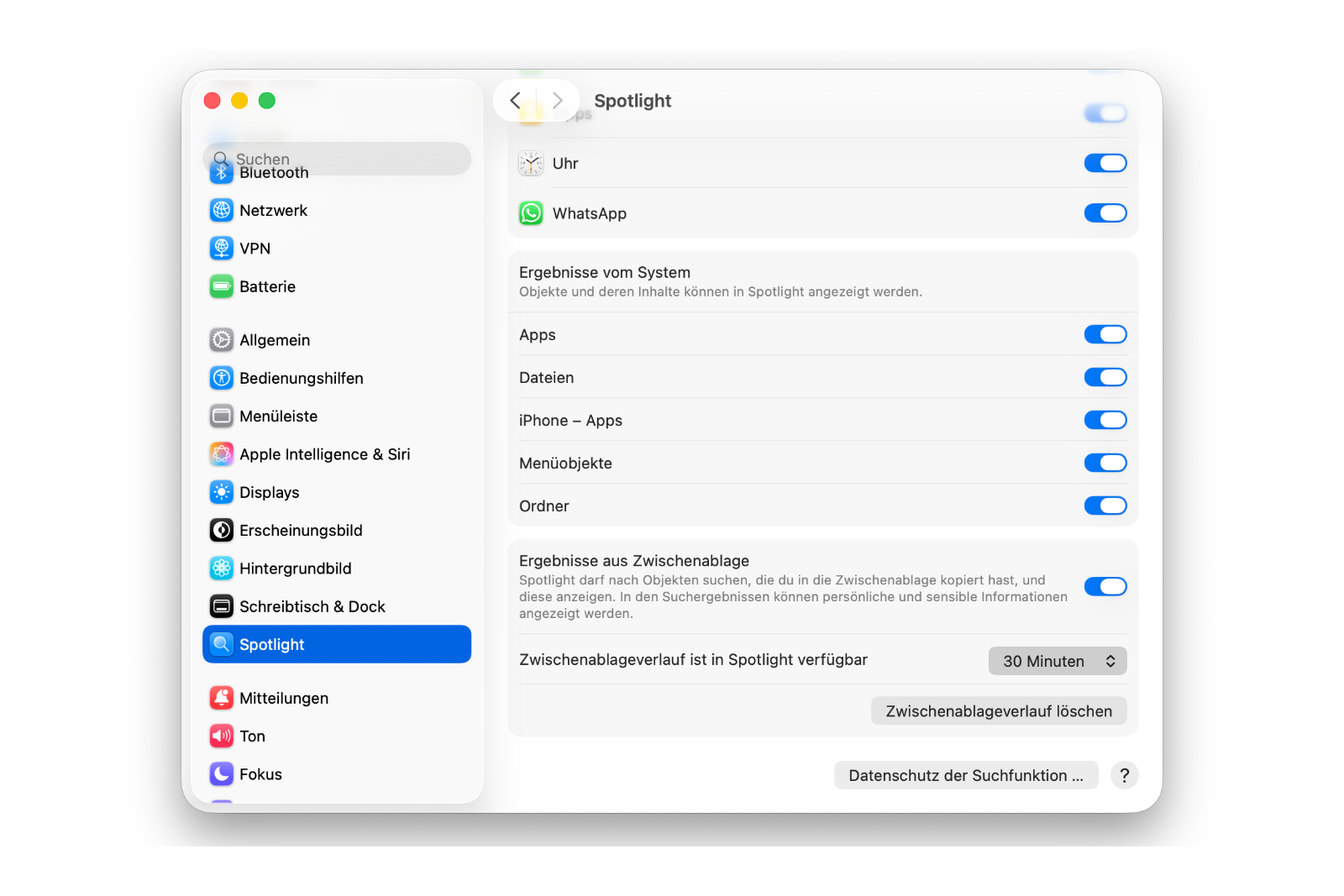
Previously, the clipboard in macOS was limited to a relatively short period. Content from further back was lost unless an external app took over saving. Apple has now integrated this concept directly into the system. With macOS 26.1, copied content can remain in the history for a longer period. In Spotlight settings, you can choose how long data should be stored. Three options are available: 30 minutes, eight hours, or seven days.
This setting allows users to tailor the history to their personal work habits. Those who frequently copy and paste benefit from longer storage, while users with higher data privacy requirements prefer shorter periods. The previously fixed limit of eight hours can now be adjusted for the first time.
Data protection and control over stored content
Apple points out that sensitive information can accumulate in the clipboard. Passwords, addresses, or snippets of email text can be stored unnoticed. To minimize this risk, macOS 26.1 now offers the option to manually delete the entire history. This feature can also be found in Spotlight settings.
Furthermore, individual apps can be excluded from Spotlight search. This prevents certain programs or their content from appearing in search results. Similarly, the analysis of search queries, which Apple uses by default to improve suggestions, can be disabled. This provides more privacy options without sacrificing user-friendliness.
macOS 26.1: More control over Spotlight and clipboard
macOS 26.1 focuses on fine-tuning but brings noticeable improvements. Spotlight is not only more powerful but also more flexible. The new ability to control clipboard activity over time provides greater control and better adapts the system to individual workflows. The option to save data for up to seven days significantly expands its practical use. At the same time, Apple remains true to its commitment to prioritizing data privacy and transparency. This update demonstrates that even small system functions can be thoughtfully developed further. The best products for you: Our Amazon storefront offers a wide selection of accessories, including those for HomeKit. (Image: Apple)
- iOS 26.2 brings third-party app stores to Japan
- Apple Creator Studio: Note in iOS 26.2 Beta 1 raises questions
- Apple makes a blunder: App Store source code accidentally ends up online
- iOS 26.2: These new features are already visible in Beta 1.
- iOS 26.2: Beta reveals planned new feature for AirDrop
- iOS 26.2: Freeform app gets table functionality
- iOS 26.2 brings alarms for reminders – here's what's new
- iOS 26.2: Liquid Glass slider brings new options
- iOS 26.2: New features make Apple Podcasts smarter
- watchOS 26.2 introduces a new scale for sleep assessment
- Live translation with AirPods: EU launch planned for December
- iOS 26.2 Beta released – Apple prepares next update
- WhatsApp is now officially available on the Apple Watch
- Apple postpones the end of the old HomeKit version to 2026.
- iOS 26.1 closes over 50 dangerous security vulnerabilities.
- iOS 26.1 now available: What's in the new update
- New intro for Apple TV: Finneas reveals details
- Apple launches App Store for the web
- Apple TV shows new intro with music by FINNEAS
- Apple launches creative Christmas project in London
- Apple confirms: No new Macs planned for 2025
- Apple stock: Wedbush raises price target to $320
- Apple stock: TD Cowen significantly raises price target to $325
- Apple stock: Evercore raises price target to $300
- Apple stock: JP Morgan raises price target to $305