With iOS 26.4, Apple introduces a new feature that provides greater transparency regarding personal Hotspot usage. For the first time, it displays how much mobile data connected devices have actually consumed. This addresses a long-standing criticism surrounding iPhone Hotspot usage.
The personal Hotspot is handy when Wi-Fi isn't available on the go. A laptop, tablet, or another smartphone can then access the mobile network via the iPhone. However, until now, it wasn't possible to see which device was using how much data. Only the iPhone's total mobile data usage could be checked, not the specific usage via the Hotspot.
With iOS 26.4, this changes. The new feature provides a clear overview of the data usage of connected devices.
New feature in iOS 26.4 in detail
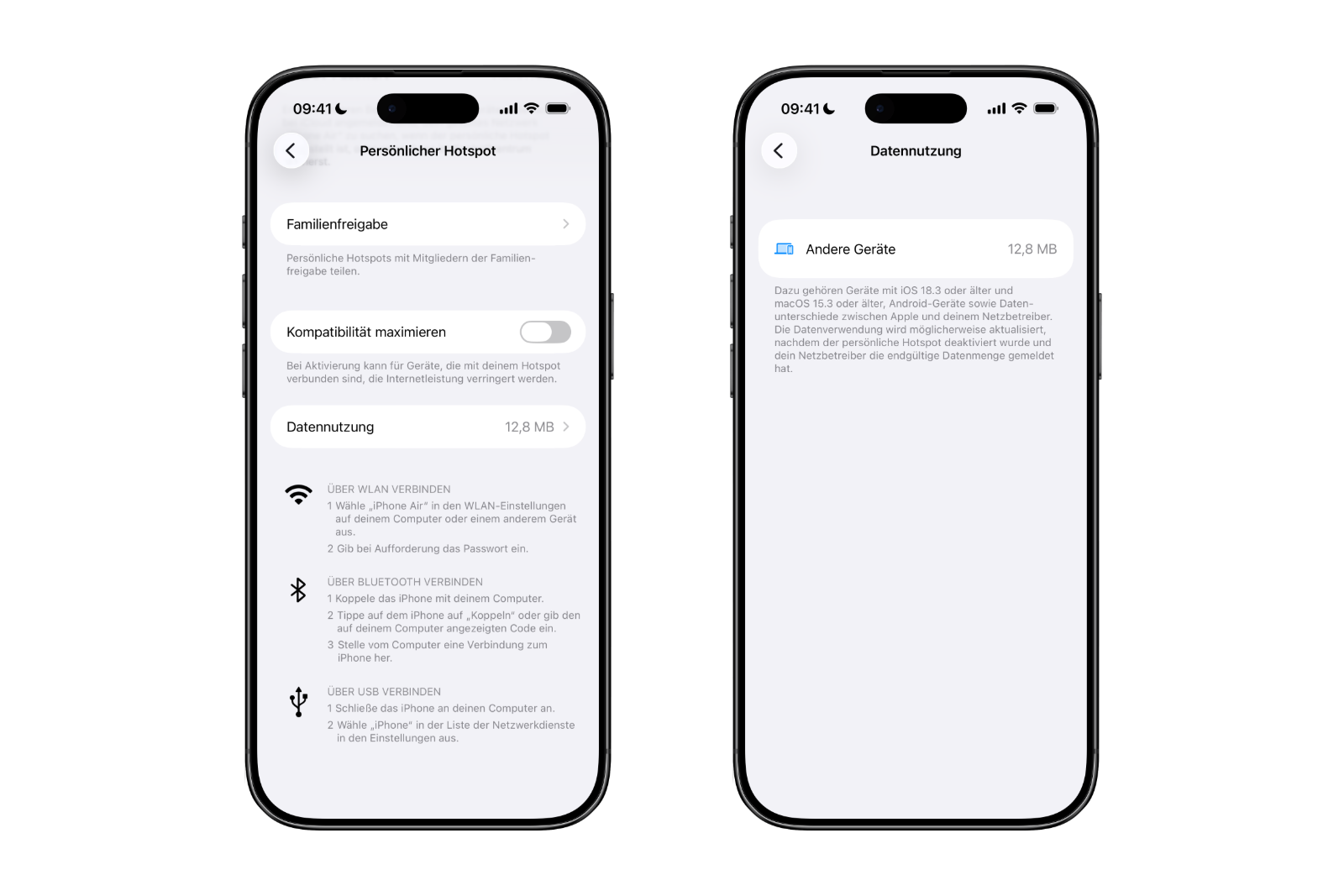
In iOS 26.4, data usage per device is displayed directly in the personal Hotspot settings. The new overview is located in the section below the "Maximize Compatibility" toggle. Several pieces of information are displayed there:
- Data usage of individual connected Apple devices
- A combined display for non-Apple devices under the heading "Other Devices"
- The total amount of data consumed via the personal Hotspot
Apple devices appear individually in the list, making it clear which device has used how much mobile data. Devices from other manufacturers are not listed individually but are grouped together as "Other Devices". The data usage is also displayed for this group.
Additionally, the total data usage via the personal Hotspot is displayed. This makes it possible to see at a glance how heavily the Hotspot has been used overall.
Why the innovation is relevant
Prior to iOS 26.4, there was no way to check the data usage of individual devices connected to a personal Hotspot. Users with limited mobile data plans had to estimate their usage or resort to third-party solutions.
The new feature is particularly useful for users with data limits. When multiple devices are connected simultaneously, it's now possible to see which device is consuming the most data. This makes monitoring easier and helps to identify unexpectedly high data usage more quickly.
Especially when streaming, cloud synchronization, or downloading large files, data usage via Hotspot can quickly increase. The new overview in iOS 26.4 makes this usage more transparent.
Availability of iOS 26.4
iOS 26.4 is currently available as a developer beta. A public beta version is expected soon. The official release of the update is planned for spring.
Changes may still occur during the beta phase before the final release. However, the new Hotspot data usage display is already part of the developer beta.
iOS 26.4 shows Hotspot usage per device for the first time
With iOS 26.4, Apple expands the functionality of the Personal Hotspot with a useful detailed view. Data usage per device is now visible for the first time. In addition to a breakdown of individual Apple devices, the data consumption of non-Apple devices is also displayed in a summary. Furthermore, total Hotspot data usage is shown.
The new feature provides greater transparency regarding mobile data usage and is particularly relevant for plans with limited data allowances. The release is planned for spring, as iOS 26.4 is currently available as a developer beta. The best products for you: Our Amazon storefront offers a wide selection of accessories, including those compatible with HomeKit. (Image: Shutterstock / Ellsy S)
- Apple stock: Wedbush remains calm despite Siri
- iOS 26.4 Beta reveals traces of Apple Health+
- iOS 26.4: Code indicates Apple TV in CarPlay
- iOS 26.4: All new features of Beta 1
- iOS 26.4 makes Apple Music smarter with AI playlists
- macOS 26.4 introduces load limiting for Mac
- visionOS 26.4 integrates NVIDIA CloudXR
- macOS 26.4 & iPadOS 26.4 with Safari update
- macOS 26.4 begins the final phase for Rosetta 2
- iOS 26.4: These are the new features in Apple Music
- iOS 26.4: New structure for wallpapers
- iOS 26.4: New standard for iPhone security
- iOS 26.4: New RCS encryption in beta testing
- Apple is expanding Apple Podcasts into a video hub
- iOS 26.4 Beta launched: Apple opens new testing phase
- Apple Music: New features for TikTok
- Apple announces „Apple Experience“ on March 4, 2026
- OpenAI hires OpenClaw developer Peter Steinberger
- Apple and iWork: Is the brand facing its end?
- Apple replaces SEED with new Sales Coach App
- Apple shows rollout of iOS 26 and iPadOS 26
- Mac Studio: Do Shortages Indicate an Update?
- Meta plans facial recognition for smart glasses