Apple Tips & Tricks
Every new version of iOS, iPadOS, macOS, and watchOS adds features – and hides many of them so well that even long-time Apple users miss them. On top of that come everyday problems: backups failing, AirDrop refusing to work, Wi-Fi passwords disappearing.
This is where step-by-step guides for exactly those moments live: from setting up a new iPhone to transferring data to uncovering hidden features in iOS and macOS. Every guide is verified against the current version – so the steps are correct when you actually need them.
Topics range from basics for newcomers to specialized features for power users: setting up iCloud properly, pairing an Apple Watch with an iPhone, using Focus modes effectively, resetting old devices for resale. When problems come up, the solution isn't just shown – it's also explained why something goes wrong, so the same issue can be solved independently next time.

iOS 15: These devices support Find My even when they are turned off
One of the most exciting iOS 15 features is definitely Find My location when the device is completely turned off.
Read moreDetails
iOS 15: Add Apple Music songs to Memories in Photos
AppleMusic: In iOS 15, Apple's native Photos app offers a significant update to Memories, including a new design and more.
Read moreDetails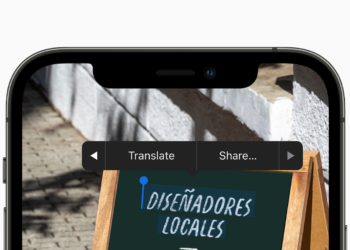
iOS 15 Live Text: Copy & Paste Text from Photos – Here’s How
iOS 15 added a feature called Live Text that can recognize text when it is typed in the camera or...
Read moreDetails
First AirPods Pro Beta released – how to install it
Apple announced some time ago that it would provide a firmware beta for AirPods Pro for the first time - this is how it is installed.
Read moreDetails
iOS 15: Rearrange and delete home screen pages – here's how
iOS 15: The feature has a small flaw, however. Rearranging and deleting can sometimes be quite useful, right?
Read moreDetails
iOS 15: How to adjust the date and time of photos
In iOS 15, the Photos app has received a significant update that includes a more extensive info section.
Read moreDetails
iOS 15 Find My: Notify when left behind – here's how
In iOS 15, Apple added separation alerts to the Find My app that notify you when you leave an Apple device behind.
Read moreDetails
iOS 15: How to invite Android users to FaceTime
With iOS 15 and iPadOS 15, you can allow anyone, even if they don't have an Apple device, to join a FaceTime call with...
Read moreDetails
iOS 15: How to activate background noises
In iOS 15 and iPadOS 15, Apple has made improvements in the area of accessibility. One of the new features is called "Background Sounds".
Read moreDetails
iPadOS 15 & macOS Monterey: How to activate the energy saving mode
iPadOS 15 & macOS Monterey: iPad & Mac users will finally get a power saving mode to save battery life.
Read moreDetails