apple patient
  • Home
  • News
  • Rumors
  • Tips & Tricks
  • Reviews
  • Insights
No Result
View All Result
  • Home
  • News
  • Rumors
  • Tips & Tricks
  • Reviews
  • Insights
No Result
View All Result
apple patient
No Result
View All Result

iOS 13.5: Apple shows example of exposure notifications

Milan Jovicic by Milan Jovicic
4. May 2020 - 20:44
in Apple News
Virus infection healthcare and coronavirus outbreak or viral pneumonia and coronaviruses influenza as a dangerous flu strain case as a pandemic medical health risk concept with a medicine symbol as a 3D render.

Virus infection healthcare and coronavirus outbreak or viral pneumonia and coronaviruses influenza as a dangerous flu strain case as a pandemic medical health risk concept with a medicine symbol as a 3D render.

Last week, Apple released the new iOS 13.5 Beta implemented the Exposure Notification interface for COVID-19 applications for the first time. The company is now using an example to show what the whole thing could look like. 

Apple and Google have now published a concrete example for the first time that shows the process of the exposure notification interface visually. (via 9to5mac) This means that the sample code shows how such a tracing app can work with the iPhone. At the same time, Apple emphasizes that the API does not endanger the privacy of users in any way. In the course of this, new resources were also made available that only developers from public health authorities can access. The new resources are intended to help with the development and implementation of the Exposure Notification interface for COVID-19. On the developer page is it [called:

Use the ExposureNotification framework to notify people about possible exposure to COVID-19, the disease caused by the SARS-CoV-2 virus. You can build a notification system that uses random, rotating keys and identifiers to communicate positive diagnoses in addition to data such as associated symptoms, proximity, and duration.

iOS 13.5 could be released as early as mid-May

Apple then goes on to note that developers need special authorization to use the relevant framework. But how exactly does the process work? First, the relevant tracing app from an authority must be installed. After installation, the user must expressly consent - deactivation is possible at any time. This means that so-called "exposure logging" must be activated.
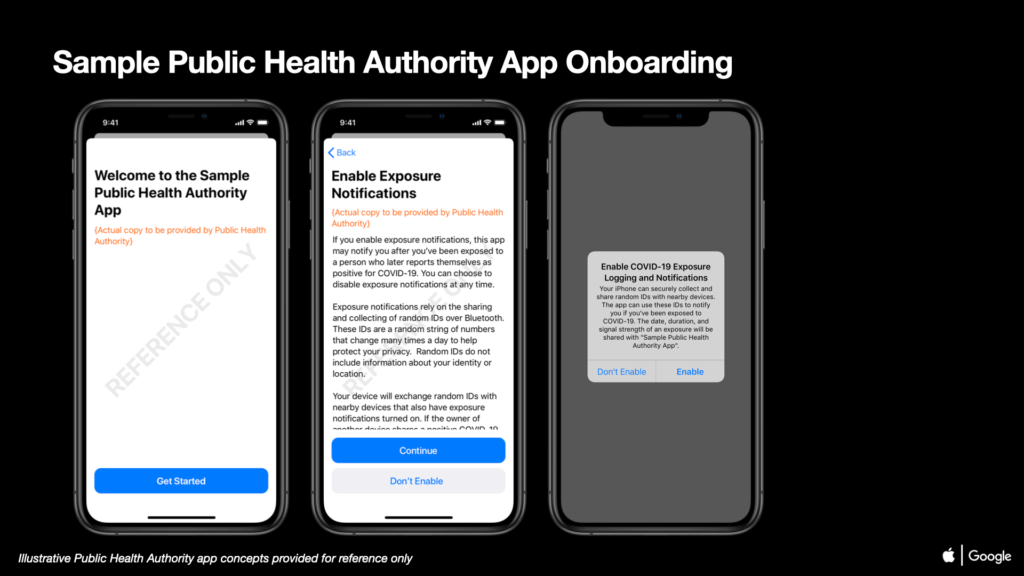
Image: Apple / Google via 9to5mac

Only then can the monitoring of contacts via Bluetooth to other devices begin. Apart from that, the number of encounters is displayed in the same menu. Users who have tested positive can indicate their status - i.e. infected - within the app. If there is contact with people who have tested positive for COVID-19, a warning appears via push notification. 
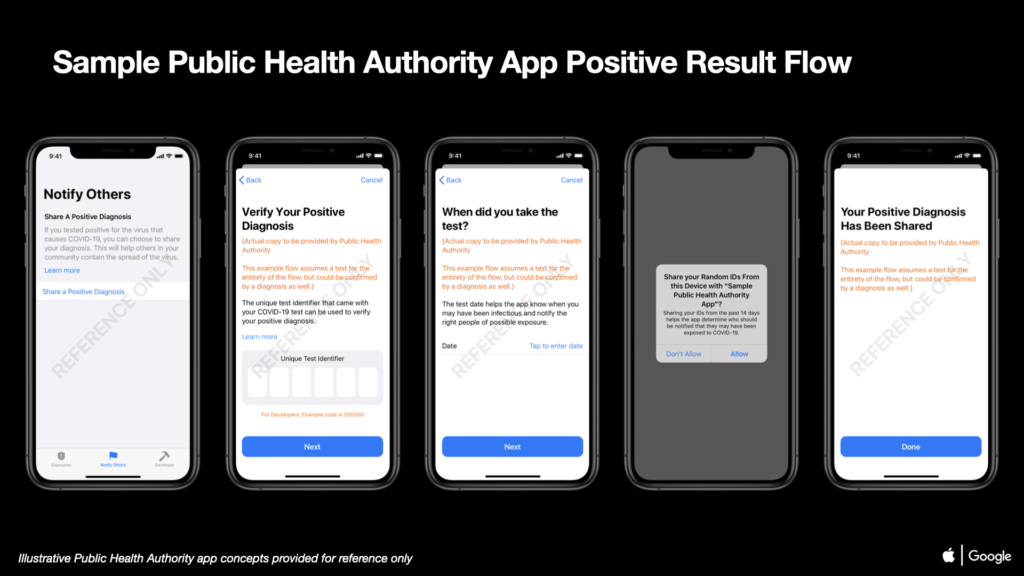
Image: Apple / Google via 9to5mac

Important: This is just a suggestion from Apple and Google. This does not mean that the final applications will look exactly like this. However, a big difference to the example is not to be expected. When the federal government It is currently unknown whether the country will provide an app for contact tracing. final version iOS 13.5 will in any case contain the API and could be released as early as mid-May. (Photo by digitalista / Bigstockphoto)
  • COVID-19: Apple & Google – how the partnership came about
Make Apfelpatient a preferred source One click – and you'll see us more often on Google
Was this article helpful?
YesNo
Source: Apple Developer
Via: 9to5mac
Tags: coronavirusiOSiOS 13.5

Our Amazon Storefront

A handpicked selection of products for iPhone, Mac and more – sorted by topic and updated regularly.

Shop Now

This post contains affiliate links (including Amazon). We earn a small commission on qualifying purchases – at no extra cost to you. Learn more on our Partner Program page.

Milan Jovicic

Milan Jovicic

Milan founded Apfelpatient in 2016 and has written all of its content himself since 2018 – news, rumors, guides and product reviews. Apple devices here aren't test units for a fortnight but everyday tools: from the iPhone to the MacBook Pro, MacBook Air and iMac through to the Apple Vision Pro, at least one device from nearly every product category is in daily use, many of them replaced annually. Every menu path in a guide is verified on the device before it goes live.

Next Post
Saint-Petersburg, Russia, April 27, 2018: Google Drive application icon on Apple iPhone X screen close-up. Google drive icon. Google Drive application. Social media network

Google Drive gets new security option

iPhone Air iPhone 17 Pro

iPhone Air or iPhone 17 Pro? All the differences compared

August 2, 2026
MacBook Air M5: 13 vs. 15 inch – Which size is worth it?

MacBook Air M5: 13 vs. 15 inch – Which size is worth it?

August 1, 2026
MacBook Pro M5: 14 vs. 16 inch – Which size and which chip are worth it?

MacBook Pro M5: 14 vs. 16 inch – Which is worth it?

August 1, 2026

About APFELPATIENT

APFELPATIENT brings you the latest Apple news, product updates, guides, reviews and tips across the entire Apple ecosystem — from the iPhone to the Mac to the Apple Vision Pro. From the first rumors to confirmed news: researched responsibly.

Follow Apfelpatient

Facebook Instagram YouTube threads threads

Company

  • About Apfelpatient
  • Contact
  • Author Profiles

Community

  • Netiquette
  • Push Notifications
  • RSS feed

Legal

  • Legal Notice
  • Privacy Policy
  • Terms of Use
  • Cookie Settings
  • Affiliate Program

Resources

  • Sitemap

© 2026 Apfelpatient. All rights reserved.

No Result
View All Result
  • Home
  • News
  • Rumors
  • Tips & Tricks
  • Reviews
  • Insights

© 2026 Apfelpatient. All rights reserved. Page Directory

Change language to Deutsch