

apple patient
  • Home
  • News
  • Rumors
  • Tips & Tricks
  • Reviews
  • Insights
No Result
View All Result
  • Home
  • News
  • Rumors
  • Tips & Tricks
  • Reviews
  • Insights
No Result
View All Result
apple patient
No Result
View All Result

iPhone 14 Pro: How to use the 48MP camera

by Milan
September 17, 2022 - 3:47 PM
in Apple Tips & Tricks
iPhone 14 Pro 48MP camera

Image: Apple

One of the biggest upgrades to the iPhone 14 Pro (Max) camera system is the increase in the main lens to 48MP with what Apple calls an "advanced quad-pixel sensor." However, the camera takes 12MP images by default. Below, I'll show you how to enable the camera's full power.

With the iPhone 14 Pro (Max)'s 48-megapixel main camera, you won't want to be constantly taking pictures, as a single image can be between 75 and 100MB in size. But if you want to capture as many details as possible to create stunning images, it's important to use the full power of the iPhone 14 Pro's main camera. With 8064 x 6048 pixels, it offers four times the resolution of 12MP images. Apple describes the whole thing as follows:

With a new machine learning model designed specifically for the Quad Pixel sensor, iPhone now captures 48-megapixel ProRAW images with unprecedented levels of detail, enabling new creative workflows for professionals.

How to use the iPhone 14 Pro's 48MP camera

Again, 48MP images are 75 – 100MB+ in size per image. So if you have little storage space, you should clean up your media library regularly.

  • Enable Apple ProRAW if it isn't already enabled. Open the Settings app on your iPhone 14 Pro or Pro Max.
  • Swipe down and tap Camera.
  • Now select “Formats” at the top.
  • Tap the box next to Apple ProRAW – the default resolution for Apple ProRAW should be 48MP.
  • Now open the camera app and make sure that RAW is displayed in the top or bottom right corner and is not crossed out - and you're ready to go.
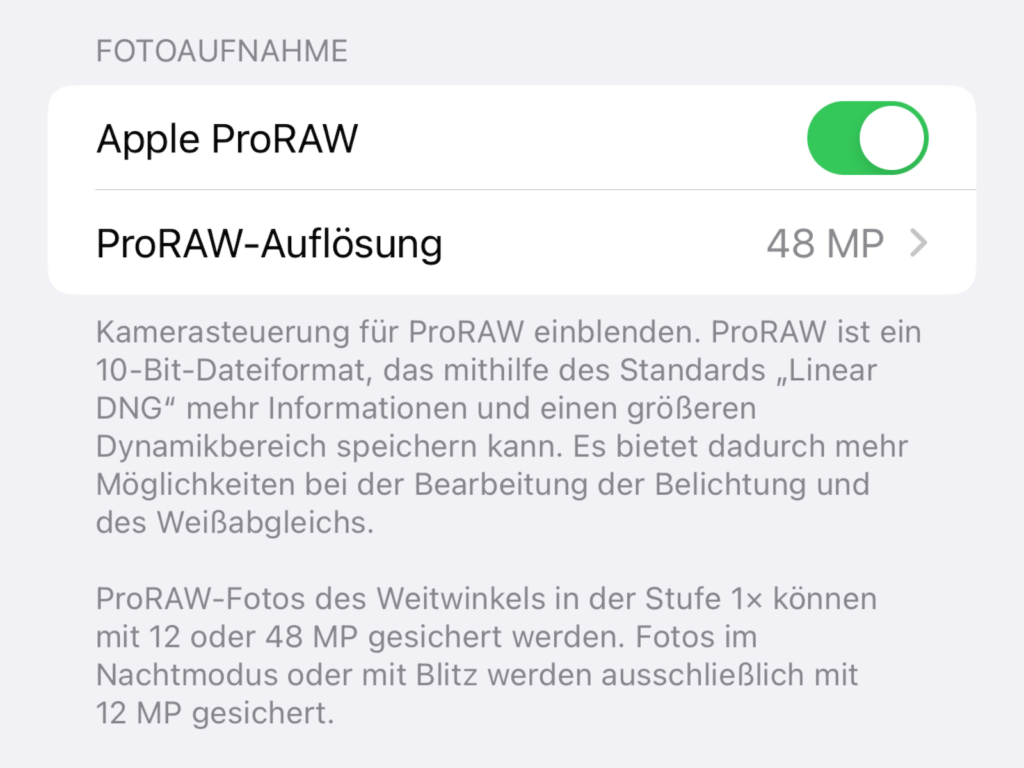
Enable ProRAW 48MP in the iPhone 14 Pro Max camera app
Image: Apfelpatient

With Apple ProRAW enabled, you should see 48MP as the default resolution for the iPhone 14 Pro and Pro Max (this is optional - you can also switch to 12MP for ProRAW). Now, when you take a picture with the stock camera app, make sure RAW is not crossed out:
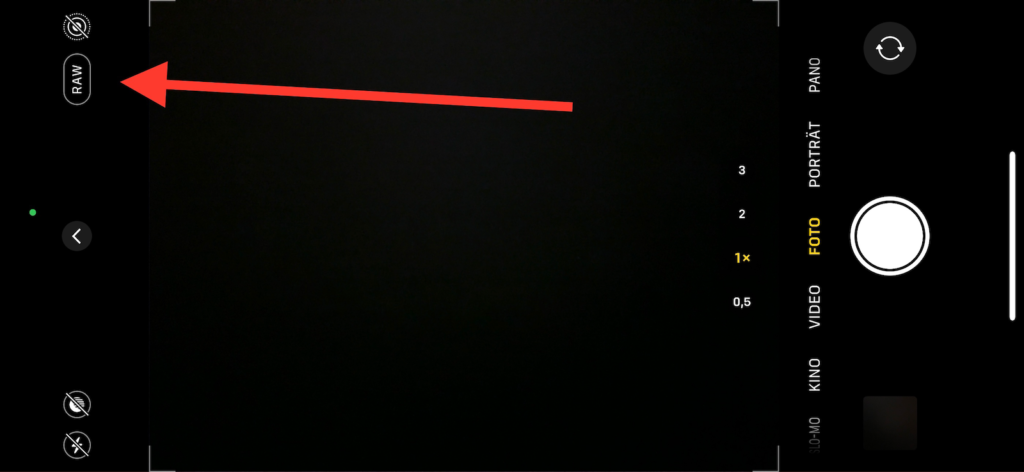
iPhone 14 Pro camera app active Apple ProRAW mode display
Image: Apfelpatient

If you tap the info button "i" after taking a photo, you can see that you took the photo at the full 48MP resolution of 8064 x 6048. Are you looking for new accessories? Then take a look in our Amazon Storefront - there you will find numerous products from leading providers, also for HomeKit and Co.! (Image: Apple)

  • iPhone 14 Pro: Disable Always-On Display
  • iPhone 14: How to activate the new power on and off tones
  • iPhone 14: How accident detection works
  • iPhone 14: How the new action mode works
Make Apfelpatient a preferred source One click – and you'll see us more often on Google
Was this article helpful?
YesNo
Tags: iOSiPhoneiPhone 14

Our Amazon Storefront

A handpicked selection of products for iPhone, Mac and more – sorted by topic and updated regularly.

Shop Now

This post contains affiliate links (including Amazon). We earn a small commission on qualifying purchases – at no extra cost to you. Learn more on our Partner Program page.

Previous Post

iPhone 14: How the new action mode works

Next Post

iOS 16.1 beta disrupts GPS on iPhone 14 Pro models

Next Post
iPhone 14 Pro

iOS 16.1 beta disrupts GPS on iPhone 14 Pro models

Apple TV The Morning Show Season 5

Apple TV: The Morning Show ends with season 5

July 23, 2026
Apple Maps iOS 27

Apple Maps will be permanently installed in Ford electric cars by 2027

July 23, 2026
Google EU

EU imposes €890 million fine on Google

July 23, 2026

About APFELPATIENT

APFELPATIENT brings you the latest Apple news, product updates, guides, reviews and tips across the entire Apple ecosystem — from the iPhone to the Mac to the Apple Vision Pro. From the first rumors to confirmed news: researched responsibly.

Follow Apfelpatient

Facebook Instagram YouTube threads threads

Company

  • About Apfelpatient
  • Contact
  • Author Profiles

Community

  • Netiquette
  • Push Notifications
  • RSS feed

Legal

  • Legal Notice
  • Privacy Policy
  • Terms of Use
  • Cookie Settings
  • Affiliate Program

Resources

  • Sitemap

© 2026 Apfelpatient. All rights reserved.

No Result
View All Result
  • Home
  • News
  • Rumors
  • Tips & Tricks
  • Reviews
  • Insights

© 2026 Apfelpatient. All rights reserved. Page Directory

Change language to Deutsch

