Apple Music is expanding its features and making it easier to switch streaming services. With the new Transfer Tool, playlists and music collections from competing services like Spotify can be imported directly into Apple Music. After initially launching in Australia and New Zealand, the feature is now also available in the US, Germany, the UK, and other countries.
Switching from one music streaming service to another used to be a time-consuming process. Playlists had to be created manually or transferred via external providers. With the introduction of the Apple Music Transfer Tool, this intermediate step is eliminated. Apple has integrated the function directly into its own app and is working with the service SongShift, which already has experience in transferring music libraries. This significantly reduces the effort and lowers the barrier to entry for a switch.
Availability in several countries
Originally launched in May 2025 only in Australia and New Zealand, the transfer tool is now available in nine countries. In addition to the two launch markets, these include Brazil, Canada, France, Germany, Mexico, the United Kingdom, and the United States. This expansion suggests that Apple is planning a further international rollout.
How the transfer tool works
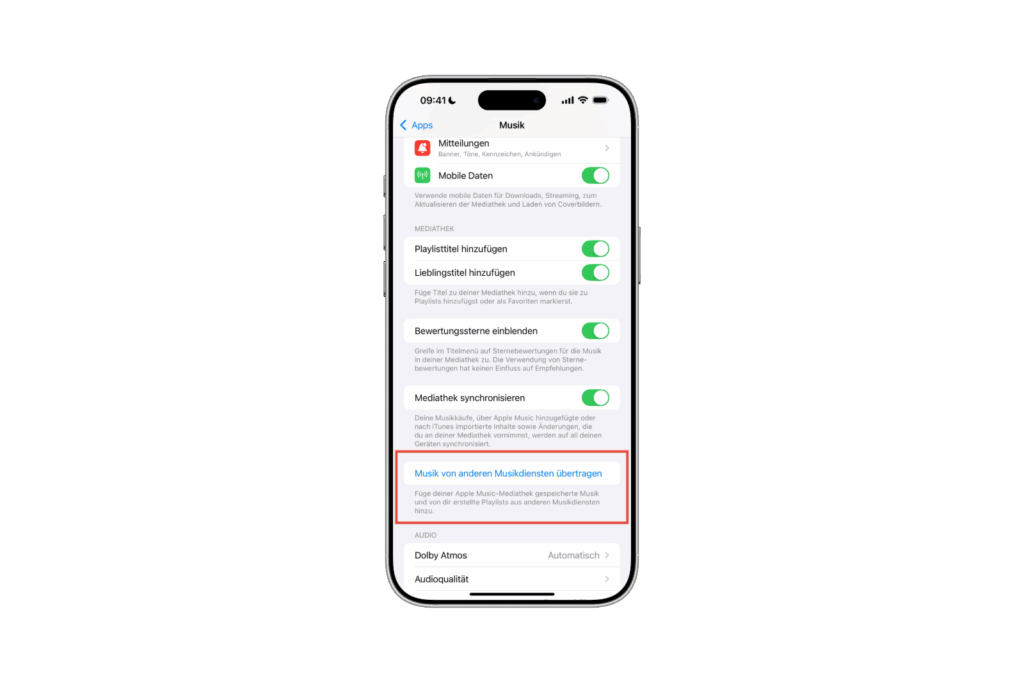
The transfer can be started directly from the Music app on iPhone and iPad. Simply open Settings, select Apps, and then select Music. The transfer begins under the option "Transfer music from other music services." If this setting isn't visible, there's an alternative: use the browser. At music.apple.com, log in with your Apple ID, click your profile picture in the top right, and select "Transfer Music."
Content that can be transferred
The Apple Music Transfer tool allows you to transfer saved songs, entire albums, and custom playlists. There are limitations with automatically generated playlists, such as those regularly offered by Spotify. These cannot be transferred. During the transfer, Apple Music checks whether the songs are in its own catalog. Tracks that cannot be clearly assigned are flagged and must be manually checked. This is intended to keep the music collection as complete as possible, even if not all tracks are exactly the same.
Significance for competition
The introduction of the tool is not just a convenience feature, but also a strategic move. Apple Music is removing barriers for users who want to switch from Spotify and making the transition significantly easier. For the streaming market, this signals Apple's desire to further expand its position. The expansion to major markets such as the US, Germany, and the UK clearly demonstrates the service's commitment to international growth.
- iOS 26: Apple Music finally gets folders for playlists
- Apple Music in iOS 26: Music Pins make access easier
- Apple makes it clear: Music is art, not an advertising medium
- iOS 26: All Apple Music innovations at a glance
- Apple Music: 10 Years of Innovation and Music History
- Apple Music gets a DJ feeling with AutoMix feature
- Apple Music: New Replay All Time Playlist now available
Apple Music makes it easier to switch from Spotify and Co.
With the Transfer Tool, Apple Music opens the door for anyone who wants to bring their playlists and collections from Spotify or other services with them. This makes the switch easier and faster. The expansion to a total of nine countries is an indication that Apple is preparing a global rollout. This strengthens the service's position in competition with Spotify and other platforms and makes the switch easier than ever before. (Image: Shutterstock / Tada Images)
- iOS 26 update opens iPhone 16 to Qi 2.2 chargers
- iOS 26 is almost ready – release candidate coming soon
- Elon Musk sues Apple and OpenAI: Dispute over the App Store